Summary

• Live lessons at CambriLearn are recorded, and students stay off camera for privacy, so teachers often taught to a silent Zoom room

• Zoom chat was not enough: replies did not show on the recording, and there was no easy way to read every answer while teaching

• According to a survey of 17 CambriLearn teachers, average student engagement during live lessons rose from 2.1/5 to 4.4/5 after ClassPoint

• Anne-Marie S., Head of KABV/Primary at CambriLearn, on why the tool stuck: "We don't have to adjust to ClassPoint. ClassPoint adjusts to us."
In CambriLearn’s live lessons, the teacher often talked to a silent room. Students stayed off camera while the lesson was being recorded. Zoom chat did not help: messages did not show on the recording, and there was no easy way to read every reply while teaching.
Teachers could not tell whether most students understood until the end of the session, if at all.
Then staff started embedding questions directly in the PowerPoint slides they already used. Since 2024, CambriLearn has expanded ClassPoint from a 10-account pilot into a tool used across a growing share of its live-lesson teaching team, spanning nearly every subject the school teaches.
Students now respond from their own devices during live sessions through multiple choice, fill-in-the-blank, short written answers, drawing, and quizzes. Teachers see answers in real time, adjust the lesson on the spot, and give quieter learners a way to participate through writing rather than speaking on camera.
If your school records live lessons with cameras off, this case study shows the constraint CambriLearn faced, how leadership rolled ClassPoint out inside PowerPoint and Zoom, and the school-level impact.
Background
| Location | South Africa |
| School type | Online school |
| Scope | Live lessons across primary and secondary, spanning CAPS, KABV, IEB, International British, Pearson Edexcel and US K-12. |
| Key features used | Interactive quizzes, multiple choice, fill-in-the-blanks, short answer, slide drawing, AI-generated questions, highlighting, rewards and stars |
CambriLearn is an online school teaching six curriculum pathways for students aged 4 to 19: CAPS, KABV, IEB, International British, Pearson Edexcel and US K-12, across subjects ranging from Mathematics and the Sciences to Languages, Social Sciences, Technology, Business, and the Arts.
Every one of those lessons is delivered live online, and teachers already built and delivered them through PowerPoint, so any new tool needed to work inside that workflow rather than replace it. That requirement is common among virtual classroom setups where live teaching runs through video calls and slide decks.
ClassPoint was introduced in 2024 with 10 teacher accounts. As more staff saw how it worked in live sessions and CambriLearn grew itself, uptake grew steadily.
The challenge with interactive live online lessons
At CambriLearn, the constraint was not simply teaching online. It was teaching live lessons that are recorded, with cameras off for the length of the recording to protect student privacy under South Africa’s data protection law (POPIA). Cameras come back on once recording stops. Until then, the teacher cannot see the usual signs of engagement: raised hands, visible reactions, or students speaking up on their own.
Teachers described a familiar pattern before ClassPoint:
- Silent rooms. Lizelle M., who teaches Mathematics Foundation, put it simply: “I was the only one participating in the lesson.”
- Zoom chat did not scale. Messages did not show on the recording, and it was too time-consuming to read every chat while teaching. Tanja D., who teaches Natural Science, Maths and Economics, said chat was the only quick option during a recording, and typing was too slow for students.
- No participation by design. In Life Orientation, Chandre’ W. said learners could not appear on the recording, so there was no participation during that stretch of the lesson
- Checks came too late. Some teachers only saw whether students understood when they ran a quiz at the end of the lesson, not while the lesson was still in progress.
According to a survey of 17 CambriLearn teachers, average ratings for seeing whether most students understood during a live lesson were 2.1 out of 5 before ClassPoint. Student engagement during live lessons averaged the same, 2.1 out of 5. Those are the kinds of gaps that formative checks during a lesson are meant to close, but Zoom chat and end-of-lesson quizzes were not doing the job on their own.
The school needed a way to:
- Bring more students into live lessons without requiring cameras
- See understanding while the lesson was still happening
- Make participation manageable during recorded sessions
- Fit naturally into PowerPoint, which teachers already used every day
Approach and implementation
Rather than introducing a separate platform, CambriLearn teachers added ClassPoint to the PowerPoint slides they already taught from. CambriLearn considered a few other tools before settling on ClassPoint.

For Anne-Marie S., the deciding factor was how little the school had to change to make it work:
“The general feel was leaning towards ClassPoint because of its versatility. I mean, we’ve got so many different things that we can do and how we can incorporate ClassPoint into our own teaching style. We don’t have to adjust to ClassPoint. ClassPoint adjusts to us.“
She has not found a subject where ClassPoint does not fit, from grade 1 to 12. She said “Just basically an all-rounder for everyone.”
Anne-Marie described how a typical live lesson runs. Teachers join Zoom with cameras on and spend the first few minutes catching up with students and introducing the day’s topic. Students then join the ClassPoint activity on their own device, usually a phone next to the Zoom computer, or a second monitor.
Once everyone is in, the teacher starts recording and teaches through ClassPoint. When recording ends, cameras come back on for about ten minutes so the class can talk through anything that came up in the questions. Then the lesson closes.
Exactly which question types get used depends on the teacher and the subject. Anne-Marie has noticed a pattern by age: older students tend toward multiple choice and calculation-style questions, while younger grades respond well to drawing and drag-and-drop.
A few examples below from actual CambriLearn slides show what that looks like in practice.
Grade 7 Economics
In a Grade 7 Economics lesson, one teacher opens with a Short Answer question in Afrikaans: “Sal jy graag eendag jou eie besigheid wil besit?” (translated: “Would you like to own your own business one day?”). She uses it because students want to feel heard, and personal stories are hard to share on a recording. A short written answer lets her see their goals without putting anyone on camera.

PS1 English class
In a PS1 English class, a teacher uses Word Cloud to ask what students are reading. The whole class can name a favourite book in a few minutes, instead of hearing from two or three learners or spending half the lesson on turn-taking.

Young Learners Literacy
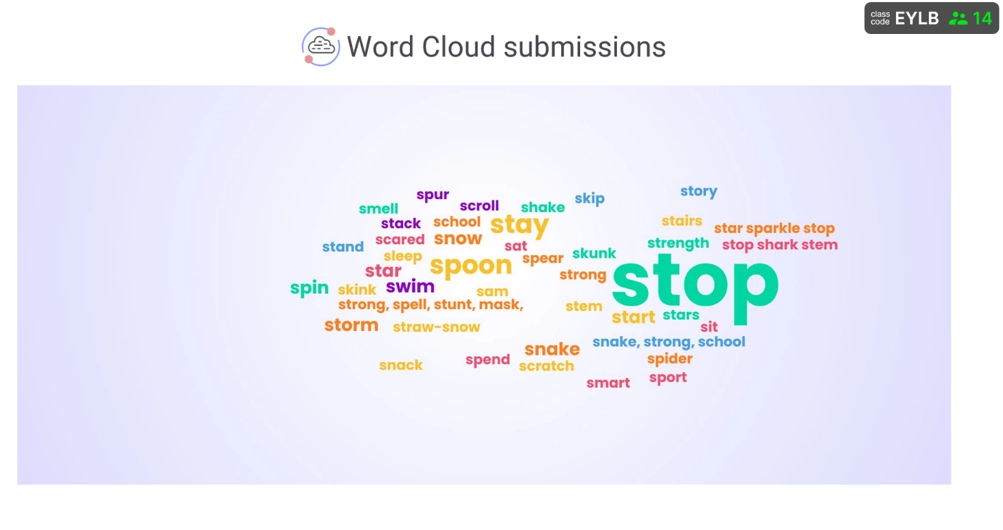
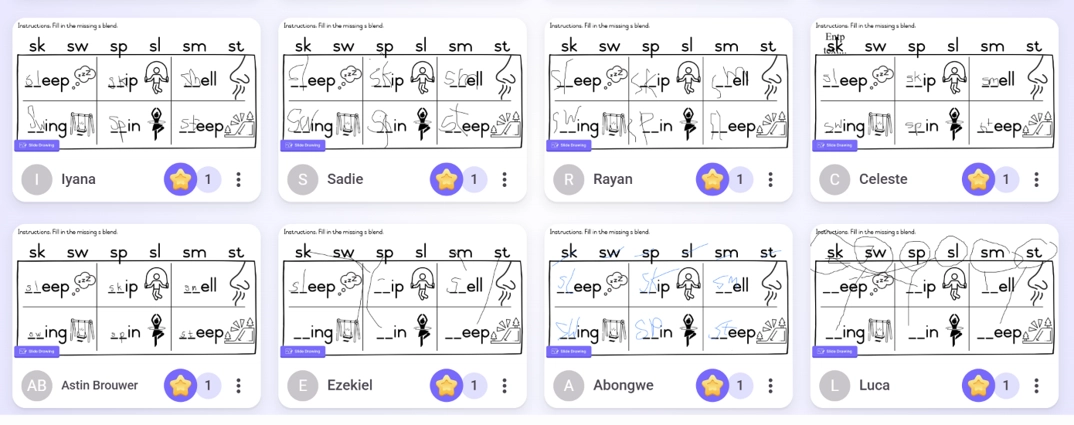
For younger learners, one Literacy teacher pairs Word Cloud and Slide Drawing to build a class glossary of words that start with an s blend. She collects anonymous word cloud answers first so she can correct spellings in real time without putting a child on the spot. Then she uses slide drawing for the follow-up, which is easier for early years.
Foundation Phase Maths
One Foundation Phase Maths teacher built a recurring end-of-lesson check she calls the “Minute to Win It” class quiz: four Multiple Choice slides she runs once the day’s topic has been covered. That shows her who understood and who needs more help.
“When I go into a Q&A at the end of the live lesson, I can then address the problem areas or discuss a question in more depth where most students submitted the wrong answer, for example. Students love it, they love to get the ‘star’ award and to take part in the challenge. It is fun and engaging while simultaneously giving me data that helps with student support.”

Add interactivity from their own content
One feature that helps across grades is ClassPoint’s AI question generator, which builds questions from a slide the teacher already has. Anne-Marie said that lets staff add interactivity to existing decks without starting from scratch.
Results
In practice, teachers reported several changes:
- Every student could respond at once, not only those willing to unmute or type in Zoom chat.
- Written answers became a primary participation channel, especially valuable when students stayed off camera or were reluctant to speak aloud.
- Teachers could see whole-class responses in real time and pause to re-teach when answers showed a gap.
- Live work could be saved back into the slide deck for revision in the next lesson.
- Students who miss a live lesson can still catch up. Because ClassPoint activity is captured in the recording along with the correct answers, absent students can watch back and work through the same questions on their own.
Patrick M. said ClassPoint keeps learners doing something during the lesson, instead of only watching the slides. Louise S., who teaches Mathematics Stage 2, uses it so she can change the data live in a data-handling lesson.
One English HL teacher described a bigger shift in how the lesson itself felt:
“ClassPoint changed the lesson from a lecture to an interactive one as instead of only explaining a grammar concept, the learners could practice and participate with the discovery of the grammar rule.”
What other schools can take from CambriLearn is less about which question types they picked, and more about how they rolled them out. They kept teachers inside PowerPoint and Zoom instead of adding a second platform. They set a clear live-lesson rhythm around recording and privacy: cameras on to join, ClassPoint while recording with cameras off, then cameras back on to close.
They also let subjects and age groups choose their own participation patterns. Written answers for quieter or sensitive moments, quick checks for Maths, drawing for younger grades. One template was never forced school-wide.
The result is participation that still works when cameras stay off. Other online and hybrid schools can copy the model without rebuilding how teachers already work.
Related: Whole-class participation strategies for getting every student involved, not just the ones who speak up first.
Impact
Survey responses and teacher feedback from CambriLearn point to the same shift: live lessons became more interactive, more students took part, and teachers gained clearer in-lesson insight, even when cameras stayed off.
| Impact area | What changed | Proof |
| Live-lesson engagement | Lessons felt less one-sided; students participated more willingly | Avg engagement rating: 2.1/5 before → 4.4/5 now (17-teacher survey) |
| Participation and voice | More students contributed, including camera-off learners | 94% of teachers agree or strongly agree that more students participate; 88% say quieter or camera-off students participate more |
| Formative assessment | Teachers saw understanding during the lesson, not only at the end | Teachers used responses to re-teach on the spot, catching gaps before they became bigger problems |
| Works across the curriculum | Not one department’s tool | Teachers in Maths, Sciences, Languages, Life Orientation, Technology, and the Arts all report the same shift |
| Student experience | Students report the same shift teachers see, in their own words | 97% of 61 surveyed students prefer lessons with ClassPoint; 100% say they have fun using it; self-rated engagement rose from 3.56/5 to 4.87/5 |
Danielle du B., who teaches Maths and Natural Sciences, described the shift in how she catches problems:
“Rather than waiting until I grade papers to find out my students are confused, ClassPoint’s instant data allows me to catch misunderstandings mid-lesson. I can immediately halt the planned agenda, address the gap in knowledge, and ensure everyone masters the concept before moving on.”
Teachers could see problems while the lesson was still happening, instead of finding them later in a stack of papers.
The same thing showed up for Michelle V., who teaches Foundation Phase Afrikaans, English, Maths and Life Skills. In a comprehension lesson, several learners had misread a question. She paused, went back to the text, and checked again before moving on.
The change was not only about spotting gaps. Prabashnee N., who teaches Technology, said short questions kept learners answering, and that helped her fit the lesson into 45 minutes. Participation changed too. Crystal M. said students had often stayed quiet and shy. Patrick M. found Grade 4–6 Social Science classes much more interactive, with learners looking forward to logging in at the start of class.
New to ClassPoint? Visit our tutorial hub to learn how to use interactive quizzes, polls, short answer, and other features to increase engagement in your lessons.
What students and parents say
A short survey went directly to CambriLearn students, and since many respondents are in primary grades, a number of parents completed it alongside their child. Of 61 responses:
- 98% (60 of 61) said they have fun when ClassPoint is used in class (58 strongly agree, 2 somewhat agree, 1 neutral)
- 95% said ClassPoint helps them understand the material better
- 84% said it helps their test results
- Self-rated engagement with a standard PowerPoint lesson averaged 3.56/5; with ClassPoint, that rose to 4.87/5
- Self-rated satisfaction rose from 3.95/5 to 4.84/5
- 97% (59 of 61) said they prefer lessons with ClassPoint over lessons without it
Asked to describe ClassPoint lessons in one word, students and parents most often reached for “fun,” “engaging,” “interactive,” and “exciting.”
Anne-Marie described why she thinks this matters beyond the lesson itself: “When a kid on the other side of the screen is watching this lesson, and they can actually participate, they feel like they belong. They feel like they are in a real classroom situation.”
That showed up in what respondents wrote themselves. One parent explained:
“It helps the children engage with the teacher/class by answering all the questions. This helps my child to concentrate on all questions, not just ones he thinks he will get to answer. He always informs me how fun it is to answer the questions. Of course, getting stars is a huge motivator.”
Another put the core shift simply: “Everyone can now answer a question instead of only 1 or 2 kids.”
Conclusion
CambriLearn’s experience shows that online schools running recorded live lessons can still build participation and formative assessment into everyday teaching, without requiring cameras or depending on Zoom chat.
The school-level impact was that this held across subjects, not in one pilot class. More students got heard, including those who stay off camera. Teachers caught gaps in time to fix them. Leaders did not have to add a second teaching platform, or give up privacy, to get there.
That is what purposeful tech does. It helps teachers teach better in the moment, gives students a reason to stay in the lesson, and lets them feel part of a real class even when they cannot be seen.
Schools that choose tech with that purpose build stronger teaching teams and see better student outcomes. Teachers perform better when they can adjust before the lesson moves on, and students stay engaged when they feel known and heard.
Related Reading:
