
You’re teaching quadratic functions from PowerPoint, you pause to check in, and the class nods along. Then the quiz comes back and half of them missed the same step. The slides weren’t the problem, the students just weren’t doing the math while you taught it.
A peer-reviewed ClassPoint study at PAREF Springdale in Cebu looked at whether that pattern could shift in Grade 9 algebra. The teacher who ran it, John Michael Potot, published the results in the Journal of Interdisciplinary Perspectives.
Below, we cover how Potot set up the study, what changed in the ClassPoint class, what the posttest scores show (including what the 78% in the title refers to), what students reported, and what didn’t run smoothly in the room.

Disclosure: ClassPoint was not involved in the design, funding, or review of this study. The research was independently conducted and published by John Michael Potot at PAREF Springdale School.
How Potot Designed the Study
The study ran during the quadratic functions unit in Potot’s Grade 9 Advanced Algebra class. He taught two sections that year, back-to-back, using the same deck for both.
Both Sections Started Below Passing on Quadratic Functions
Before any teaching began, both classes sat the same pretest on quadratic functions, and both averaged in the failing range. That rules out one easy explanation: neither section started with stronger students.
Same Slides, One Class Got Live Questions Built In
Once the unit started, the two sections ran differently.
The control section, 25 students, got the lesson through standard PowerPoint — same slides, no ClassPoint questions for students to answer during class. Potot describes this as a traditional approach.
Both sections still had formative assessments through the unit; what differed was whether students could respond live inside the slides.
The experimental section, 24 students, got the same deck with ClassPoint questions woven in: multiple choice, short answer, polls, and a few word cloud prompts. Students answered from their phones while the lesson was still going.
He didn’t open a new app or rebuild the unit from scratch. Same PowerPoint, same content, one class just had live response built into the slides. That’s the whole comparison.
How the ClassPoint Class Ran Interactive Algebra Lessons
Potot built questions into the slide deck at natural checkpoints — discriminant, factor pair, vertex — and students answered from their phones while he taught.
Responses showed up on his screen in real time, so he could reteach a step most of the class missed or keep going when most had it.
Their answers stayed anonymous to classmates, with immediate feedback on whether they were right.
Which ClassPoint Features Fit Algebra Best
After the unit, students rated what actually helped. Multiple choice ranked highest. Word cloud ranked lowest. Polls, short answer, draggable objects, and image uploads fell in between.
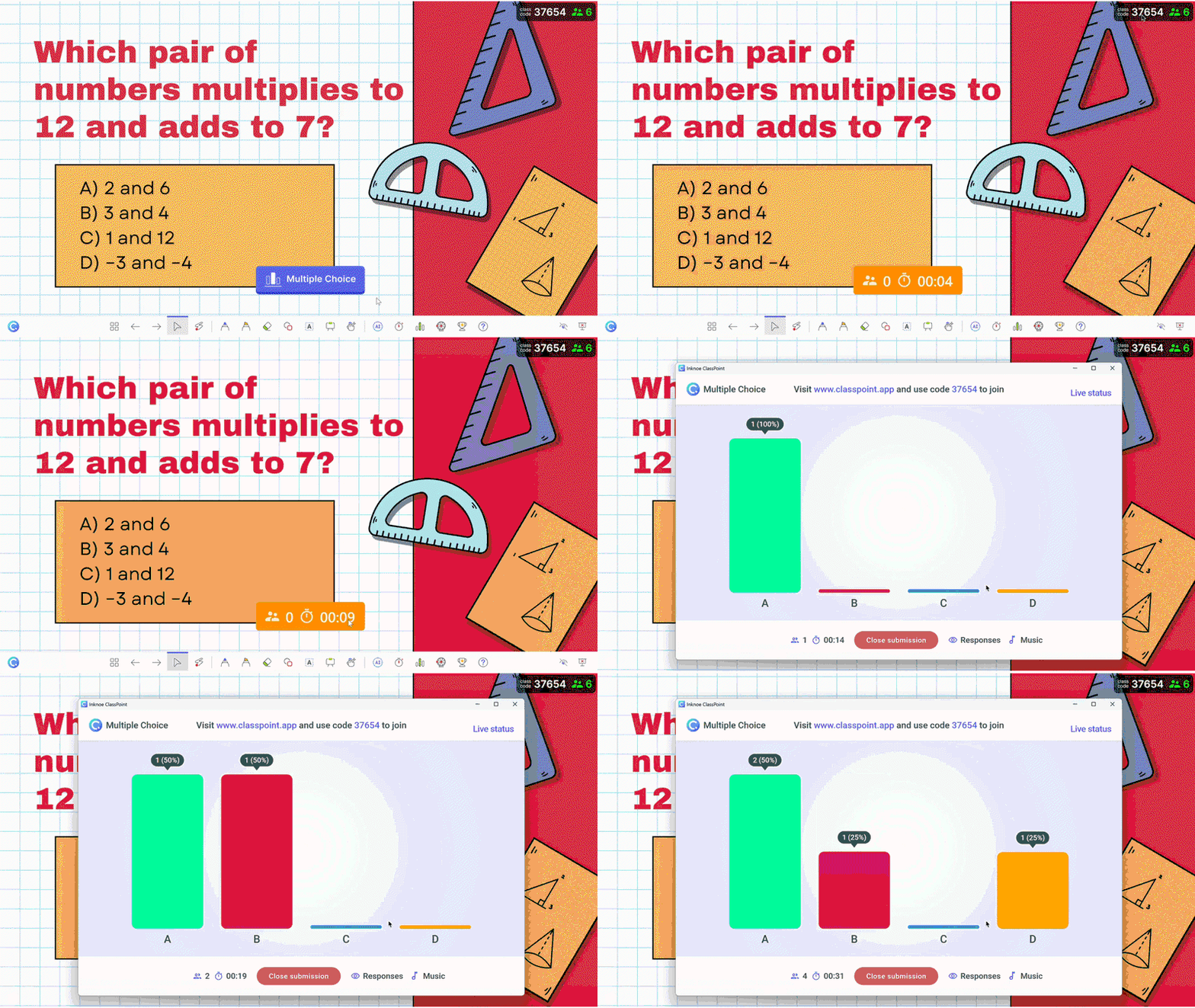
For quadratic functions, that tracks. Most steps have a right answer, and multiple choice or short answer checks that directly. Students mostly used word cloud to share opinions, not to work through problems — fine for a brainstorm, less useful for procedural math.
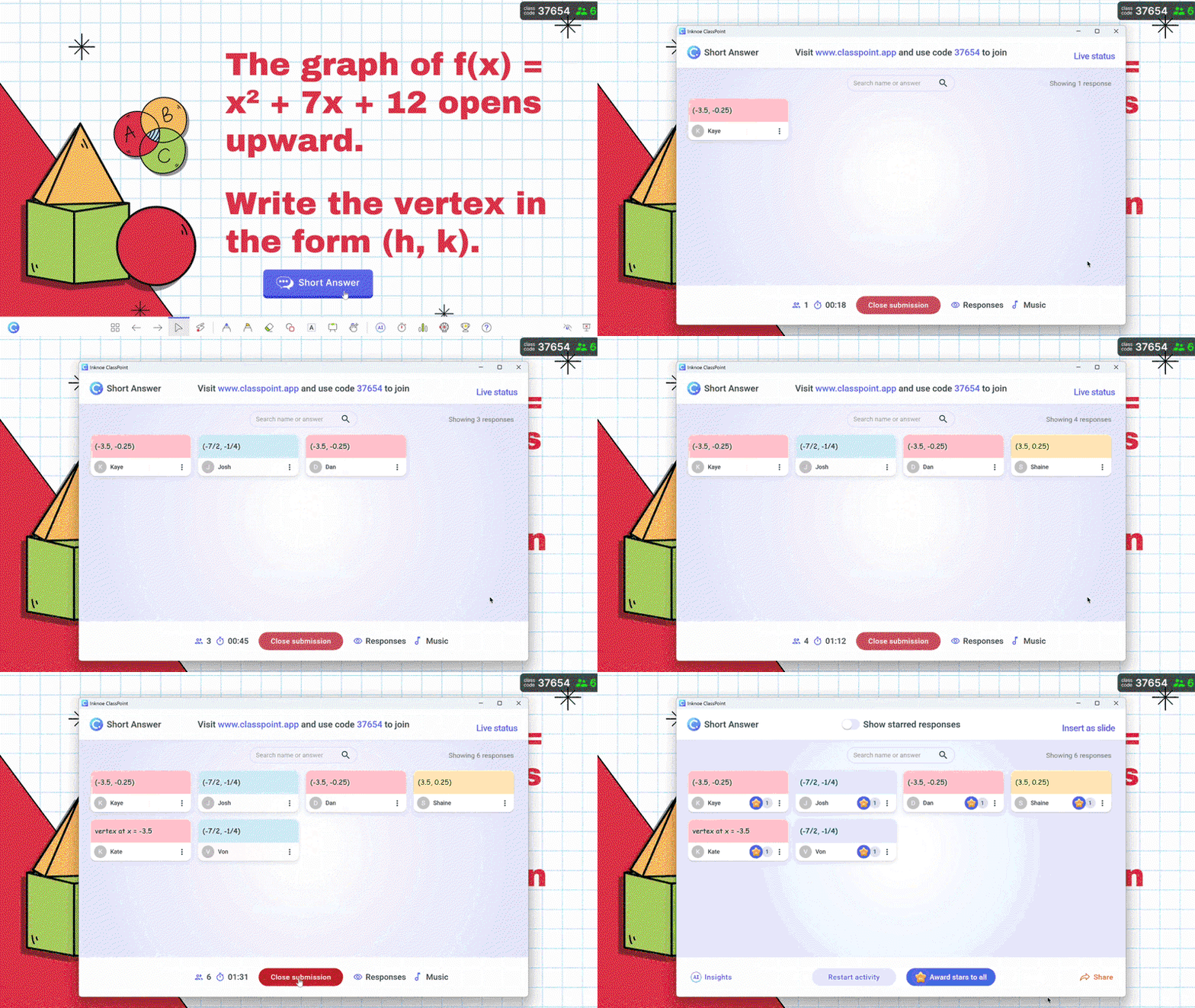
Try this: For units with clear right answers, lean on multiple choice and short answer. Save word clouds for vocabulary, predictions, or "what do you notice?" moments.
What Changed on the Posttest
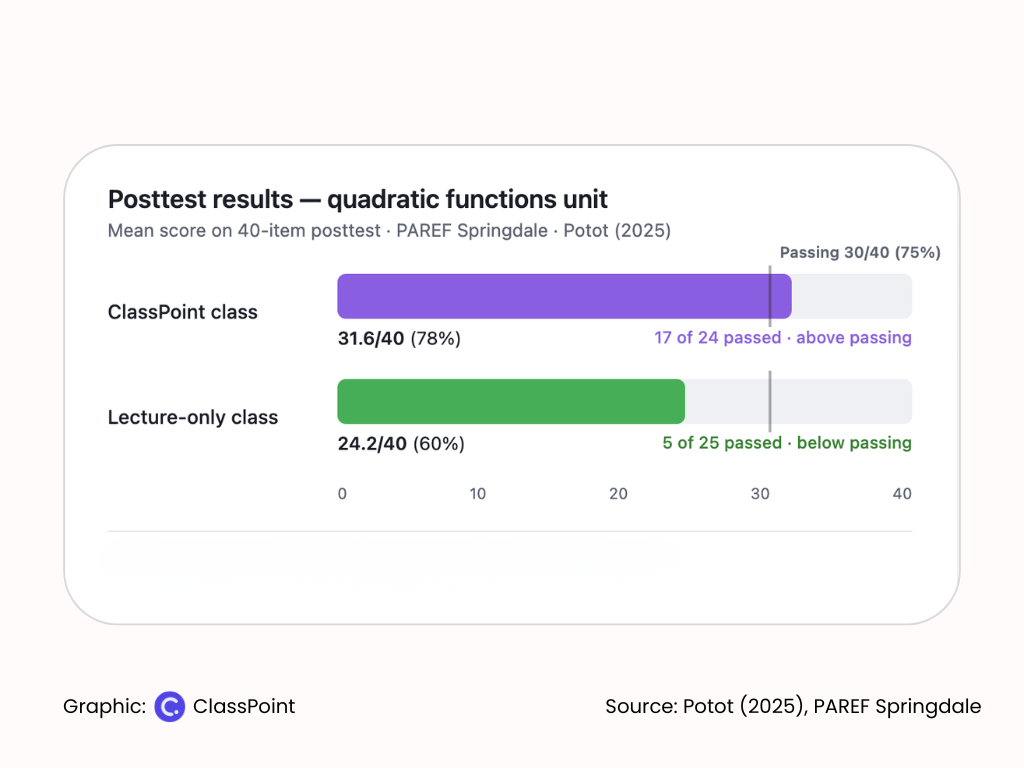
The unit ended the way most do: both classes sat the same 40-question test on quadratic functions. At PAREF Springdale, passing means 30 out of 40 — 75%. Easy bar to compare against.
The ClassPoint Class Hit 78% and Crossed the Passing Line
The ClassPoint section cleared it. They averaged 31.6 out of 40, about 78%, with 17 of 24 students passing.
The Lecture-Only Class Improved But Stayed Below Passing
The other class moved in the right direction too, just not far enough. They averaged 24.2 out of 40, roughly 60%. Only five of 25 students made it over the passing line.
Worth saying plainly: the lecture-only deck wasn’t a waste. Every student in that class scored higher on the posttest than they had on the pretest. They just didn’t gain enough to pass.
The ClassPoint Class Gained More
Both sections improved from pretest to posttest. The lecture-only class picked up about 11 points on average. The ClassPoint class picked up about 19.
Potot’s analysis suggests that gap wasn’t just random noise, the ClassPoint class didn’t just get better; they got meaningfully better.
Full study: Want the numbers behind this? Potot's open-access paper breaks down how both classes scored before and after the unit — and whether the ClassPoint class's gains were large enough to trust.
What the Study Found Beyond the Scores
The posttest tells you whether scores moved. Student feedback hints at why — at least from the ClassPoint section’s point of view. Potot surveyed those 24 students after the unit on what the daily experience felt like.
The Slides Asked Questions Back
In the lecture-only class, PowerPoint was a one-way deck. In the ClassPoint class, the same slides paused for multiple choice, short answer, and polls, students had to respond before Potot moved on.
Students said the on-screen questions pulled their attention back to the lesson because they had to watch for the next ClassPoint prompt.
That shift showed up in how students described the unit:
“As opposed to just regular discussions, ClassPoint requires you to answer some polls, short questions, and word clouds. These help me stay engaged in the class rather than just sleeping. It also helps me by making me answer them and learning rather than just reading on the board and forgetting it later on.”
Same content, different expectation: you’re doing the math during the lesson, not just copying from the board.
Anonymous Responses Made It Easier to Try
ClassPoint lets students submit answers without their names showing to the class. They still get immediate feedback on whether they were right — points and a quick visual cue when an answer comes in, according to Potot’s paper.
“Since there was no need to worry about record keeping, I was less hesitant to participate.”
Wrong guesses became private corrections, not public mistakes.
Not Every Student Felt the Same Shift
Not every student raved about it. A few didn’t notice much change. Others found typing on a phone fiddly, which is partly why Potot leaned on multiple choice for steps with a clear right answer.
Phones were a classroom management issue too. His class had phone boxes and clear rules for when devices came out.
The class passed, but not everyone loved the process.
Tip: Before you try this in one unit, sort out both: question types that fit the math, and phone rules that fit your room.
What Didn’t Work Well and What Helped
Most of the friction in Potot’s class came from connectivity — school Wi-Fi, slow load times, and a few students without cell data. That’s a real constraint, but his students and his own fallbacks show it’s manageable if you plan ahead.
Internet Lag and Dead Zones
“Took quite a long time for it even to load. Very dependent on the internet. Moreover, since our school has internet problems, you can put 2 and 2 together.”
Some students couldn’t participate at all without cell service or a data plan. Others moved closer to windows where the signal was stronger and waited it out when pages loaded slowly.
What helped: Potot didn’t abandon the checkpoint when the app lagged. He ran the same question verbally or dropped the digital layer entirely for that moment. Same math, same read on the room — just without phones.
When You Need a Low-Tech Backup
Students in the study described the same instinct: answer in the room if the tech won’t cooperate. Potot built that into how he taught — rephrase the prompt, take verbal responses, keep the lesson moving.
Tip: Pick your fallback before day one: verbal responses, mini whiteboards, or a show of hands. Decide it now so you're not improvising when the Wi-Fi drops mid-lesson.
Three Takeaways for Your Classroom
Potot’s setup was built for research. Yours doesn’t have to be — one unit, a few in-slide checks, and clear phone and Wi-Fi rules is enough to start.
- Add two or three questions to slides you already use. Drop multiple choice or short answer at the steps where students usually miss the same thing — no deck rebuild required.
- Stop when half the class gets it wrong. Live responses show where the room is stuck before anyone leaves. Reteach there, while the thinking is still fresh.
- Set phone rules and a low-tech backup before day one. Decide when devices come out and what you’ll do when Wi-Fi fails — verbal answers, whiteboards, or a show of hands.
Start With One Unit
Teaching from slides should not mean teaching blind. Potot used the same deck for both sections. What changed was whether he could see student answers while the lesson was still happening.
That is what separated passing from falling short. Not a harder unit or a different teacher. A read on the whole class, early enough to reteach while it still matters.
You already know when to stop and explain again. Potot’s results suggest you deserve a way to see who needs it before the quiz does. One unit is enough to find out.
Related: Another peer-reviewed ClassPoint study at Hong Kong Polytechnic found the same shift with 800 university students in a different subject.
