You already know your students are using AI. The essays are a little too polished. The answers are suspiciously thorough, and when you ask a student to explain what they wrote, the confidence disappears.
The usual responses haven’t solved the problem with detectors that flag false positives and every “AI-resistant” assignment becomes less resistant with the next model update. The real issue isn’t whether students are using AI. It’s that when they do, they stop thinking. And you don’t find out until the work is graded.
This post takes a different approach. We’ll start with why detection and banning don’t work anymore, then walk through how to design lessons where student thinking happens live, in front of you, during class. Five steps, any level, any subject.
When the thinking happens during class, not at home on a laptop, AI can’t do the work for them.
Why Detecting and Banning AI Isn’t Working
Most schools responded to students using AI the same way: block it, detect it, or design around it. None of those have held up.
AI Detectors Aren’t Reliable Enough
AI detectors get it wrong often enough to be dangerous. A 2023 study published in Patterns found that widely used GPT detectors misclassified over 61% of essays written by non-native English speakers as AI-generated, while getting native-speaker essays nearly all correct. That means a tool meant to catch cheating is most likely to flag students who are already working harder to write in a second language.
More recent evaluations haven’t fixed the problem. A 2026 study in the International Journal for Educational Integrity concluded that neither Turnitin nor Originality is reliable enough to make the call on its own:
“sufficiently reliable to serve as the sole basis for academic misconduct decisions.”
A student accused wrongly loses trust in the system while another who slips through learns the detector is beatable.
Want the full breakdown? Do AI Detection Tools Work? covers who these tools hurt most, why top universities are dropping them, and what's replacing detection at schools that have moved on.
Bans and AI-Proof Assignments Have Limits
Banning AI sounds decisive, but it’s unenforceable outside the classroom. Students use it at home, on their phones, through apps that don’t look like ChatGPT. You can restrict access on school devices, but you can’t restrict access everywhere else.
Then there are AI-proof assignments, prompts designed to be too specific or too personal for AI to handle. These work for a semester, maybe, but AI models improve faster than assignment design cycles. What stumped ChatGPT in September is routine by March.
The Real Risk: Students using AI Stop Thinking
The bigger problem is what researchers call cognitive offloading. Students using AI aren’t just skipping the assignment, they’re skipping the learning.
The OECD Digital Education Outlook 2026 found that students who used general-purpose AI tools produced higher-quality work, but performed worse on exams when access was removed. Offloading cognitive work to chatbots, the report warns, can lead to “metacognitive laziness” that weakens the skills assignments are supposed to build. The work looks done but the thinking never happened.
That’s the gap no detection tool can close. You can’t catch missing thinking in a finished product. You can only see it while it’s happening.
The Shift: Design for Visible Thinking, Not AI Prevention
If the response to students using AI has been to detect and ban, it hasn’t worked. The fix isn’t better surveillance. It’s changing when and where the thinking happens.
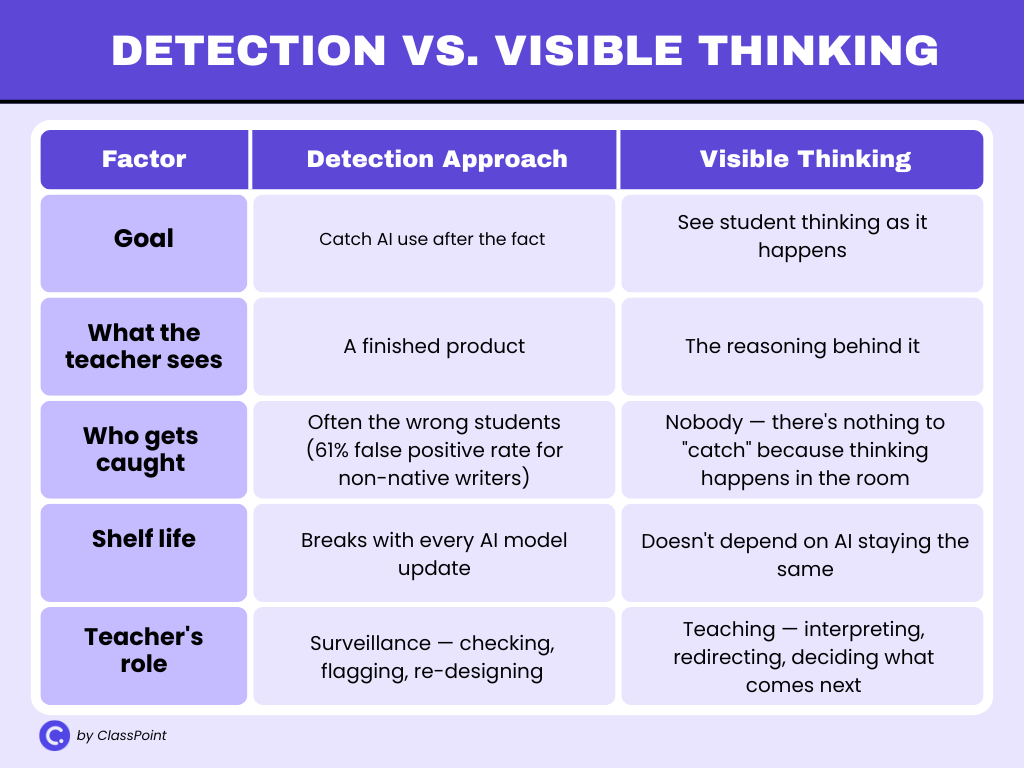
This idea isn’t new. Visible Thinking, a framework developed by researchers at Harvard’s Project Zero, is built on a simple premise: when students speak, write, or draw their reasoning, they think more deeply, and the teacher can actually see what’s happening.
The approach uses short, repeatable routines that surface student thinking during a lesson, not after it. Something as simple as asking every student to write one sentence explaining their reasoning before opening a class discussion is a thinking routine.
What’s changed is the urgency. In a classroom where students using AI can produce polished output on demand, making thinking visible is no longer just good pedagogy, it’s the most reliable way to know whether learning is actually happening.
A 2025 study that used Project Zero’s thinking routines alongside AI in university courses found that when students collaborated and reasoned through problems before consulting AI, they learned more than those who reached for AI first.
The routines gave instructors a way to see reasoning in real time, before AI could fill the gaps.
Three principles make this work in practice:
- Collect thinking from every student at once. Not one answer from one volunteer — every student responds at the same time, so you see the whole room, not just the loudest voices.
- Make it happen live. If the thinking happens in front of you during class, there’s no window for AI to fill. The student either has something to say or they don’t.
- Use what you see to teach. The responses aren’t just collected — they become the material for the next conversation. You pick examples, compare them, and let the class evaluate what good thinking looks like.
None of this requires new curriculum or extra prep. It’s a change in how the lesson runs, not what it covers. The five steps below show how to put all three principles into practice.
See this in practice: These paraphrasing activities use all three principles in a single lesson — Word Clouds to collect thinking from every student, anonymous Short Answer for peer evaluation, and real-time teacher-led discussion to close the loop. The post includes a free downloadable PowerPoint template you can customize for any subject or grade.
How to Teach Around AI (Step by Step)
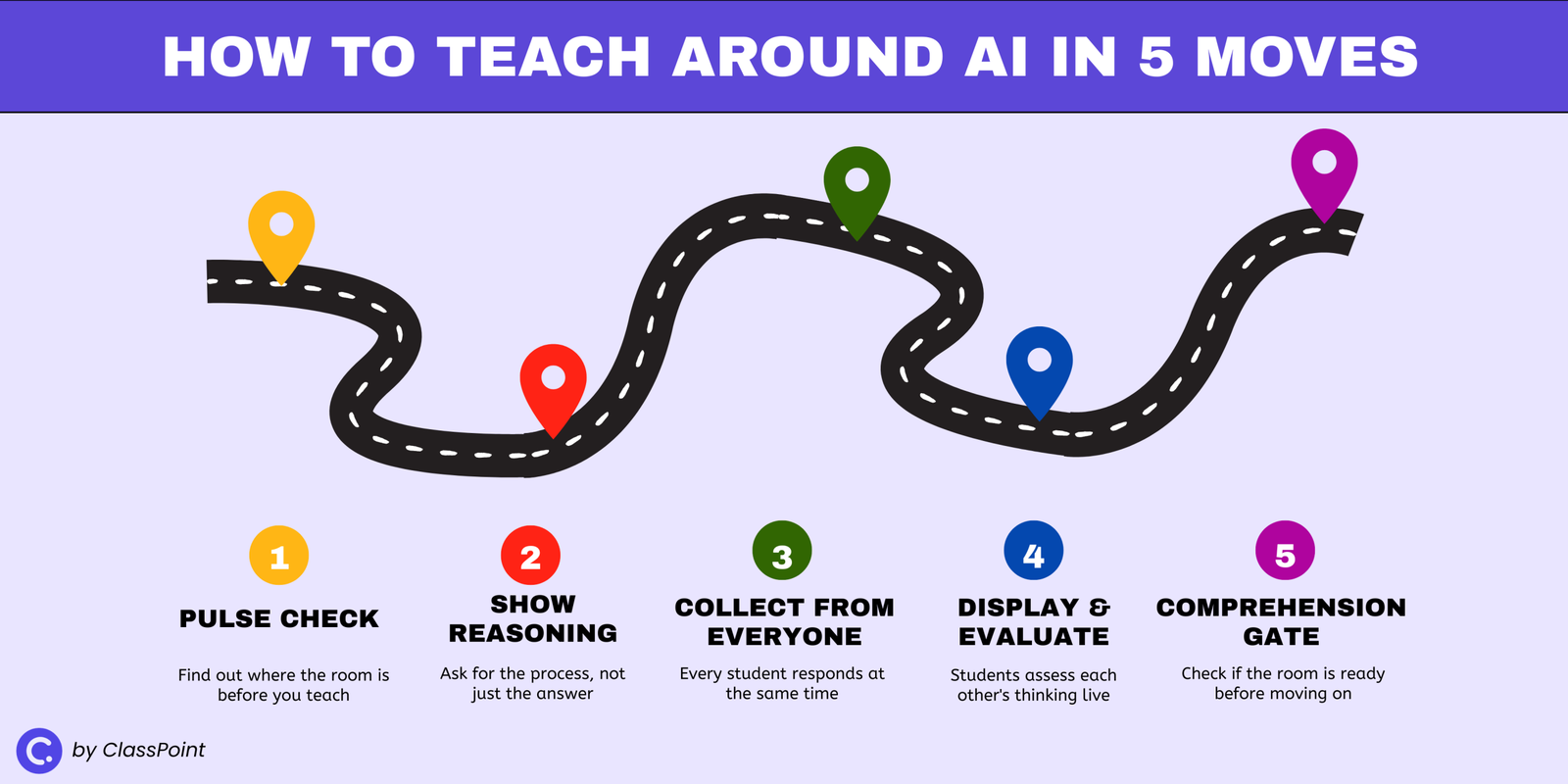
These five moves aren’t a lesson plan you follow in order. They’re design principles you can drop into any lesson, in any combination, whenever you need to make student thinking visible.
All you need is a way to collect responses from every student at once, whether that’s a tool like ClassPoint (a free PowerPoint add-in that turns your slides into interactive quizzes and polls), mini whiteboards, or sticky notes.
Step 1: Start With a Pulse Check, Not Instructions
Before you teach anything, find out where the room is. A quick, low-stakes poll at the start of a lesson tells you whether students already grasp the concept, are halfway there, or need the basics before you go further.
A True/False or Yes/No/Unsure question takes under a minute. Students respond, you see the breakdown, and you know whether to move forward or slow down. No grading, no pressure — just a signal from every student before the lesson begins.
The point isn’t which tool you use. It’s that you’re hearing from the whole room, not just whoever raises a hand.
Step 2: Make Students Show Their Reasoning, Not Just Their Answer
AI is excellent at producing correct answers. It’s terrible at showing how it got there. Use that gap.
Instead of asking students to write a final response, ask them to show their process: sketch a diagram, annotate a passage, map out a problem-solving path, or label the steps they took to arrive at their answer. When the task requires visual reasoning, there’s nothing to paste from a chatbot.
This works on paper, on whiteboards, or digitally, the format matters less than the requirement. The moment you ask “show me how you got there” instead of “give me the answer,” you’ve made AI irrelevant to the task.
Step 3: Collect Written Thinking From Every Student at Once
This is where most classrooms lose visibility. The teacher asks a question, three hands go up, one student answers, and the lesson moves on. The other 27 students? Unknown.
Replace that with simultaneous collection. Pose a question or prompt, have every student submit a written response at the same time, and review them all before moving forward. This can be digital submissions, index cards collected at the same moment, or whiteboards held up on a count of three.
The difference between this and calling on a volunteer is the difference between hearing one voice and seeing the whole room.
Step 4: Put Student Responses on Display and Let the Class Evaluate
Collecting responses is useful. What you do with them is what changes the learning.
Pick 2–3 student submissions and display them anonymously. Then ask the class: Which response shows original thinking? Which one just restated the obvious? Which one would fall apart if you asked a follow-up question?
This is the move AI cannot replicate. The reasoning is happening live, in the room, in conversation. Students are evaluating each other’s thinking against criteria they’re building in real time.
A student who outsourced their response to AI will hear the gap between their answer and one that shows genuine understanding, and they’ll hear it from their peers, not from a grade.
Anonymity matters. When students know their name isn’t attached, the quiet ones participate and the overconfident ones get measured against the same standard as everyone else.
Step 5: Run a Quick Comprehension Gate Before Moving On
Before you transition to the next topic or assign independent work, check whether the room is ready.
A single well-designed question can tell you everything. Frame it as a multiple choice question where each wrong answer represents a specific misconception, so when a student picks option C, you don’t just know they got it wrong. You know why.
The lesson hinges on the result: if most students get it right, move on. If they don’t, you know exactly where to circle back, while the thinking is still fresh, not after it’s been graded.
For more on this, here are 8 ways to check for understanding that work at any point in a lesson.
Why This Works and What It Doesn’t Solve
Students using AI can produce polished work, but these five moves target the one thing AI can’t fake: reasoning in real time. A chatbot can produce a polished essay, a correct answer, or a well-structured argument. It can’t think out loud in front of a class, defend a response under questioning, or adjust when the teacher asks a follow-up.
When you design lessons around live thinking, the student either shows up with understanding or they don’t. There’s no middle ground to hide in.
This approach also changes the teacher’s role. You’re not spending energy on surveillance, checking submissions, running detectors, rewriting prompts to stay ahead of the next model. Instead, you’re doing what teaching has always been: watching how students think, choosing the right moment to intervene, and deciding what comes next based on what you see.
That expertise is something no tool replaces, but this isn’t a complete solution. It covers what happens during class but it doesn’t solve take-home assignments, standardized testing, or school-wide AI policy.
Students will still use AI outside your classroom, and this approach doesn’t pretend otherwise. What it does is make sure that the time they spend in front of you is time where real thinking happens, and that you can see it clearly enough to know who’s learning and who’s going through the motions.
The Real Question
AI isn’t going away. The tools will keep improving, and students will keep using them. You can spend your energy trying to stay one step ahead of that, or you can step back and focus on what’s always mattered.
The real question was never “how do I stop students from using AI.” It was “how do I know if my students are actually learning.” That question existed long before ChatGPT. AI just made it impossible to ignore.
FAQ
Should students use AI at all?
That depends on the task. If the goal is for students to practice thinking, reasoning through a problem, forming an argument, restating an idea, then students using AI skips the part that matters. But AI can be useful when the goal is evaluation: have students critique an AI-generated response for accuracy, structure, or bias. The key is whether the student is doing the thinking or the tool is.
What about AI-proof assignments?
They help in the short term. Personalizing prompts, requiring local references, or adding oral components all make it harder for AI to produce a usable response. But AI models improve fast, and no assignment stays AI-proof forever. Rather than designing around students using AI, a stronger long-term approach is to design lessons where thinking happens live, so the quality of the work depends on what the student can do in the room, not at home.
How can teachers use AI in the classroom?
AI works well as a teaching tool when you’re the one using it. Generate practice questions from your slides, create variations of a problem set at different difficulty levels, or produce sample responses for students to evaluate. The OECD’s research supports this: educational AI tools designed with a clear teaching purpose lead to better outcomes than giving students open access to general-purpose chatbots.
How can you tell if a student used AI?
Most AI detectors are unreliable, research shows they misclassify non-native English writing at rates above 60%. A more dependable approach is to make student thinking visible during class. When students explain, sketch, or defend their reasoning in real time, you don’t need a detector. You can see whether the understanding is there or not. The goal isn’t to catch students using AI after the fact. It’s to design lessons where AI has nothing to contribute.
Why do students use AI to cheat?
Most students using AI aren’t trying to game the system. They’re optimizing for the outcome the assignment rewards. When the grade depends on a finished product, an essay, a problem set, a written response, and the product is all the teacher sees, AI is the rational shortcut. Students are more likely to do the thinking themselves when the assignment makes the process visible and valued, not just the final result.
