
If you’ve been teaching for a while, you’ve probably run a poll or a Q&A with Slido. It’s quick to set up and does live polls, Q&A, and quizzes well.
But it was built for meetings and events first, not classrooms. Maybe you want more gamification, a tool that works inside your slides, or features made for students. Or maybe you just want something that feels less corporate.
I tested a bunch of Slido alternatives in my own lessons and narrowed them down to eight. Below, I compare them on ease of use, integrations, engagement features, and what you get on the free plan.
Slido Alternatives at a Glance
| Tool | Works with | Stand-out features | Free plan |
|---|---|---|---|
| ClassPoint | Add-in inside PowerPoint | 8 activity types incl. slide drawing, image/audio/video upload; stars, badges, leaderboard; AI quiz from slides | Yes, 25 students per class, 5 activity types |
| AhaSlides | Own editor; PowerPoint and Google Slides add-ins; import slides | Polls, quizzes, Q&A, spinner wheel, rating scales | Yes, 50 participants, 5 quiz + 3 poll questions per presentation |
| Mentimeter | Own editor; import from PowerPoint, Keynote, Google Slides (paid) | Word clouds, ranking, quizzes, Q&A, content slides | Yes, 50 participants per month |
| Wooclap | PowerPoint, Google Slides, Teams, Zoom; LMS on Campus plan | 21 question types, competition mode, self-paced sessions, SMS answers | Yes, unlimited participants, 5 questions per month |
| Vevox | PowerPoint, Microsoft Teams, LMS/VLE | Polls, anonymous Q&A, quizzes, AI question generator, attendance tracking | Yes |
| Crowdpurr | Browser-based; screen-share or project | Live trivia with points and leaderboards, polls, Q&A | Yes, 20 participants per experience |
| Pigeonhole Live | PowerPoint, Google Slides, Zoom, Teams, Webex | Moderated Q&A with upvoting, polls, quizzes, AI translation | Yes, 100 participants |
| Poll Everywhere | PowerPoint integration on every plan | Many poll types, competitions, AI prompts, attendance (Engage plan) | Yes, 40 audience size |
Pricing and limits were checked on each tool’s site in October 2026 and can change.
1. ClassPoint
ClassPoint is an add-in that runs inside PowerPoint. You present your usual slides and collect student answers from the same slideshow, without switching to another app.

That’s the main difference from Slido. Your questions sit on your slides, so there’s no second tab to manage while you teach.
“I don’t have to click out of my slide deck or into another platform to take polls… It makes it so much easier and fun to ask students to engage.” – Stacy P., Educator
Key Features
- PowerPoint Add-in: Questions, results, and tools all run in PowerPoint slideshow.
- 8 Activity Types: Multiple choice, word cloud, fill in the blanks, short answer, slide drawing, and image, audio, or video upload.
- Gamification: Stars, levels, badges, and a leaderboard.
- Presentation Tools: Name picker wheel, timer, annotation, and draggable objects.
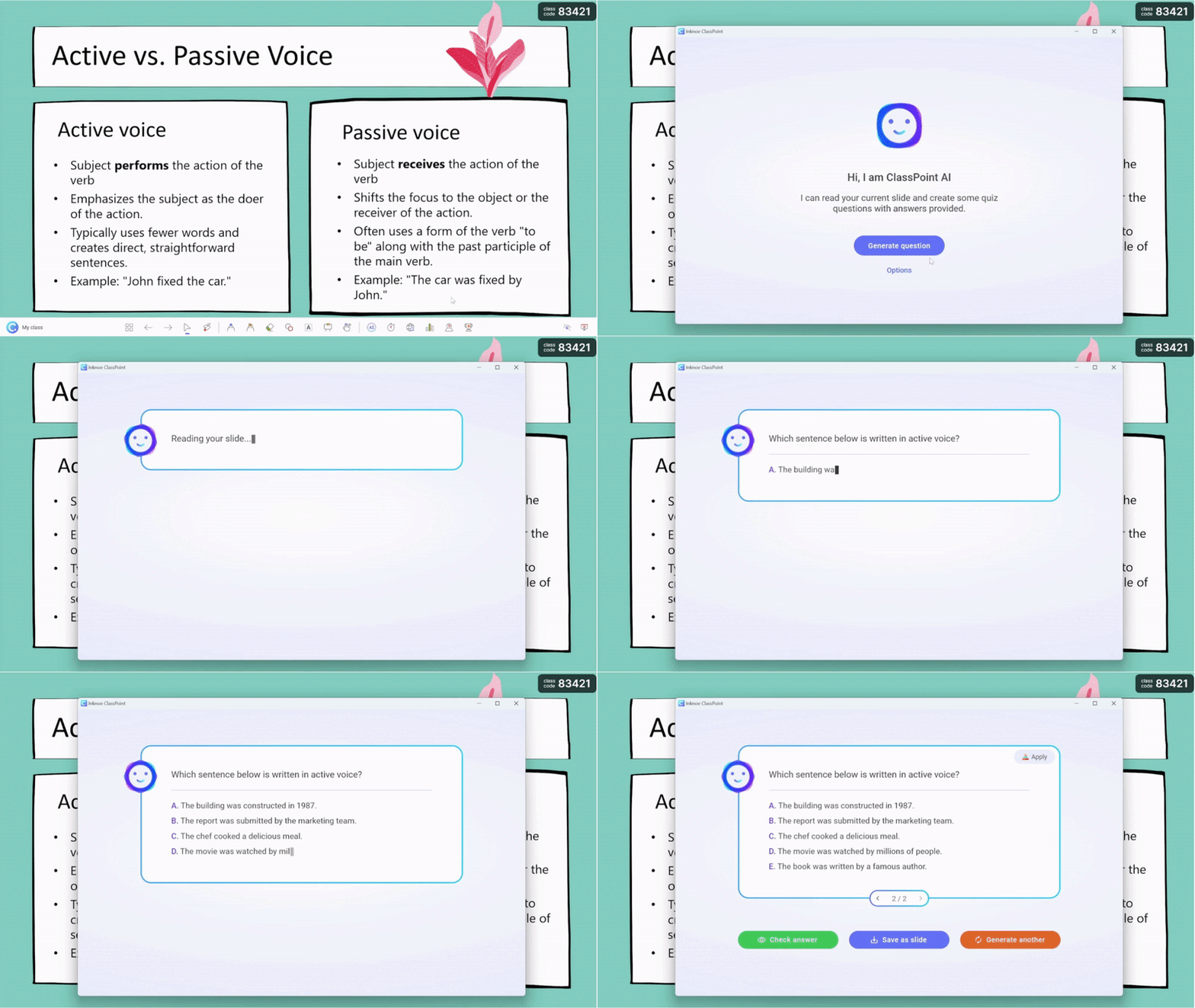
- AI Quiz Generator: Creates questions from the content of your slides.
I used the AI quiz generator to quickly create questions from my slide content, and it worked like a charm. The gamification added a competitive edge my students loved.
Pricing
Free Basic plan with 25 students per class and 5 activity types. Pro is USD 8/month (USD 96 billed annually) for 200 students and all 8 activity types. Premium is custom and adds live Q&A and grouping.
How It Compares to Slido
Slido runs alongside your slides, while ClassPoint runs inside PowerPoint. It adds question types Slido doesn’t have, like drawing and media uploads, plus classroom gamification.
Schools that want live Q&A and student grouping can add both with the Premium plan.
2. AhaSlides
AhaSlides is simple enough to pick up quickly, with enough variety to keep lessons fresh. You can build slides in AhaSlides or bring in your existing PowerPoint or Google Slides.

Students join with a link or QR code and answer in real time. The playful formats are good for getting the quieter kids to join in.
Key Features
- Easy Setup: Drag-and-drop editor with templates.
- Fun Engagement Tools: Spinner wheel, emoji reactions, and rating scales.
- Flexible Integration: Works on its own or with PowerPoint and Google Slides.
- Question Variety: Multiple choice, open-ended, image-based, ranking, and more.
I found the spinner wheel a surprisingly fun way to pick students for questions. It gets a laugh every time.
Pricing
Free plan with 50 participants and up to 5 quiz and 3 poll questions per presentation. Paid plans are monthly or yearly, with special rates for teachers and students.
How It Compares to Slido
AhaSlides lets you build and present everything in one place, where Slido mostly sits beside your deck. Its templates and spinner wheel give it more personality for lessons.
3. Mentimeter
Mentimeter feels polished but is still easy to use. It’s a good fit if you want to mix polling and presentation in one tool.

You can create quizzes, word clouds, ranking questions, and content slides, so a whole lesson can run from Mentimeter. Students join with a code and respond live.
Key Features
- Many Slide Types: Polls, quizzes, word clouds, ranking, Q&A, and content slides.
- Presentation Builder: Add text and images alongside interactive slides.
- Menti AI: Included on every plan, including free.
- Exports: Image, PDF, and Excel exports on paid plans.
I liked the ranking and word cloud slides most. They’re great for kicking off a discussion.
Pricing
Free plan with 50 participants per month. Basic is $11.99 per presenter/month billed yearly, and Mentimeter lists discounted offers for educators.
How It Compares to Slido
Both cover polls and Q&A, but Mentimeter has more slide types and works as a full presentation tool. Importing PowerPoint or Google Slides needs a paid plan.
We've put ClassPoint and Mentimeter side by side. Check out our full piece here.
4. Wooclap
Wooclap caught my attention because it’s designed for education with learning science in mind. It works with PowerPoint, Google Slides, Teams, and Zoom.

It has 21 question types, from polls and MCQs to word clouds. Competition mode adds timers and scoring, and self-paced sessions cover homework or flipped learning.
Key Features
- Competition Mode: Rankings and timed scoring for reviews.
- Self-Paced Sessions: Engage students before and after class (paid plans).
- Answer by SMS: Students can reply by text message.
- LMS Integration: Moodle, Canvas, Blackboard, and more on the Campus plan.
The LMS integration is a big help for tracking student progress, if your school is on the Campus plan.
Pricing
Free Starter plan with unlimited participants and 5 questions per month. Paid plans are billed annually.
How It Compares to Slido
Wooclap covers similar ground but leans into education. Competition mode feels more like a game, and the free plan is limited by questions per month rather than participants.
5. Vevox
If your school runs on Microsoft tools, Vevox is worth a look. It integrates with PowerPoint and Teams and works with common LMS/VLE platforms.

You can run live polls, word clouds, quizzes, and anonymous Q&A. It also has data analytics and attendance tracking, which are useful for formative assessment.
Key Features
- Microsoft Integration: PowerPoint and Teams.
- Anonymous Q&A: Helps quieter students ask questions.
- AI Question Generator: Creates quiz questions for you.
- Analytics and Attendance: Track engagement and who attended.
The AI question generator is a nice touch for saving prep time.
Pricing
Vevox has a free plan and separate education plans for teachers and lecturers. Paid plans include a 30-day refund window.
How It Compares to Slido
Vevox and Slido are similar in function, but Vevox fits Microsoft-heavy schools and adds attendance tracking. Its reporting is aimed at tracking learning, not just event engagement.
6. Crowdpurr
Crowdpurr turns your classroom into a live quiz show. It’s built for trivia and competition, which makes it great for review days.

Students join from a browser with a QR code or URL and earn points on a leaderboard. It also has polls and Q&A, but trivia is where it shines.
Key Features
- Game-Show Trivia: Points, timers, and leaderboards.
- No App Needed: Runs in the browser.
- Trivia Library: Ready-made trivia to start from.
- Screen Share Friendly: Project it or share it in Zoom or Webex.
The leaderboard is a hit for test reviews and energizing lessons.
Pricing
Free Basic plan with 20 participants per experience. The Classroom plan is $24.99/month billed yearly ($49.99 for one month) with 100 participants.
How It Compares to Slido
Crowdpurr takes gamification much further than Slido. For quick polls or a calm Q&A, Slido’s simpler setup may suit you better.
7. Pigeonhole Live
Pigeonhole Live excels at Q&A, especially in larger settings like lecture halls. It integrates with PowerPoint, Google Slides, Zoom, Teams, and Webex.

Its Q&A supports anonymous questions, upvoting, and moderation. You can also run polls and quizzes inside your presentations.
Key Features
- Moderated Q&A: Approve, upvote, and manage questions.
- AI Translation: Available as an add-on for multilingual audiences.
- Scale: The Standard plan supports 2,000 participants.
- Custom Branding: Themes and logos on paid plans.
The AI translation feature is a standout for multilingual classrooms.
Pricing
Free Starter plan with 100 participants. Presenter is $13/month billed yearly with 250 participants.
How It Compares to Slido
Pigeonhole matches Slido’s core features and goes further on Q&A. For everyday classroom polls, it may be more than you need.
8. Poll Everywhere
Poll Everywhere has been a classroom staple for years. It’s reliable and has a PowerPoint integration on every plan, including free.

It supports many poll types, including clickable images and ranking. Paid plans add reporting and attendance management.
Key Features
- Every Question Type: All poll types on every plan.
- AI Prompts: 10 per month on the free plan.
- Attendance and Reporting: On the Engage plan and up.
- Data Export: Available on every plan.
The ability to tie responses to student names is a big plus for grading participation.
Pricing
Free Intro plan with an audience of up to 40. Present is $10/month ($120 billed annually) with 700 participants.
How It Compares to Slido
Poll Everywhere and Slido are close, but Poll Everywhere’s attendance and reporting suit classrooms. Slido’s interface may feel more modern to casual users.
Which Slido Alternative Is Best for You?
Each tool has its own personality, and the best one depends on how you teach. Here’s how I’d break it down:
- ClassPoint: For teachers who present from PowerPoint and want questions, gamification, and AI quizzes inside the slideshow.
- AhaSlides: For playful, visual lessons with templates and a spinner wheel.
- Mentimeter: For polished presentations with lots of slide types.
- Wooclap: For education-focused features, competitions, and self-paced work.
- Vevox: For Microsoft schools that want anonymous Q&A and attendance.
- Crowdpurr: For turning review time into a trivia game show.
- Pigeonhole Live: For large lectures that need moderated Q&A.
- Poll Everywhere: For a dependable classic with participation tracking.
My Final Take
Start with where you present. If your lessons live in PowerPoint, a tool that works inside it saves the most hassle. If you want game-style review or large-room Q&A, Crowdpurr or Pigeonhole Live may fit better.
Try the free plans with one real lesson before you commit. Happy teaching!
FAQs
What is the best alternative to Slido for teachers?
It depends on your setup. If you teach from PowerPoint, ClassPoint keeps everything in your slideshow. Wooclap and Poll Everywhere are strong education-focused options, and AhaSlides is good for playful lessons.
Is there a free Slido alternative?
Yes. Every tool on this list has a free plan, with limits such as participant caps or question counts. Wooclap’s free plan allows unlimited participants but only 5 questions per month.
Can I use Slido alternatives for large classes?
Yes. Pigeonhole Live, Poll Everywhere, and Wooclap’s paid plans handle hundreds of participants or more. Check each plan’s limit before a big session.
Which Slido alternatives work inside PowerPoint?
ClassPoint runs as a PowerPoint add-in. AhaSlides, Wooclap, Vevox, Pigeonhole Live, and Poll Everywhere also offer PowerPoint integrations.
Do Slido alternatives work offline?
Most need an internet connection, because students join with a link or code. Plan for Wi-Fi or mobile data before class.
