As the year wraps up, teachers usually take a quick look at what actually helped them in the classroom. ClassPoint had a steady stream of updates this year, so this recap keeps everything in one place.
The updates this year stayed focused on things teachers use often. Small refinements that change how a lesson feels in the moment. Smoother responses from students. Clearer moments during activities. And fewer little frictions that usually slow down your flow.
Below is the full list of everything ClassPoint added in 2025 and a simple peek at what is coming your way next year.
Editable Student Responses for Ongoing Activities
You want activities to feel more forgiving for students. You want them to feel safe enough to fix their work without starting over.
Starting off with one of the most requested updates: students joined in a ClassPoint session can now change their answers as long as the activity is still open.
Why teachers appreciate this:
- Students can correct mistakes without restarting the activity
- It encourages quick self-checking and reflection
- Teachers get cleaner, more accurate submissions
- It reduces stress for younger learners who tap fast
A small feature with a big impact on classroom flow.
With editable resubmissions, these quizzes become more flexible and keep activities moving smoothly.
How it works:
- While the activity is still active, delete a student’s submitted responses.
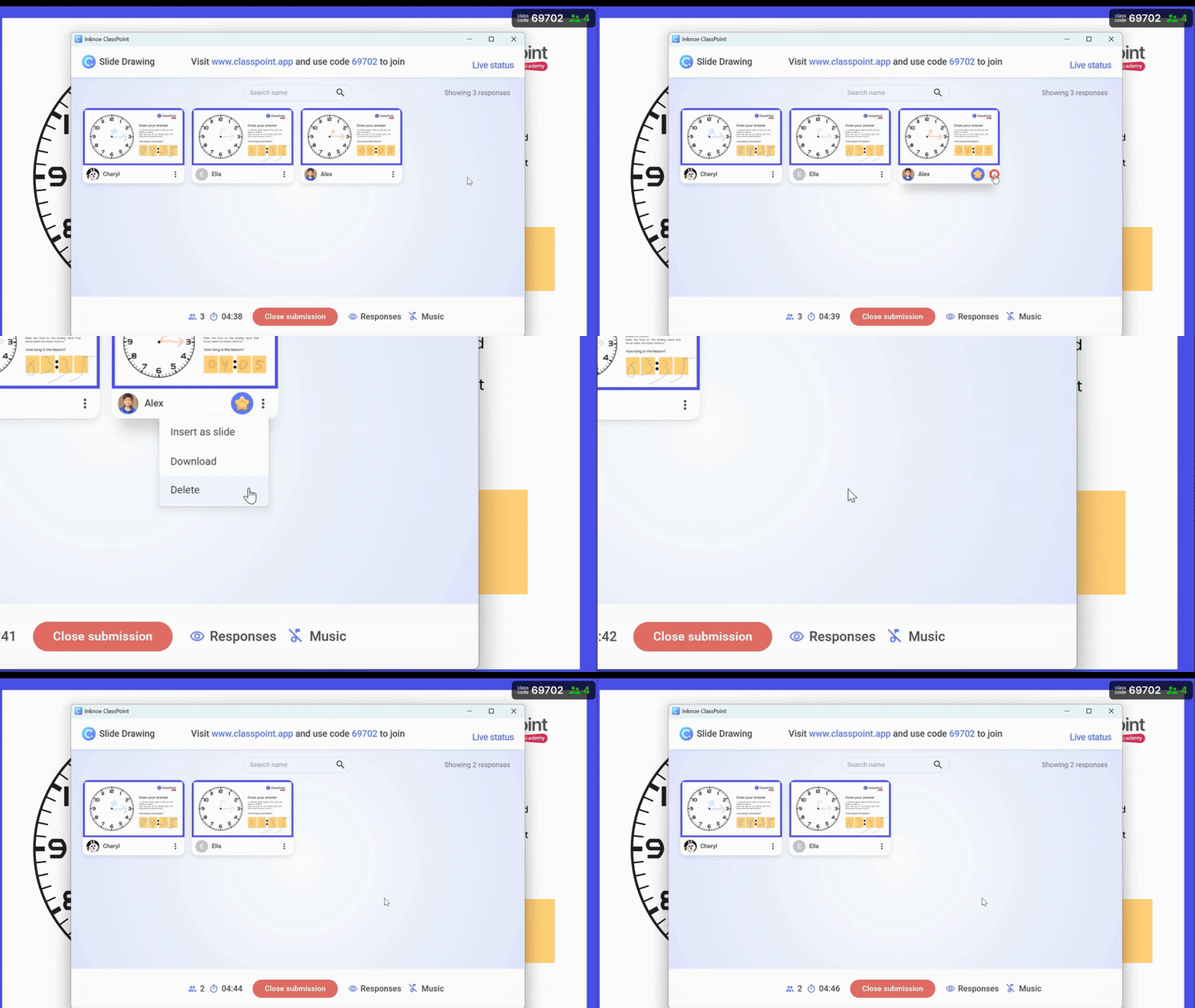
- On Slide Drawing, the slide is returned to the student, allowing them to edit their annotations and resubmit.
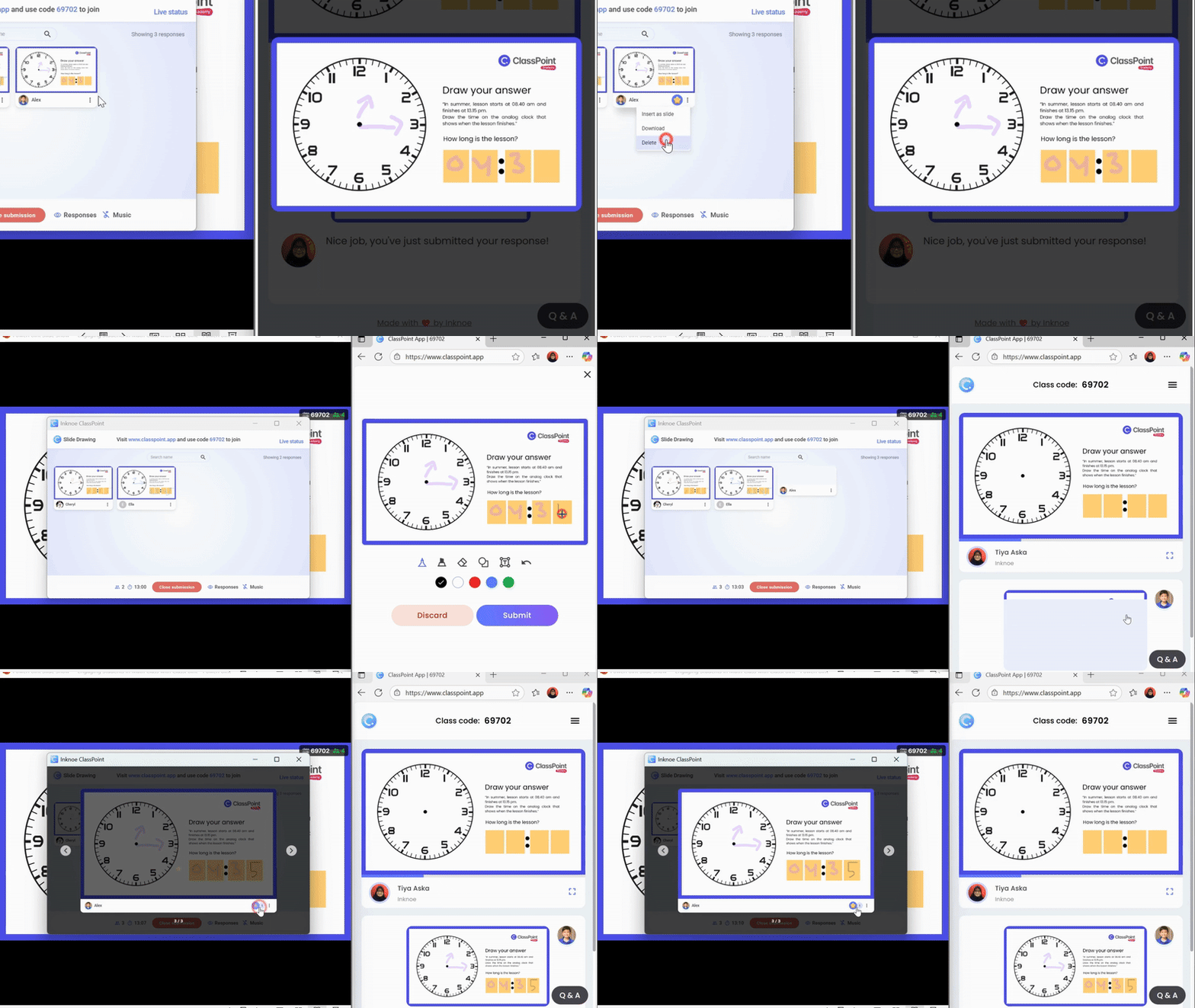
The same function is also available in Short Answer, where students can edit their responses and submit again.
Shareable Class Activity Reports
Another request that kept coming up was the need to share learning evidence more easily. Teaching rarely happens alone. You work with co-teachers or coordinators or school leaders who also want a clear picture of what happened in class.
Class Activity Reports offer a clear overview of what happened during an activity. They help teachers revisit student responses, reflect on participation, and document learning progress.
Teachers can now share the report link directly with colleagues, co-teachers, or school leaders. This makes collaboration smoother and gives teaching teams a consistent view of classroom activity.
What others can access from a shared report:
- Detailed reports of class sessions
- Student responses and quiz results
- Downloadable Excel files for MCQ quizzes
- Activity summaries for the entire class
This makes it easier to review learning evidence, support discussions about progress, and collaborate with teaching teams.
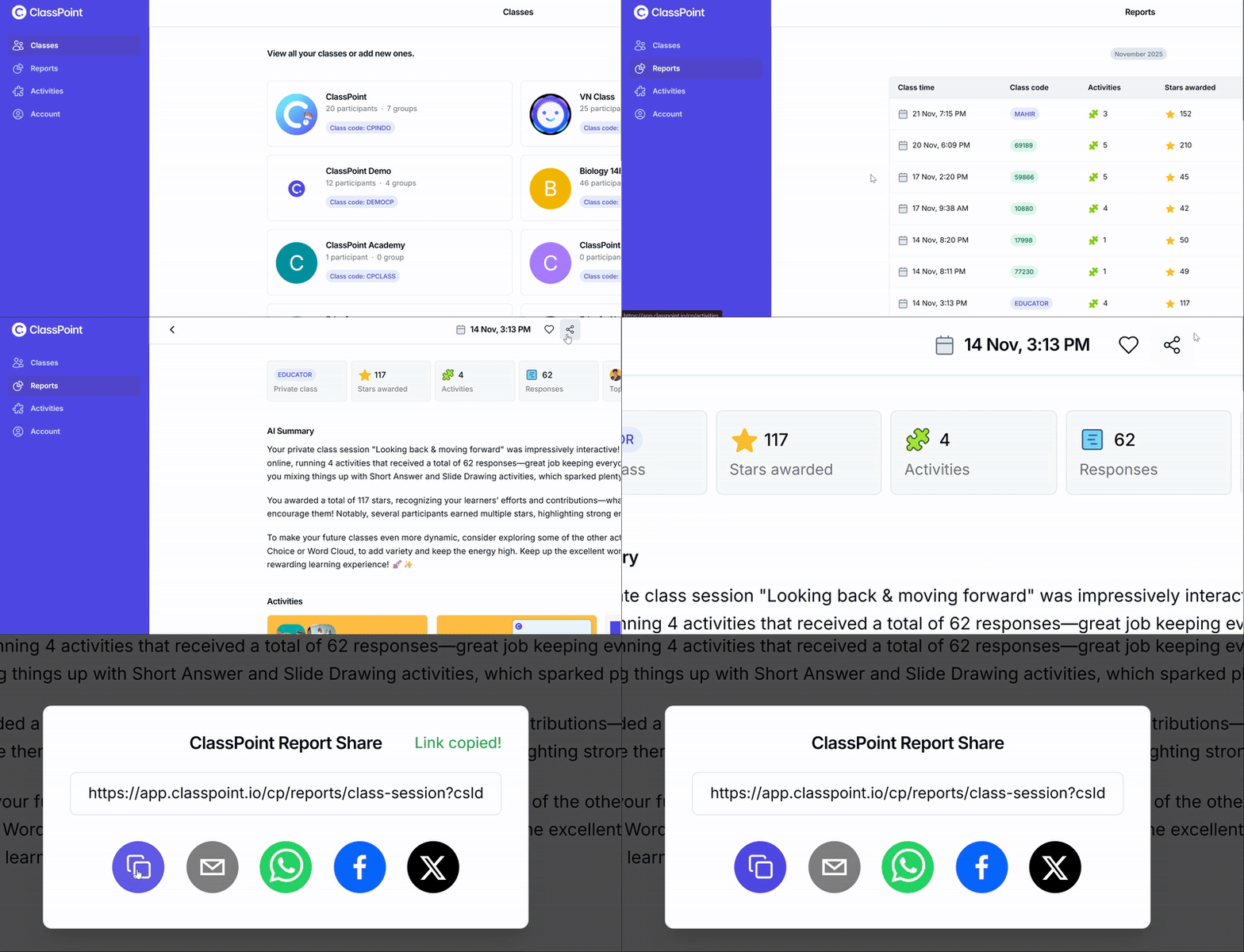
How to view and share your reports:
- Go to the Report tab at app.classpoint.io
- Select one of your Class Activity Reports
- Click the Share button to generate a link
Sunsetting the Embedded Browser
This next part is a small cleanup update. It removes a feature that very few teachers used.
ClassPoint’s Embedded Browser has now been officially sunsetted.
This decision was based on very low usage.
Removing it helps ClassPoint stay lighter, faster, and focused on features that teachers rely on every day.
For the full explanation and suggested alternatives, you can read this dedicated update.
What’s Coming in 2026
Now for the part everyone looks forward to. A quick look at what teachers will be able to use in the coming year. These updates lean into flexibility and choice, so no matter what device you have on your desk, you can still keep your lessons interactive.
ClassPoint Cross-Platform
Many teachers told us the same thing. You want ClassPoint to meet you on whatever device your school gives you. So this is where the next phase begins.
ClassPoint is now available across more presentation environments, giving teachers the freedom to teach interactively on Mac, iPad, Chromebooks, and other non-Windows devices.
Teachers can present ClassPoint lessons online, run activities, and engage students directly from the browser without needing Windows or PowerPoint installed.
This expansion makes it easier for teachers to stay interactive no matter what device the school provides or what they prefer to teach with.
AI Activity Insights
Teachers often spend so much time reading through answers one by one. This upcoming set of AI tools is meant to help you see the whole class more clearly, without the usual late-night sorting.
ClassPoint cross-platform includes AI Summary and AI Insights for every quiz activity.
Once a quiz is completed, the AI provides an overview that highlights general student performance, recurring mistakes, and common thinking patterns across the class.
Teachers can also ask the AI questions to explore the class responses further. This helps reveal:
- What kinds of errors students commonly made
- Patterns in how students approached the questions
- Overall strengths and gaps in understanding
- Suggestions for follow-up teaching or revision
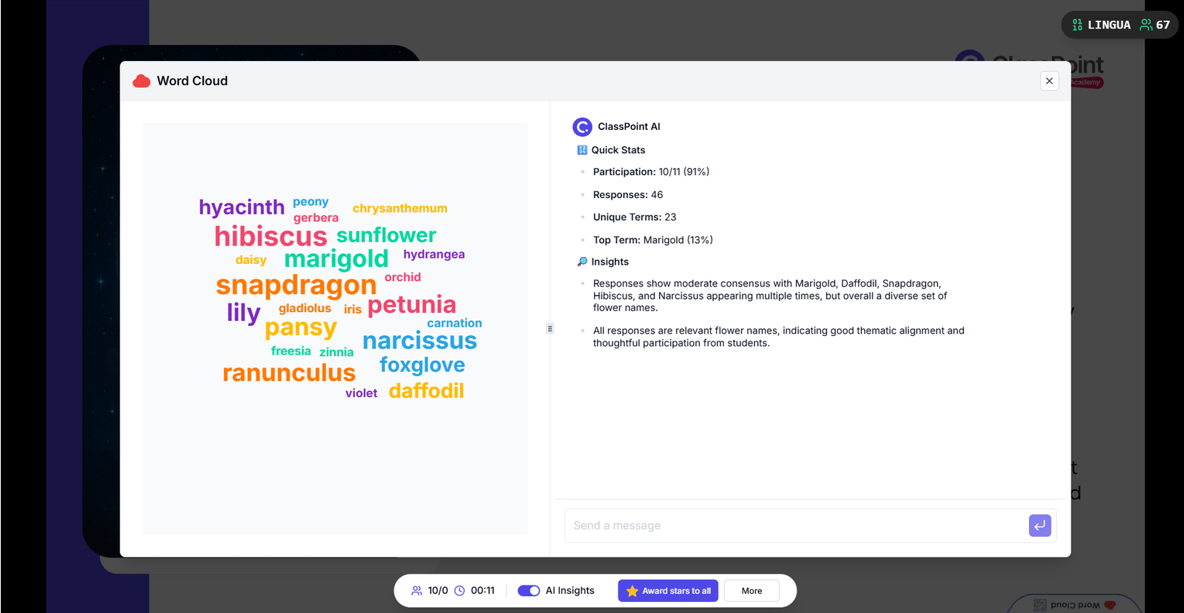
The insights are based on the full set of student responses, giving teachers a clearer picture without needing to review every submission manually. The goal remains the same. Less time spent sorting through data, more clarity to guide the next lesson.
In case you missed it, check out all the AI Tools in ClassPoint for Smarter Quizzes, Insights, and Reports.
Google Slides Development
Some teachers work in PowerPoint. Others live in Google Slides. ClassPoint is making room for both.
Work is underway to bring ClassPoint’s tools to Google Slides.
This upgrade will give teachers the freedom to choose the presentation tool they prefer without losing interactivity.
Contact us if you’d like to have a walkthrough demo and to have an early access of ClassPoint cross-platform for your school.
Final Thoughts
The year’s updates might look simple on paper, but they touch the small details that shape your everyday teaching. Editable responses that keep activities moving. Report sharing that makes teamwork easier. A lighter app that focuses on what teachers truly rely on.
And with the new cross-platform features, AI insights, and Google Slides development underway, the next year is already shaping into something exciting. More ways to present. More ways to understand your class. More freedom for teachers to teach in the way that feels most natural.
If you want to explore any of these new features further, stick around and we’ll keep you updated with content that supports you in the years ahead.
