Modern audiences expect more than slides that talk at them.
Whether you are presenting in a classroom, a training room, or in front of colleagues, people learn best when they can participate, react, and shape the session with you.
That is where strong interactive presentation ideas become powerful. They shift the experience from passive viewing to active learning.
This guide combines clear strategies, interactive activities, and presenter-ready tools that help you build presentations people enjoy participating in.
What Makes a Presentation Interactive

Before choosing activities or tools, it helps to understand the principles that make interaction work for any audience:
✅ Make people think early. Start with a question, prediction, or visual prompt. Early participation builds momentum.
✅ Create small moments of choice. Let the group select the next topic, example, or path. Choice increases buy in.
✅ Build in short discussion points. Pair sharing and micro conversations help participants process information quickly and socially.
✅ Use variety to reset attention. Alternate between speaking, reacting, voting, and visual tasks. Variety keeps energy steady.
Now that you have these principles at hand, you can confidently explore interactive presentation ideas that bring your session to life.
1. Start With a Warm Up Question

Warm ups set the tone for interaction and help the audience shift from “listening mode” to “thinking mode.” They make your interactive presentation ideas feel natural from the very start.
🧠 Try asking these questions:
“What is one challenge you face with this topic?”
“What outcome would you like from today’s session?”
“What made you interested in this discussion?”
Warm ups break the initial silence and invite participation.
Running out of ideas on how to warm up your audience? Check out 255 Irresistible Icebreaker Questions.
2. Run a Live Poll

Live polls are one of the most effective interactive presentation ideas because they generate instant engagement and shared insight.
📝 How to run it:
Step 1. Ask a question.
Step 2. Let the audience vote via device.
Step 3. Reveal the results on screen.
Step 4. Add one reflective follow up question.
Try these prompts:
“Which issue should we solve first?”
“How confident do you feel about this process?”
“Which option do you prefer moving forward?”
You can gather responses verbally or through a tool. This helps you see if the group is aligned before you continue.
3. Quick Checks for Understanding

Quick checks help you validate whether your audience is following your content.
| Method | What It Does | When to Use |
|---|---|---|
| 🤚Hand Raise | Fast sentiment check | Early in a session |
| 📊Short Poll | Measures understanding | After introducing key content |
| 1️⃣One Word Responses | Surfaces clarity levels | Before moving to the next section |
✔ Why it works:
It keeps your delivery agile. You can speed up, slow down, or clarify based on real time input.
4. Offer Topic Choices

Choice makes people feel invested. Even small decisions support your interactive presentation ideas by sharing control with the audience.
For example, you are presenting three case studies. Instead of choosing yourself, you could ask your audience, “Which example should we explore first: A, B, or C?”
Participants vote and you follow their lead. Engagement increases because they shaped the path.
Let people decide which example to unpack or which direction to explore next. Even small choices increase engagement and ownership.
5. Do Prediction Tasks

Prediction activates curiosity. Humans pay more attention when they first form a guess.
Ask participants to:
✅ Estimate numbers
✅ Predict which strategy succeeds
✅ Guess which option has best results
✅ Forecast outcomes before revealing data
Examples:
“Which process do you think is fastest?”
“How long do you think this workflow takes in real life?”
“Which trend do you think grew the most this year?”
After revealing the answer, participants compare expectations with reality, a proven method that increases retention.
6. Have Micro Discussions

Short conversations help participants process information without losing momentum.
How to run a micro discussion:
- Ask a direct question.
- Give 30–60 seconds to talk with a partner.
- Ask two people to share.
- Continue with your content.
Variations:
🔄 Turn and Teach – each partner teaches the concept in their own words
👥 Group of Three – adds diversity of thought
📝 Micro Reflection – share one takeaway or doubt
These discussions increase social engagement while keeping time efficient.
7. Interpret Visuals Together

Visual interpretation is one of the most flexible interactive presentation ideas, especially for data heavy or conceptual topics.
You can interpret visuals such as charts, diagrams, or abstract pictures. You can ask the following questions:
❓“What do you notice first?”
❓“What pattern stands out to you?”
❓“What would you change if this were your project?”
❓“What question does this visual raise?”
Visual prompts activate analytical and creative thinking simultaneously, making discussions feel natural and spontaneous. This invites different perspectives and creates natural discussion.
8. Do One Minute Sketch or Diagram

A rapid drawing activity helps participants simplify complex ideas.
🎨 Tips:
• Keep strict timing (one minute only).
• Remind the audience that artistic skill does not matter.
• Ask a few participants to show theirs.
🖼 Example prompts:
“Draw the workflow as you currently understand it.”
“Sketch what success looks like in one minute.”
“Diagram the core issue in this scenario.”
This activity encourages clarity, creativity, and concise thinking.
9. Conduct a Mini Case Race

A short scenario creates fast, meaningful engagement.
For example, a client asks for a major deliverable in half the usual time. Ask your audience, “what is your immediate next step?”
Here’s how to run it:
• Give participants one minute to write a response.
• Display a few submissions.
• Highlight unique insights.
• Summarize themes.
This combines critical thinking with quick decision making.
10. Do a Sorting Challenge

Sorting tasks help teams structure priorities or processes.
Examples:
| Sorting Task | Items | Purpose |
|---|---|---|
| Priority ranking | Tasks or ideas | Identifies what matters most |
| Must have vs nice to have | Features or decisions | Clarifies scope |
| Sequencing | Steps in a process | Builds shared understanding |
Discussion guide:
“Which item was hardest to place and why?”
“What differences do you notice across groups?”
“What does this ranking tell us about our priorities?”
11. Run a Quick Debate

A structured debate boosts energy and surfaces diverse viewpoints.
How does a debate usually go? Refer to the steps below:
Step 1. Present a prompt.
Step 2. Let participants choose a side.
Step 3. Give each side one minute to discuss.
Step 4. Ask 2–3 representatives to share.
Step 5. Wrap up with a neutral summary.
To get you started with your quick debate activity, these are the sample debate topics you must take in mind:
• “Remote work or office work: which drives better collaboration?”
• “Should meetings always have a formal agenda?”
• “Do deadlines help or hurt innovation?”
This supports productive disagreement without discomfort.
If you need more debate topics at hand, read more on 70 Thought-Provoking Debate Topics in Different Categories That Cover the Most Important Issues of Our Time.
12. Do Light Movement Activities

Movement resets attention, especially in longer sessions.
Try these low effort movement tasks:
• Stand left or right based on your opinion.
• Move to a corner representing your stance.
• Line up by years of experience.
• Form quick triads around the room.
Light movement activities not only spices up your presentation but breaks monotony, encourages collaboration, increases alertness, and makes the environment more open and dynamic.
How ClassPoint Helps You Create Interactive Presentation Ideas
Many presenters struggle to deliver interactive presentation ideas without juggling multiple tools. ClassPoint solves this by embedding interaction inside PowerPoint itself, allowing you to create active, collaborative moments without leaving your slides.
⭐ 1. Run Interactive Activities to Boost Engagement
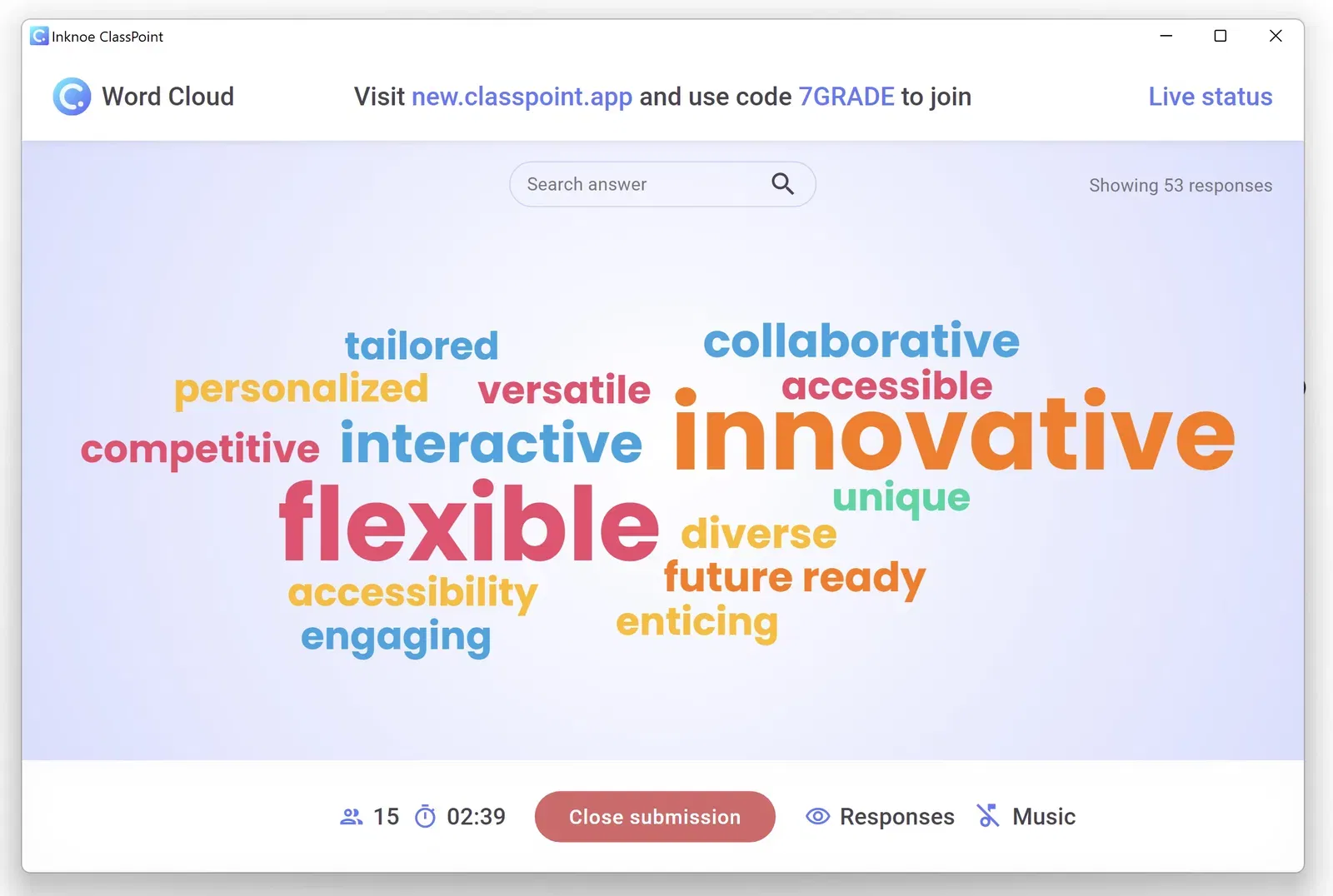
You can convert any slide into an audience activity with one click. This supports your interactive presentation ideas by allowing participants to respond directly from their devices.
| Activity Type | What It Does | When to Use |
|---|---|---|
| Multiple Choice | Fast voting and decision making | Checking opinions or knowledge |
| Short Answer | Collects text responses | Gathering insights or ideas |
| Word Cloud | Visual group brainstorm | Getting first impressions |
| Image Upload | Accepts photos or sketches | Creative tasks or field examples |
| Slide Drawing | Lets participants draw on a blank slide | Mapping ideas or quick diagrams |
Examples:
• Kick off a meeting with a Word Cloud on “What success looks like.”
• Run a strategy workshop with Short Answer prompts.
• Use Slide Drawing during planning sessions for rough diagrams.
🔍 2. Quick Poll for Instant Feedback

Quick Poll helps you take the room’s pulse on the spot. No prep required.
It elevates interactive presentation ideas because it lets you pivot your content based on real responses and makes decision making more democratic.
Try these moments:
• “Which topic should we explore next?”
• “How familiar are you with today’s tool?”
• “Is this approach practical for your team?”
Use Quick Poll to check energy levels mid presentation. It helps you adjust pacing before attention dips.
🎯 3. Random Name Picker for Fair Participation

Imagine this: You ask a question, and the same two people answer again. Name Picker fixes this by selecting someone at random.
Where it helps:
• Workshops where participation tends to be uneven
• Small group presentations where you want balanced voices
• Training sessions where quiet participants need gentle prompting
This tool keeps the atmosphere inclusive without putting anyone on the spot manually.
✏️ 4. Annotation Tools for Clear, Live Explanation
Studies show visual annotation helps audiences process complex information faster than static slides alone. ClassPoint’s annotation suite lets you draw, write, highlight, and mark up your slides.
Tools you can use:
🖍️ Pen for sketching
✨ Highlighter for key points
⬛ Shapes for simple diagrams
🗒️ Sticky notes for brainstorming
🔡 Text tool for labeling
🏆 5. Leaderboard to Boost Energy
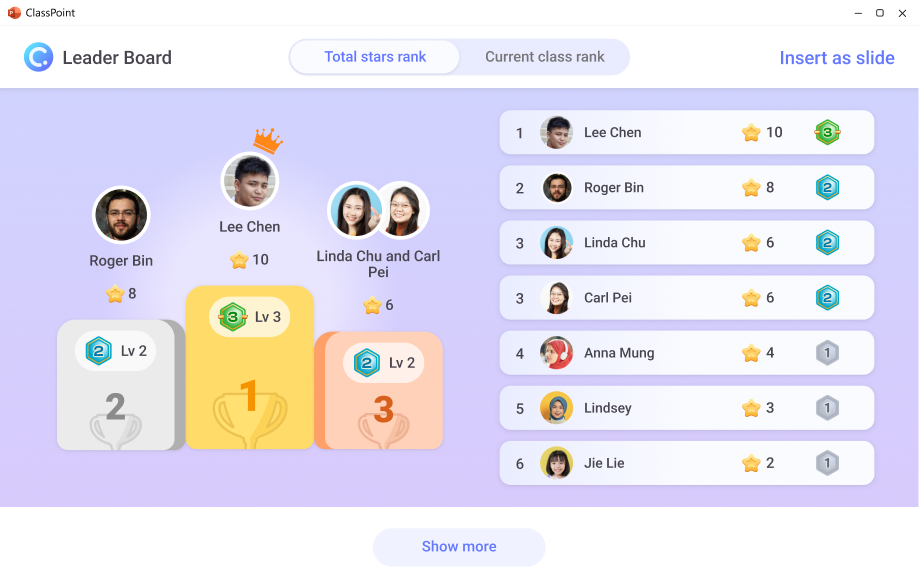
Gamification keeps engagement levels high, especially in longer sessions.
Leaderboard adds friendly motivation, a sense of progress and light competition without pressure.
| Why It Works | Example Use |
|---|---|
| Rewards effort | Award points for correct answers in activities |
| Keeps attention sharp | Use in multi topic workshops |
| Adds excitement | Reveal rankings at intervals |
This is great for energizing corporate trainings, onboarding sessions, or creative workshops.
📥 6. Automatic Saving of Audience Responses
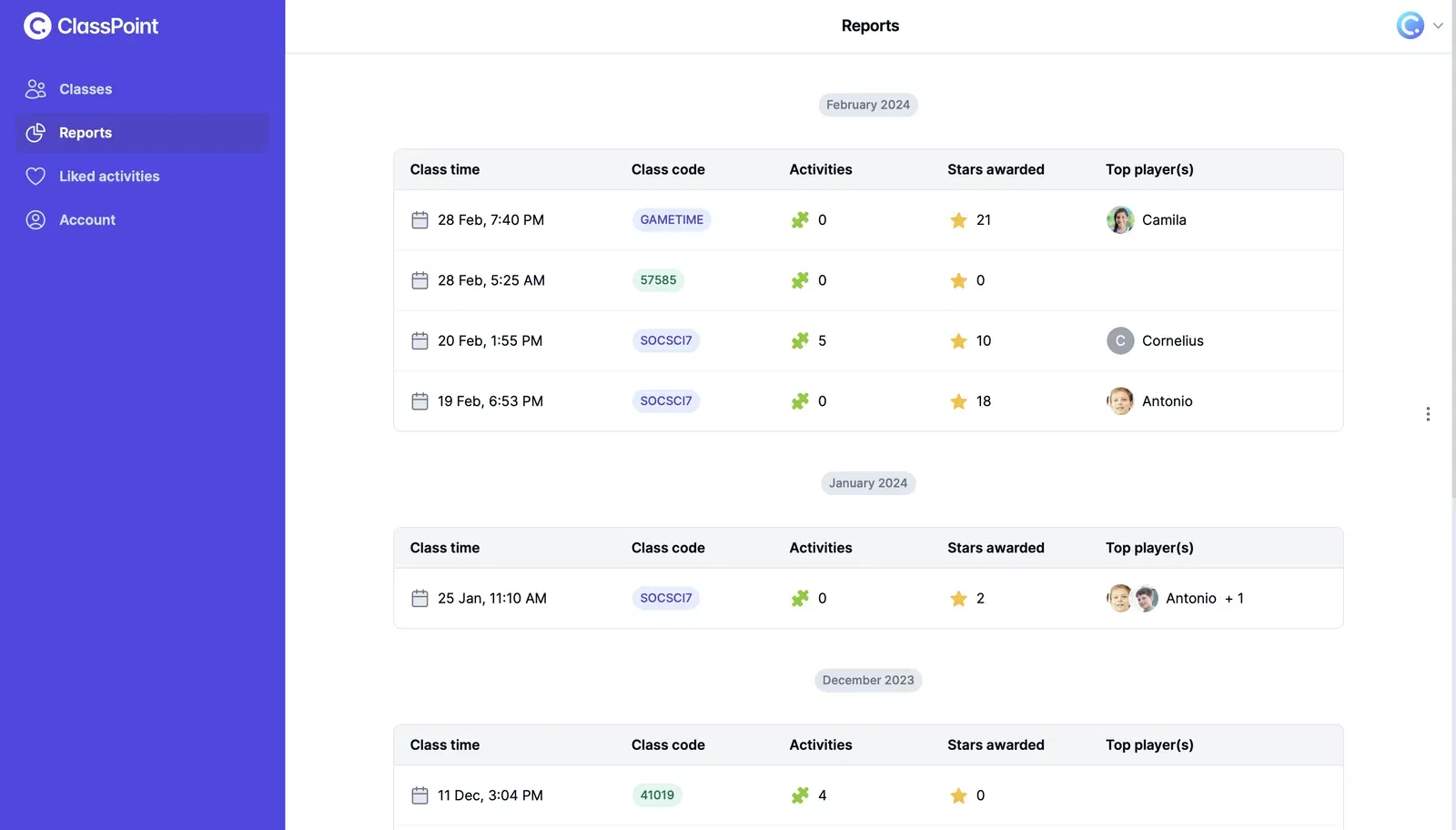
Everything your audience submits is stored automatically. This turns feedback into usable data instead of something that disappears once the slide changes.
Benefits of Saving Audience Responses:
✅ You never lose audience insights
✅ You can export responses for reporting
✅ You can analyze patterns after the session
✅ You can share summaries with participants
To follow up the reports, it’s best to build a reflection document using the audience responses. Since it presents the top insights, you can turn the common challenges you came across into action items.
This supports presenters who want interaction and meaningful outcomes.
ClassPoint helps you create presentations that feel alive, collaborative, and memorable in any setting. Your interactive presentation ideas become easier to run, more effective, and far more engaging for your audience.
FAQs
What should I consider before choosing interactive presentation ideas?
Start by understanding your audience size, session goals, and time available. Some interactive presentation ideas work best for small groups, while others scale well in large rooms. Always choose ideas that fit your purpose, not just the novelty.
How many interactive presentation ideas should I use in one session?
A good rule of thumb is to include one interactive moment every 8 to 12 minutes. Using too many interactive presentation ideas can feel overwhelming, while too few make the session feel flat. Balance interaction with content.
Can interactive presentation ideas work in hybrid or virtual sessions?
Yes. Most interactive presentation ideas adapt well to virtual or hybrid setups if you use tools that allow real time participation. Activities like polls, word clouds, and micro discussions translate well online.
What do I do if my audience is quiet or hesitant to participate?
Start with low pressure interactive presentation ideas like warm ups or simple polls. These build confidence without putting anyone on the spot. As participation grows, introduce more involved activities.
How do I keep interactive presentation ideas from derailing my timing?
Choose activities with fixed durations. One minute sketches, short polls, and 30 second pair shares keep your interactive presentation ideas engaging while staying on schedule. Prepare clear transitions to guide the flow.
Can I use interactive presentation ideas even if I’m not a confident presenter?
Absolutely. Many interactive presentation ideas require minimal facilitation, such as prediction tasks or visual interpretation prompts. These activities shift the attention to the audience, reducing pressure on the presenter.
What if my audience is very large?
Large groups can still participate through devices. Choose interactive presentation ideas like word clouds, polls, sorting tasks, and quick debates. These activities scale well because responses come from the crowd rather than individual volunteers.
How do I measure the impact of my interactive presentation ideas?
Look at engagement levels, response patterns, and participant feedback. If you use a tool like ClassPoint, saved responses help you evaluate which interactive presentation ideas generated the most participation and insight.
Can interactive presentation ideas work without technology?
Yes. Many interactive presentation ideas such as stand-and-choose activities, physical sorting lines, and micro discussions require no devices. Technology enhances interaction, but it is not essential.
How do I choose interactive presentation ideas that fit professional settings?
Pick ideas that support decision making, collaboration, or reflection. Interactive presentation ideas like priority sorting, case races, visual analysis, and quick debates feel natural in corporate or training environments.
