You just finished explaining a concept. You ask if there are any questions. Silence. A few nods. One student is still copying notes from three slides ago. Another is staring at you with an expression that could mean anything.
You move on. The clock is running.
That gap between teaching something and knowing whether it landed is where learning quietly falls apart. A check for understanding closes it — a quick, low-stakes pause mid-lesson that tells you whether students are following or falling behind.
Most teachers rely on “Does everyone get it?” or whoever raises their hand. That gives you data from five students, not thirty.
This guide covers what checking for understanding actually means, why it matters, and eight strategies you can start using tomorrow without redesigning your lessons.
What Is Checking for Understanding?
Checking for understanding is a formative strategy that Fisher and Frey define as the ongoing process of verifying that students are learning what’s being taught, not assuming it. Unlike a test or a graded assignment, it happens in the middle of learning, not at the end.
The goal isn’t to evaluate students, it’s to inform your next move as a teacher.
It can be as simple as a question, as quick as a thumbs-up scan, or as structured as a short written prompt. What matters is that it surfaces thinking from the whole room, not just the students who volunteer.
Why Is Checking for Understanding Important?
Because catching a misconception on Tuesday is easier than reteaching an entire unit on Friday.
Checking for understanding consistently leads to measurably better student outcomes. A 2026 study published in SN Social Sciences tracked 4,500 students and found a 25% increase in achievement and a 32% increase in engagement when teachers used formative assessment as a regular part of instruction. The largest gains came from immediate, content-specific feedback — exactly what a mid-lesson check provides.
When you check for understanding consistently, you:
- Spot confusion before it compounds
- Adjust pacing based on real data, not assumptions
- Give quieter students a way to show what they know
- Spend less time reteaching and more time moving forward
Students benefit too. Regular low-stakes checks build metacognition: students learn to notice what they know and what they don’t, rather than assuming they’re fine until the test. When checks are routine and ungraded, getting something wrong feels like a normal part of learning instead of a failure. Over time, students start self-correcting earlier because they’ve practiced identifying their own gaps.
How to Check for Understanding During a Lesson
Timing matters as much as the strategy itself. Aim for at least two or three checks per lesson, spread across these moments:
- After introducing a new concept — before practice begins. A quick poll or hinge question confirms the foundation is solid.
- During guided practice — while students are working. Walk the room, use mini whiteboards, or try “show a mistake” to catch errors early.
- Before transitioning to a new topic — an exit ticket or 3-2-1 closes one section cleanly before the next begins.
Short, frequent checks give you far more useful data than a single test at the end of a unit. A 30-second thumbs-up scan after a key explanation, a two-minute hinge question at the midpoint, and an exit ticket in the last two minutes is enough to cover most lessons. The key is knowing which strategy fits each moment.
The next section breaks down eight practical options you can match to these checkpoints.
8 Strategies to Check for Understanding in Any Lesson
None of these require special training or a complete lesson redesign. Each one works with what you already have and gives you a clearer picture of what your students actually understand.
1. Let Students Think Before They Talk
Most classroom discussions are dominated by the same five students. The rest stay quiet, not because they don’t understand, but because they haven’t had time to form a thought.
Think-pair-share fixes this. Pose a question, give students a minute of silent thinking, then have them discuss with a partner before anyone shares with the group. By the time you open it up, every student has already rehearsed an answer. The quiet ones have something to say. The confident ones have refined their thinking.
You don’t need any tools for this. Just a question and a pause.
For a deeper look at creative variations, see how to implement think-pair-share in the classroom.
2. Ask the Whole Room at Once
Calling on one student tells you what one student knows. To check for understanding across the entire class, you need every student responding at the same time.
The low-tech version is simple: thumbs-up, thumbs-sideways, or thumbs-down. Or fist-to-five, where students rate their confidence from zero to five. You ask, count to three, and scan the room.
The limitation is that you’re estimating from a quick glance. You can’t track who showed what, and students tend to copy the person next to them.

If you teach with PowerPoint, ClassPoint’s Quick Poll captures every response individually. Open it during your slideshow (no slide prep needed), pick a format like True/False or a 1-to-5 scale, and see the full class breakdown on screen.
If you don’t teach from PowerPoint, Mentimeter works well here too. It runs in the browser, so you create a poll, share a join code, and collect responses from any device.
3. Show a Mistake and Ask Them to Fix It
Instead of asking students to produce a correct answer, show them an incorrect one and ask them to find the problem. This requires deeper thinking because students have to evaluate work, identify what went wrong, and explain why.
Display a solved equation with a calculation error, a paragraph with a logical flaw, or a labeled diagram with something misplaced. Give students a few minutes to find and correct the mistake, then discuss as a class.
This works well on paper, on a projected slide, or on a whiteboard. No special tools needed. The learning happens in the reasoning, not the medium.
4. Have Every Student Show Their Thinking at the Same Time
Mini whiteboards have been a classroom staple for years. Every student writes or draws their answer, holds it up on your count, and you see thirty responses at once instead of hearing from three.
The analog version works great. The limitation is that answers vanish the moment the board is erased, and it’s hard to compare responses side by side.

ClassPoint’s Slide Drawing turns this digital. You send a slide to students’ devices and they annotate directly on it: sketch a diagram, label a graph, solve a problem. Every submission is saved and displayed in a grid, so you can compare, revisit, or project individual responses for discussion.
For a free alternative, you can check out Whiteboard.fi that lets students draw on shared digital boards.
5. Ask What They Learned and What’s Still Unclear
At the end of a lesson (or mid-way through a longer one), ask students to write down three things they learned, two things they found interesting, and one question they still have.
This 3-2-1 format is structured enough to guide thinking but open enough to surface genuine confusion. The “one question” prompt is the most valuable part; it tells you exactly what to address next class.
Students can write this in a notebook, on a sticky note, or on an index card. No technology required. Keep the responses and skim them before your next session.
6. Use One Question to Decide Your Next Move
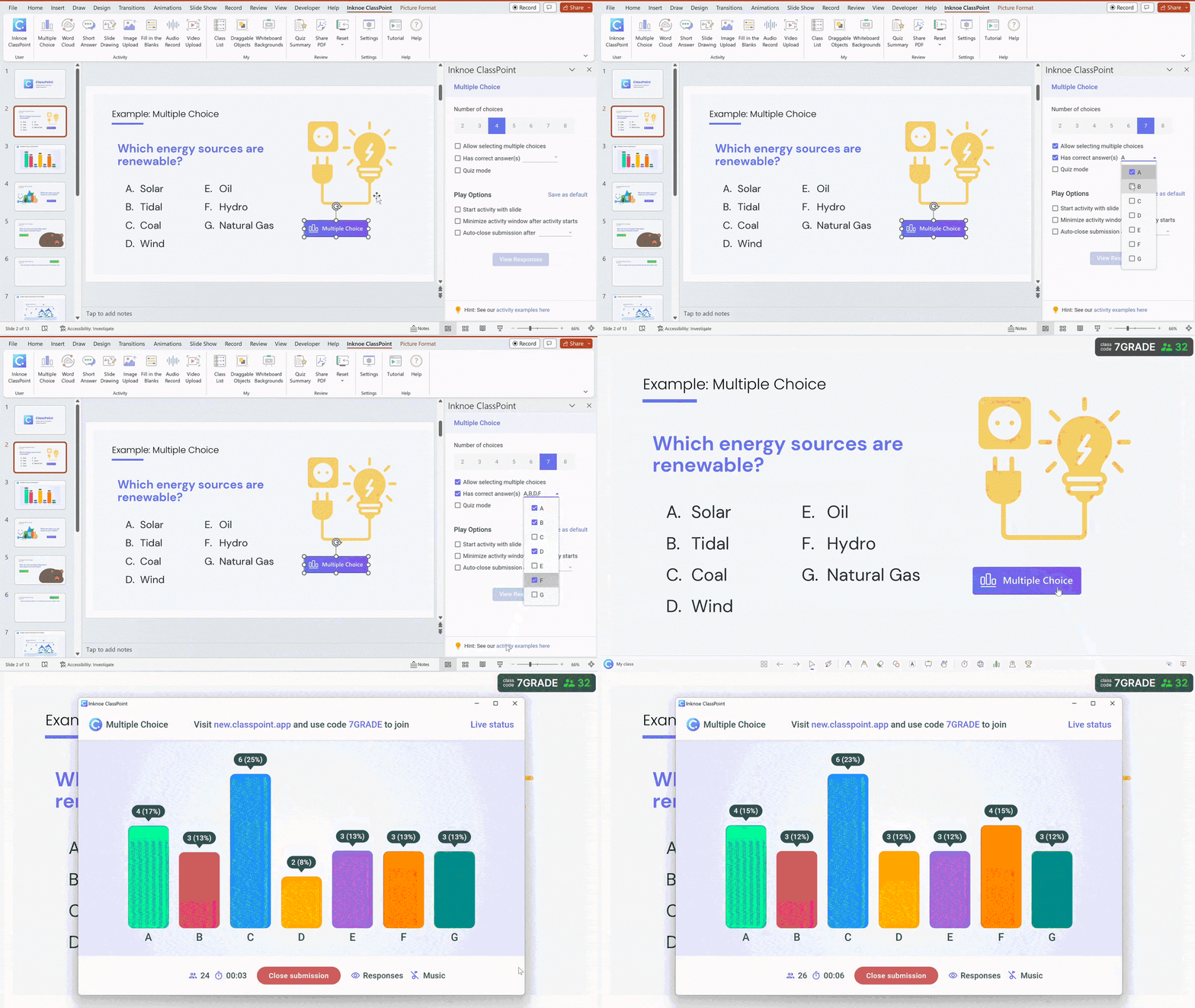
A hinge question is a single multiple-choice question placed at a critical point in your lesson, usually right before you transition to new material. The lesson “hinges” on the result: if most students get it right, you move on. If they don’t, you circle back.
What makes a hinge question different from a regular quiz question is the answer choices. Each wrong option represents a specific misconception. So when a student picks option C, you don’t just know they got it wrong. You know why, and you can address that exact gap.
Write your hinge question on a slide, then add a ClassPoint Multiple Choice button. Turn on Quiz Mode to auto-grade and see the answer distribution instantly.
7. Ask What’s Still Confusing
This is the simplest strategy on the list, and one of the most useful.
At any point in a lesson, pause and ask: “What’s the one thing that’s still confusing you right now?” Students write their answer on a slip of paper or sticky note and hand it in. No names required.
What you get back is a stack of honest, anonymous feedback. Some students will say “nothing,” and that’s fine. The ones who write something specific (“I don’t understand why we flip the fraction”) are giving you exactly what you need to reteach before the confusion deepens.
This works best when you make it routine. The more students expect it, the more honest the responses get.
8. End Class With a Quick Written Check
An exit ticket is a short prompt students answer in the last two minutes of class. One question, one brief response, done before they walk out. It captures what stuck and what didn’t from that day’s lesson.
Good exit ticket prompts are specific: “Explain one cause of the French Revolution” works better than “What did you learn today?” The first reveals understanding; the second invites “stuff about France.”
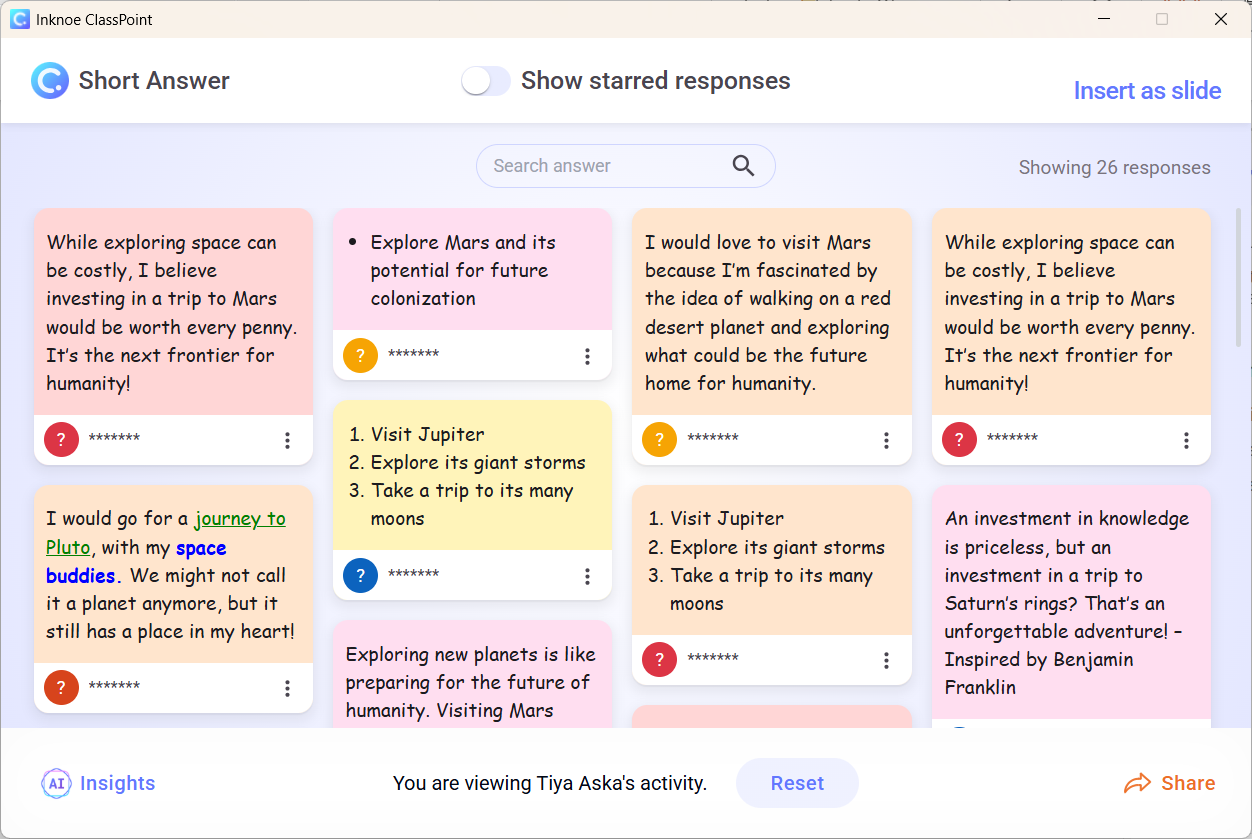
Paper exit tickets (index cards, sticky notes, half-sheets) work perfectly. If you want to save responses digitally, ClassPoint’s Short Answer lets students submit from their devices, and you can review everything after class.
A simple Google Forms link works just as well — one question, shared link, responses collected in the Responses tab for you to review after class.
For more ideas on making exit tickets engaging, see 30+ fun ways to use exit tickets for instant feedback.
Best Practices for Checking Understanding
Good strategies still fall flat without the right approach. Keep these in mind:
Check the whole room, not just volunteers. Calling on raised hands tells you what your most confident students know. Written responses, whiteboards, and digital polls give you data from everyone.
Keep it low-stakes. The moment students feel graded, they start guessing safe answers instead of showing real thinking. Frame checks as practice, not performance. Say “I want to see where we are” instead of “Let’s see who was paying attention.”
Act on what you find. The point of checking isn’t to confirm you can move on. It’s to find out whether you should. If half the class misses a hinge question, pause and reteach before pushing ahead.
Keep it under two minutes. A check that takes five minutes stops being a check and starts being an activity. One question, one prompt, one quick scan. If it takes longer than that, students lose momentum and you lose instructional time.
Want to go digital? These strategies work with or without tech, but if you're exploring tools, here's a side-by-side comparison of the top formative assessment tools to find the right fit.
Which Strategy Should You Start With?
You don’t need to overhaul your teaching to start checking for understanding more effectively. Pick one strategy that fits how you already run your class and try it this week. Just one.
Maybe that’s a hinge question before your next transition, a stack of sticky notes for a muddiest point check, or a think-pair-share the next time you catch yourself about to ask “Does everyone get it?”
The teachers who do this well didn’t start with eight strategies and a toolkit. They started with one small habit and built from there.
Need a ready-made example? These 4 paraphrasing activities use several of the strategies above, Word Clouds, anonymous Short Answer, and real-time feedback, in a single lesson progression, with a free PowerPoint template included.
FAQ
What should I do when students say they understand but clearly don’t?
This is one of the most common challenges in teaching. Students nod, say “yes,” and then bomb the assessment. The problem is that “Do you understand?” invites a social response, not an honest one. Replace it with a task that makes understanding visible: ask students to solve a problem, explain a concept in their own words, or apply the idea to a new example. If they can do it, they understand. If they can’t, you’ve found the gap without anyone having to admit confusion.
What do I do with the results after a check for understanding?
Sort responses into three groups: students who got it, students who are close, and students who are lost. If most of the class got it, move on and circle back to the few who didn’t during independent work. If the split is roughly even, reteach the concept using a different approach and recheck. If most students missed it, stop and address the gap before going further. The goal is a quick read, not a detailed analysis. Ten minutes of targeted reteaching beats a full period of general review.
How do I check for understanding when students won’t participate?
Quiet students aren’t necessarily confused. They may be anxious, unsure, or processing slower than their peers. Switch from verbal to written formats: mini whiteboards, sticky notes, or digital response tools let every student answer without speaking in front of the class. Anonymous submissions remove the fear of being wrong publicly. You can also use think-pair-share so students rehearse an answer with a partner before the whole-class moment.
What does checking for understanding actually reveal?
More than just “they got it” or “they didn’t.” A well-designed check shows you where thinking broke down. Did students misunderstand the vocabulary? Did they follow the process but make a calculation error? Can they recall a fact but not apply it to a new situation? Each of these requires a different response. A hinge question with carefully written wrong answers can tell you exactly which misconception a student holds. That’s far more useful than a generic score.
