
Do you dread the thought of standing in front of an audience, unsure whether they’re engaged or just waiting for it to end? You’re not alone.
Presentation skills are crucial for success in education, business, and beyond. Whether you’re a teacher trying to engage students, a professional delivering a report, or a speaker at an event, how you present matters.
It’s more than just speaking. It’s about telling a story and creating a meaningful connection with your audience. So, how do you master this skill and keep your audience captivated?
This guide will walk you through the essentials of effective presentation skills, giving you the confidence and techniques to engage your audience and communicate your ideas clearly. From storytelling to visual aids, we’ll show you how to master the art of presenting in any setting.
What Makes One Have Good Presentation Skills?
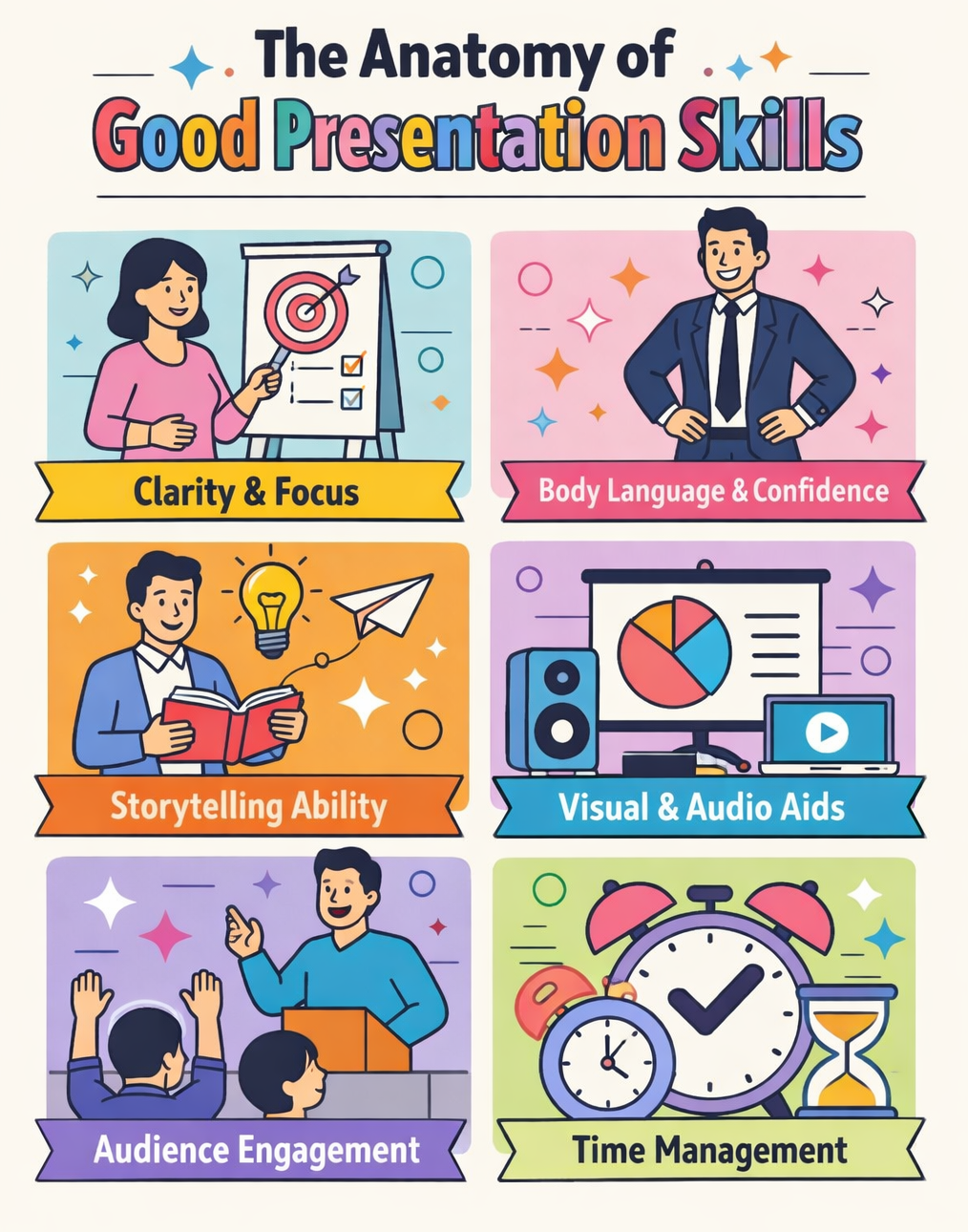
You know the difference between a talk that leaves you inspired and one that has you checking your watch, right?
Strong presentation skills are the secret sauce. It’s not just about talking, it’s about engaging your audience, delivering your message clearly, and making sure they walk away remembering what you’ve said.
Let’s take a look at the key ingredients that make a presentation truly memorable:
- Clarity and Focus. Effective presenters ensure their message is clear and easy to follow. They create a structured outline to help their audience digest the main points.
- Body Language and Confidence. Non-verbal communication plays a huge role in presentation skills. Good posture, eye contact, and gestures not only convey confidence but also help engage the audience.
- Storytelling Ability. Great presenters turn data and facts into stories that resonate emotionally with the audience, making the content more relatable and memorable.
- Visual and Audio Aids. Visuals and audio support a presentation, but they should never overshadow the message. Using slides, images, or videos should enhance the narrative, not distract from it.
- Audience Engagement. Engaging the audience through interactive elements, questions, and discussions is key to keeping their attention. Audience participation helps create a more dynamic atmosphere.
- Time Management. Skilled presenters know how to balance the amount of time spent on each section of their presentation, ensuring that all key points are covered without overwhelming the audience.
At the end of the day, good presentation skills are all about creating a connection with your audience. By combining the key ingredients above and using them effectively, you can create presentations that leave a lasting impact and keep your audience coming back for more.
Speaking of visual and audio aids, head on to "7 Best Presentation Aids for Engaging Your Audience" to aid you in preparing your presentations beyond text-only slides.
What to Look For in Good Presentation Skills?

When you’re watching a presentation, you can tell when someone truly has their act together. It’s not just about the slides or the words, they know how to keep the audience hanging on every word.
But what exactly makes a presentation stand out? What qualities should you be looking for in a good presenter?
We’ll break down the key qualities that separate skilled presenters from the rest. These are the traits that make a presentation not just good, but memorable:
| Key Quality | Description |
|---|---|
| Audience Engagement | A good presenter ensures their audience remains engaged throughout the presentation. Active participation, eye contact, and vocal variety are all signs of effective engagement. |
| Content Mastery | A strong presenter knows their material well and can speak on it with confidence, providing examples and answering questions without hesitation. |
| Visual Appeal | Well-designed slides or visuals enhance the content. A good presentation should have visuals that complement the spoken words, making complex ideas easier to grasp. |
| Clear Structure | A successful presentation follows a clear, logical structure (introduction, body, and conclusion). This makes the content easy to follow and ensures the message is effectively conveyed. |
| Adaptability | Great presenters can read the room and adapt their delivery based on the audience’s reaction. They can adjust their language, tone, and pacing to fit the needs of their listeners. |
Now that we’ve highlighted these key presentation skills, think about your own presentations. Are you hitting all the marks? If not, don’t worry, these qualities can be developed with practice and focus.
By mastering these essential elements, you’ll be well on your way to becoming the kind of presenter that leaves a lasting impression.
Tips to Develop Good Presentation Skills

Improving your presentation skills is not something that happens overnight. It takes time, effort, and a willingness to push yourself outside your comfort zone.
Whether you’re preparing for your next class, business pitch, or public speech, these actionable tips will help you go from average to exceptional:
1️⃣ Practice, Practice, Practice
As what one famous quote says, “repetition is the mother of mastery.” If you want to be a great presenter, practice is non-negotiable. But it’s not just about saying the words; it’s about delivering them.
To guide you carefully, these are activities that you can get on your practice routine:
- Rehearse in front of a mirror: This can be surprisingly helpful. Seeing yourself speak helps you notice body language issues like fidgeting, lack of eye contact, or slouching.
- Record yourself: Play back your practice sessions. Does your pacing feel right? Are your ideas clear? It’s an eye-opener that helps fine-tune your delivery.
- Simulate the environment: Practice in the actual space or use the tools you’ll be presenting with. This reduces stress on the big day.
- Get feedback from others: Perform in front of friends, family, or colleagues. They can point out what works and what doesn’t.
2️⃣ Know Your Audience
Understanding who you’re speaking to can make all the difference. Tailoring your presentation ensures your message hits home.
What does your audience already know? What are their expectations? This knowledge allows you to meet them where they are.
Whether you’re speaking to kids or experts, the way you present your message should differ. Choose the right language and examples for your audience. For a professional crowd, use a formal tone. For a group of students, you might want to make it more casual and relatable.
If you're presenting to a class of grade schoolers, simplify the terminology and use examples they can relate to, like movies or everyday experiences. This approach makes your message more digestible and engaging, leveling up your presentation skills to a notch.
3️⃣ Use Visual Aids Wisely
Another way to take into mind when you’re honing your presentation skills is the use of visual aids. Visual aids should support your message, not overwhelm it. Striking the right balance is crucial. Below are some of the examples of what are the effective and ineffective visual aids:
| Effective Visual Aid | Ineffective Visual Aid |
|---|---|
| A clear chart or image that reinforces your point | Text-heavy slides with no images or visuals |
| A single powerful photo or infographic | Cluttered slides full of random visuals that distract |
| A simple diagram or flowchart to illustrate complex processes | Overloaded slides with multiple charts or graphs |
| A quote or key takeaway displayed alongside a related image | Using small fonts or low-quality images that are hard to read |
If you want to combine both text and images, you can probably use graphic organizers to get your points across. This will keep the necessary topics covered, while still getting your audience’s attention through its visual format.
4️⃣ Keep It Simple
Your audience is there to listen, not to decode a complex presentation. Keep your message clear and to the point.
Here are few mini tips to remember:
✅ Stick to key points: Don’t try to cover everything. Focus on 3-4 main points you want your audience to remember.
✅ Avoid jargon: Make your presentation accessible. If your audience isn’t familiar with technical terms, simplify them or leave them out.
✅ Use analogies: When dealing with difficult concepts, analogies help people understand by relating the unfamiliar to something familiar. For example, explaining electrical circuits as “roads for electricity” makes it easier to grasp.
Use case in point: When presenting a business proposal, avoid overwhelming the audience with data. Instead, focus on three key takeaways, making them clear and easy to remember.
5️⃣ Develop Emotional Intelligence
Last but not the least, having good presentation skills is not just about intellect and confidence. The best presenters don’t just share information, they connect with their audience on an emotional level. Emotional intelligence plays a huge role in how you engage, adapt, and respond to your listeners.
For example, during a webinar, if you notice your audience looks overwhelmed, pause and ask for questions or summarize the key takeaways to re-engage them without overwhelming them.
Reading the room is just as important. Pay attention to your audience’s reactions and adjust your tone, energy, or pacing accordingly. It keeps them engaged and in sync with your message.
If your audience looks overwhelmed, simplify your message. If they’re disengaged, add a story or an interactive element. Be aware of both your emotions and those of your audience. This helps you manage nervousness and connect with your listeners on an emotional level.
To further guide you in honing your presentation skills, check out "How to Prepare for a Presentation Like a Pro" for more proven tips.
How Can We Incorporate Presentation Skills with Interactive Tools?
Good presentation skills are all about engaging your audience and keeping their attention. But sometimes, it’s tough to keep everyone hooked.
Enter interactive tools like ClassPoint, which can transform any presentation into an exciting and dynamic experience. These tools not only make your job easier but also elevate your ability to connect with your audience.
Let’s look at a few interactive features that can help hone your presentation skills and keep your audience actively involved:
Real-Time Audience Interaction with Quick Polls

You know how crucial it is to get feedback from your audience, but how often do you stop to ask them questions during your presentation?
With Quick Polls, you can engage your audience right from the start. Ask them questions, get instant feedback, and adjust your delivery based on their responses. It’s a simple way to make sure they’re with you every step of the way.
Live polls break up the monotony and keep people engaged. They also allow you to gauge their understanding, making your presentation more interactive and fluid.
Interactive Slide Drawing, Image and Video Uploads
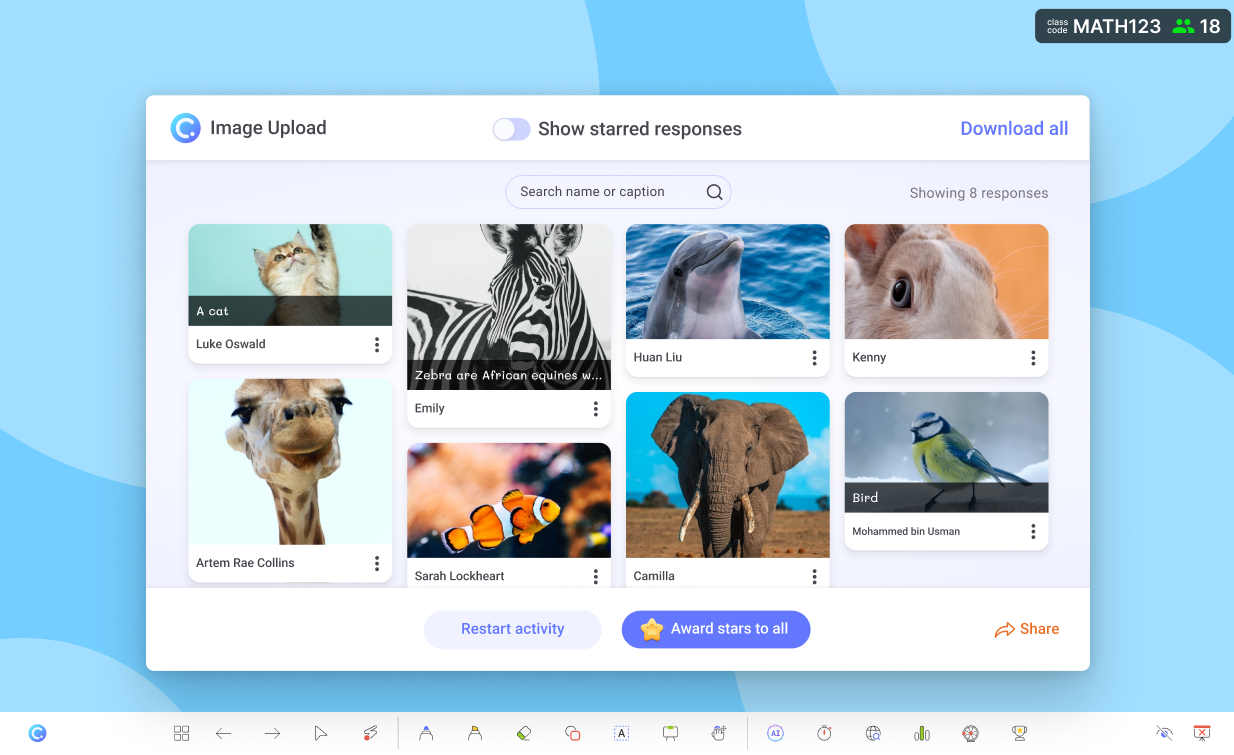
Want to make your presentation stand out? ClassPoint lets you use have slide drawing to draw diagrams and upload images or videos on the fly. Whether you’re explaining a concept or adding a visual aid, this feature keeps your presentation dynamic and interactive.
The ability to upload images or videos on the spot helps you bring your ideas to life and clarify information instantly.
Gamification with Points and Stars
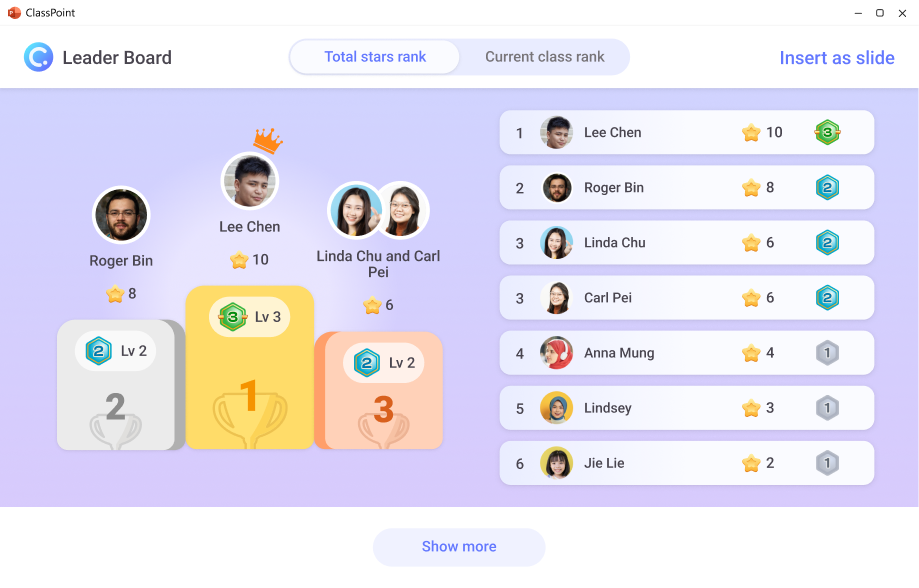
Who doesn’t love a little competition?
Using a points or star system is a great way to gamify your presentation. Whether you’re asking questions, conducting quizzes, or simply encouraging participation, rewarding your audience with points adds an element of fun and keeps everyone on their toes.
Gamification taps into your audience’s competitive nature. It creates an engaging environment that motivates them to pay attention and get involved. Plus, it makes the learning experience more enjoyable.
Other ClassPoint Features to Aid Your Presentation Skills:
- Name Picker for Random Engagement:
Use the name picker to randomly select audience members to answer questions or participate in discussions, ensuring everyone stays engaged. - Interactive Annotations:
Annotate your slides in real-time, highlighting key points or illustrating complex concepts visually to make your presentation more dynamic. - Seamless Integration with PowerPoint:
If you’re already using PowerPoint, ClassPoint’s integration allows you to enhance your slides with interactive features without leaving the platform you’re comfortable with.
Mastering presentation skills takes practice and the right tools. By combining effective strategies with interactive features like those offered by ClassPoint, you can create presentations that captivate and engage your audience, making a lasting impact every time.
Ready to take your presentation skills to the next level? Try integrating interactive tools into your presentations today and start engaging your audience like never before!
FAQs
What are some common mistakes that hurt presentation skills?
Common mistakes include speaking too fast, not engaging the audience, overwhelming them with information, and failing to manage time properly. Focusing on clarity, audience interaction, and practicing your delivery can help avoid these pitfalls.
How can I improve my presentation skills without formal training?
You can improve your presentation skills by practicing regularly, watching recordings of your presentations to self-assess, and seeking feedback from friends or colleagues. Reading books on effective communication and learning from great presenters can also be valuable.
How can I make my presentation more interactive to improve my presentation skills?
To make your presentation more interactive, you can incorporate polls, Q&A sessions, and audience participation activities. Tools like live quizzes, name pickers, and real-time feedback encourage engagement and improve your presentation skills.
Can I improve my presentation skills by focusing on storytelling?
Absolutely! Storytelling is a powerful tool that helps make complex ideas relatable and memorable. Using stories in your presentations can keep your audience engaged and help them connect with your message on an emotional level.
How can I adapt my presentation skills for virtual presentations?
In virtual presentations, it’s important to use clear visuals, engage with your audience through chat or polls, and keep your pace steady. Make sure your technology is reliable, and avoid distractions by maintaining eye contact with the camera.
