
Have you ever attended a lecture where it felt less like a presentation and more like the lecturer was simply telling a story?
The slides were clear, the ideas flowed naturally, and even a complex or academic topic felt easy to follow. Long after the session ended, what stayed memorable was not just the content, but the way the presenter carried themselves and guided the audience through each idea.
That experience is not accidental. It is the result of storytelling in presentations, an approach that helps presenters turn information-heavy topics into engaging, meaningful narratives.
In this blog, we will guide you through the principles of storytelling in presentations, practical techniques you can use, and how the right tools can support a more engaging delivery.
What is Storytelling in Presentations?

Storytelling in presentations is the practice of structuring content around a clear narrative, rather than presenting ideas as isolated points or slides.
Instead of simply delivering information, the presenter guides the audience through a journey, introducing context, highlighting a challenge, developing ideas step by step, and ending with a purposeful takeaway.
In both education and professional settings, storytelling helps audiences understand why something matters, not just what it is. Information becomes easier to follow when it is framed as a sequence of ideas that connect logically and emotionally. A well-told story gives content direction, relevance, and meaning.
At its core, storytelling in presentations answers three essential questions:
📣 Where are we starting?
📣 What happens along the way?
📣 Why does this matter in the end?
When these questions are clear, the audience knows how to follow and why they should care.
Why Storytelling is Important in Presentations

Most presentations fail not because the content is weak, but because the audience struggles to stay engaged or understand how ideas connect. Storytelling solves this by giving structure and intention to information.
Storytelling in presentations helps because it:
- Reduces cognitive overload. Ideas are sequenced instead of presented all at once, making them easier to process.
- Improves understanding. Concepts build gradually, helping audiences follow even complex or academic material.
- Strengthens memory and recall. Information tied to context and progression is remembered longer than isolated facts.
- Creates relevance and connection. Stories give meaning to content, making it feel purposeful rather than abstract.
Across classrooms, training sessions, and professional talks, storytelling in presentations helps audiences stay oriented, engaged, and more likely to remember what matters.
Simply put, people don’t remember slides, they remember stories.
The Elements of a Good Storytelling in Presentations
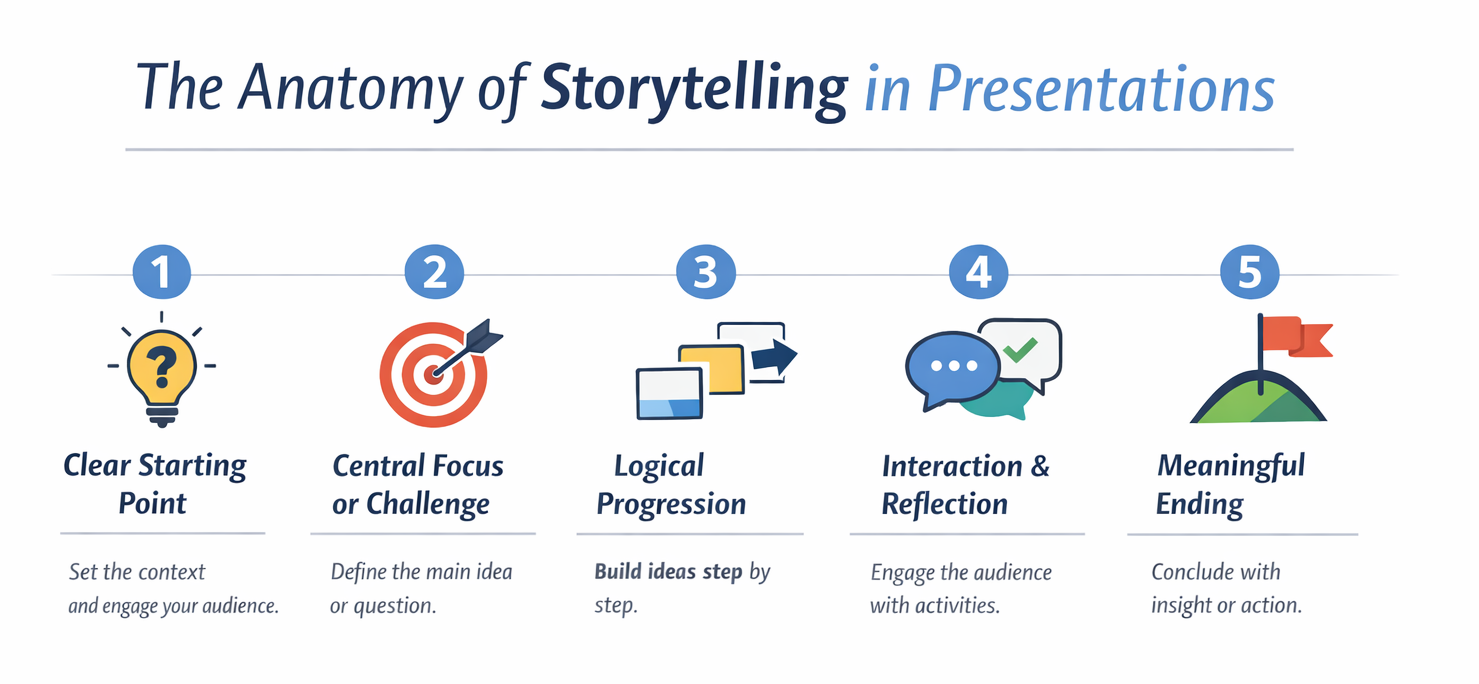
Not every presentation needs a dramatic plot. However, effective storytelling presentations tend to share several core elements that guide the audience from start to finish:
1️⃣ A Clear Starting Point
Every story begins with context. This could be a guiding question, a familiar problem, a real-world situation, or a scenario that frames the topic. A strong opening gives the audience something to anchor their attention to.
2️⃣ A Central Focus or Challenge
Good presentations revolve around a main idea or question. This keeps the presentation from feeling scattered and helps the audience understand what the story is really about.
3️⃣ Logical Progression
Each slide should feel like a natural continuation of the previous one. Ideas should build, contrast, or expand in a way that feels intentional. When slides follow a clear progression, audiences don’t need to guess what comes next.
4️⃣ Interaction and Reflection
Stories invite audiences to think, predict, respond, or reflect. These moments turn storytelling into a two-way experience rather than a one-direction delivery, especially in learning environments.
5️⃣ A Meaningful Ending
Strong storytelling presentations end with clarity. The conclusion reinforces the main message, connects back to the opening, and leaves the audience with insight or action.
When these elements are in place, presentations stop feeling like a sequence of slides and start feeling like a journey the audience can follow.
Practical Tips and Techniques for Storytelling in Presentations

Storytelling doesn’t require complex visuals, dramatic delivery, or elaborate slide design. What it really requires is intention, being deliberate about how ideas are introduced, developed, and concluded.
Here are practical techniques presenters can use to strengthen storytelling in presentations:
| Technique | What It Looks Like in Practice | Why It Works |
|---|---|---|
| Start with a question or scenario | “Why do some cities grow faster than others?” or “Imagine running this experiment with limited resources.” | Gives the audience a clear entry point and a reason to care from the first slide. |
| Stick to one idea per slide | One concept, one diagram, or one takeaway per slide instead of multiple bullet clusters. | Keeps the story easy to follow and prevents mental overload. |
| Explain why you’re moving on | “Now that we understand the problem, let’s look at how it’s usually solved.” | Helps the audience see the connection between ideas instead of feeling lost. |
| Ask before you tell | “What do you think happens next?” or “Which option would you choose?” before revealing the answer. | Turns the audience into active participants in the story. |
| Repeat ideas in different forms | Introduce a concept → show an example → revisit it with a question. | Reinforces understanding without sounding repetitive. |
| End where you started | Revisit the opening question and show how it’s now answered or reframed. | Creates closure and makes the presentation feel complete. |
Together, these techniques help presenters guide attention rather than compete for it, allowing the story to carry the presentation forward instead of relying on dense slides or constant explanations.
Combine these practical techniques with digital tools to level up your presentation by checking out 18 Must-Have Interactive Presentation Tools for Engaging Classes.
How ClassPoint Supports Successful Storytelling in Presentations
Storytelling in presentations works best when the audience is not just listening, but actively following and responding as the story unfolds. This is where ClassPoint plays a critical role.
Instead of treating slides as static checkpoints, ClassPoint helps presenters turn each part of the story into an interactive moment that guides attention, invites participation, and keeps the narrative moving with purpose by:
🔠 Turning Interactive Questions that Create Story Checkpoints
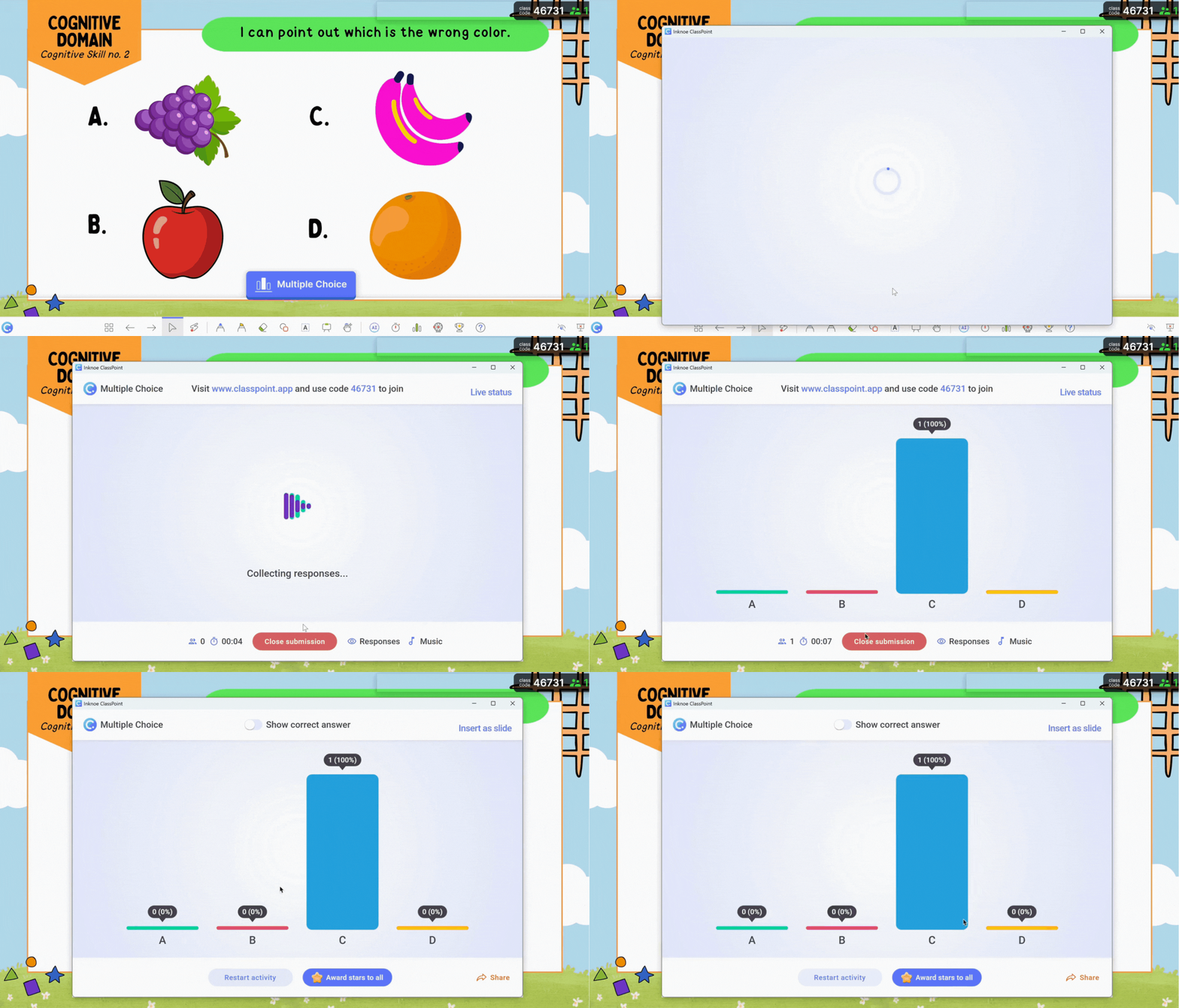
ClassPoint’s interactive question types allow presenters to pause the story at meaningful moments. By embedding Multiple Choice Questions, Short Answer Activities, or Quick Polls directly into slides, presenters can turn key points into moments of reflection or decision-making.
These checkpoints help the audience process what they’ve just heard before moving forward.
Instead of rushing through content, the presenter can slow the story down, check understanding, or surface perspectives that naturally lead into the next part of the narrative.
🖌️ Highlighting Key Moments With Live Annotations

ClassPoint’s live annotation tools allow presenters to draw, highlight, underline, or circle directly on slides while explaining ideas. These visual cues help guide attention to what matters most at each moment in the story.
This is especially valuable when presenting complex or academic content. By visually emphasizing relationships, steps, or key terms, presenters reinforce the narrative flow and reduce the mental effort required to follow the story.
🎮 Sustaining Engagement With Gamification

Stars, levels, badges, and leaderboards help maintain momentum throughout longer story-based presentations. These elements are especially effective in classrooms, where attention naturally fluctuates over time.
⭐️ Additional ClassPoint Features that Strengthen Story Flow
Beyond the core storytelling tools, ClassPoint offers supporting features that help maintain momentum and clarity throughout the presentation.
- Image, video, and audio uploads for richer storytelling responses let participants share visuals, demonstrations, or voice reflections to make ideas clearer, more concrete, and more personal—especially for complex or abstract topics.
- Built-in presentation tools like timers, name pickers, and whiteboard support help presenters manage pacing and participation without stepping outside the story.
- Session reports allow presenters to review participation and responses after the presentation, helping them reflect on which parts of the story resonated most and where pacing or clarity can be improved.
FAQs
What is the difference between storytelling in presentations and traditional presenting?
Storytelling in presentations focuses on guiding the audience through a clear narrative with context, progression, and purpose. Traditional presenting often relies on listing information slide by slide, which can feel disconnected and harder to follow.
Can storytelling in presentations work for data-heavy or technical topics?
Yes. Storytelling in presentations is especially effective for data-heavy topics because it helps organize information into a logical flow. Instead of overwhelming audiences with numbers, storytelling highlights why the data matters and how each insight connects.
How long should a storytelling presentation be?
Storytelling in presentations is not defined by length but by structure. Even a five-minute presentation can use storytelling by having a clear opening, progression of ideas, and a meaningful conclusion.
Can storytelling in presentations be used in assessments or student presentations?
Yes. Storytelling in presentations helps students structure their thinking when explaining concepts, defending arguments, or presenting projects. It encourages clarity, coherence, and confidence.
Can storytelling in presentations be learned, or is it a natural talent?
Storytelling in presentations is a skill that can be learned and practiced. By focusing on structure, transitions, and audience perspective, presenters can steadily improve their storytelling ability over time.
