Every teacher has their own set of non-negotiables in the classroom.
Some consider classroom design and layout top of mind, while others zoom in on intricate details, like setting up reward systems or using standard hand signals.
These elements matter. But so does class participation, and for very important reasons.
Student participation has come a long way with new techniques and teaching pedagogies being introduced on the regular.
And while it’s no longer a new concept, some teachers still struggle to distinguish between calling on individual students and designing for whole-class engagement.
In this blog, we’ll skip the tips for getting one student to speak up. Instead, we’ll focus on practical ways to design a living, active system where the entire class participates.
Key Takeaways
- Understand the difference between individual and whole-class participation, and why it matters for fostering engagement.
- Explore practical strategies to improve participation, such as redesigning questions, reducing social risk, and timing participation throughout the lesson.
- Learn to balance structure with spontaneity to make participation natural and inclusive for all students.
- Identify common mistakes in participation design and how to avoid them to keep every student involved.
- Discover how technology can enhance participation by providing real-time feedback and interactive tools, with ClassPoint as an example.
Understanding individual vs. whole-class participation
Before we dive in, it’s important to recognize the distinction between individual student participation and whole-class participation, which are two key approaches to engaging students in the classroom.
What is individual student participation?
This focuses on a single student speaking or answering questions, often through raised hands or cold-calling.
While it can give a voice to select students, it frequently leads to disengagement for others who may not be called upon or may feel uncomfortable speaking out.
What is whole-class participation?
In contrast, whole-class participation is about involving every student in the discussion or activity, ensuring that the classroom dynamic is inclusive and interactive.
This approach prevents any student from becoming passive, and encourages collective responsibility for learning.
However, it requires careful structuring to ensure all students are engaged and the class doesn’t become chaotic.
| Individual Student Participation | Whole-Class Participation | |
|---|---|---|
| Focus | One student speaks or answers at a time | Entire class participates together |
| Engagement Type | Voluntary, often driven by a few students | Inclusive, involves all students |
| Risk Level | Higher for shy or introverted students | Lower, as participation is spread out |
| Interaction Type | One-on-one or small group interactions | Group-wide interaction and feedback |
| Common Format | Raised hands, cold-calling, volunteers | Polls, quizzes, group discussions |
How whole-class participation improves learning

Whole-class participation directly impacts learning. More specifically, retention.
In a well-known study on retrieval practice, students who repeatedly retrieved information remembered 61% of the material one week later, compared to only 40% for students who simply re-studied it.
Frequent, low-stakes checks improve long-term memory and reduce misconceptions early.
When more students think, more students learn.
Whole-class participation increases:
- Retrieval practice across the room
- Immediate feedback for the teacher
- Equal cognitive load instead of a few students carrying it
In other words, participation is a learning strategy. And when participation is built into instruction, achievement follows.
What makes whole-class participation fail
Classrooms rarely go quiet by accident.
On a high level, it usually comes down to this: your participation design invites passivity instead of activity.
Here’s what that often looks like:
- One-mic syndrome: Only one voice speaks at a time. Volunteers or cold-called students carry the discussion while everyone else mentally checks out.
- Participation saved for the end: Teaching runs for 15 to 20 minutes straight, and engagement only happens after the content is delivered. By then, confusion has already piled up.
- High-stakes entry points: Questions demand full explanations right away. Without low-risk ways in, quieter students stay silent and let confident peers lead.
- Spontaneous but inconsistent engagement: Participation depends on mood, energy, or who feels brave that day. There’s no predictable structure holding space for everyone.
Each of these breakdowns is common. And each one is solvable.
The four strategies below directly address these design gaps, helping you move from reactive participation to a system where the whole class stays involved.
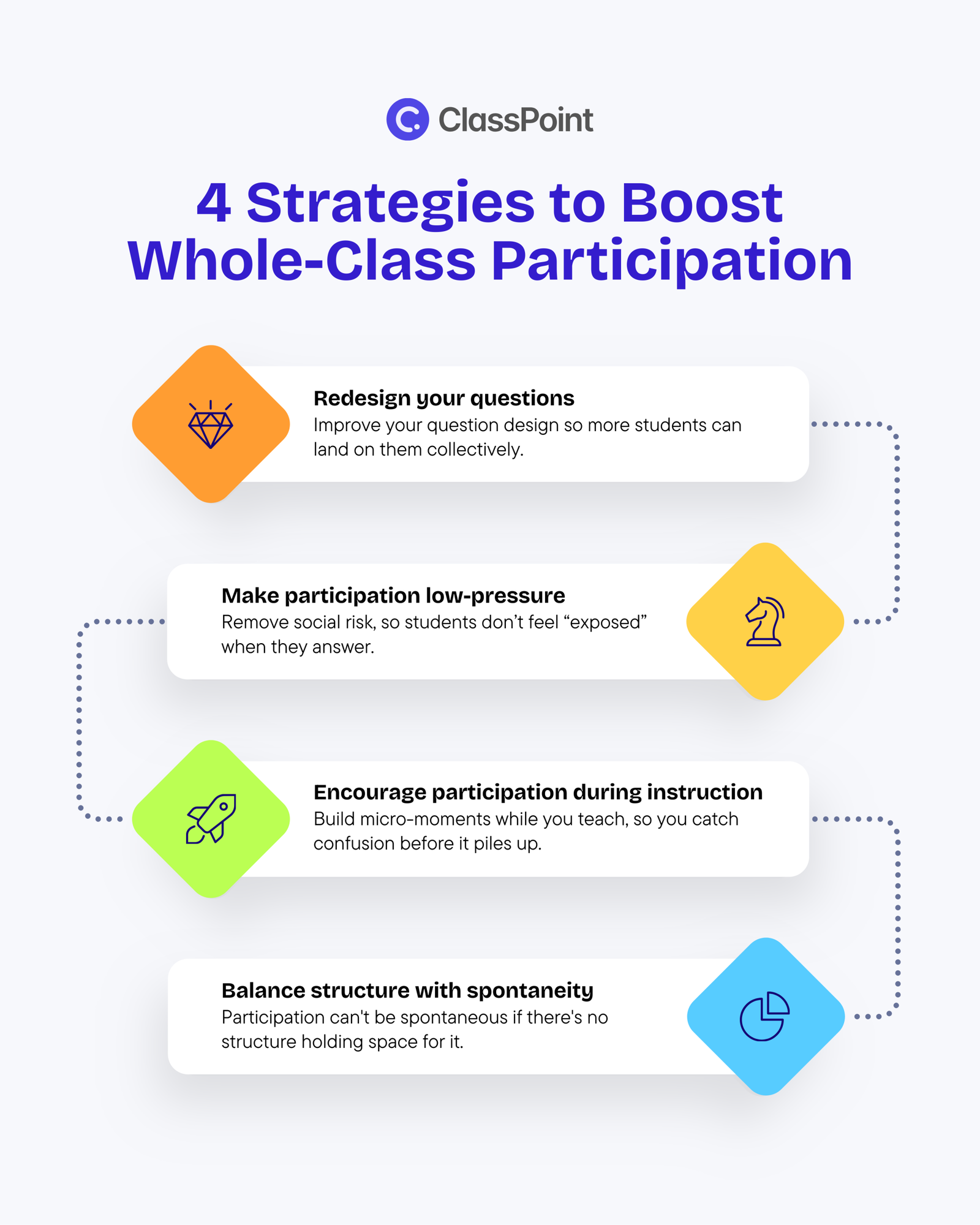
Strategy #1: Redesign your questions
Most classroom questions are built for one person to answer.
That right there is a problem.
- “Who can tell me the main idea?”
- “What’s the author’s purpose here?”
- “Does anyone have a question?”
These prompts wait for a volunteer, or put one student on the spot.
And as you call on the lucky student, the rest of the class exhales. Their job is done.
What you can do instead: design questions where everyone can respond in 10 seconds or less.
Start with low-risk entry points.
Instead of asking for an analysis, simply ask for a reaction:
- “Thumbs up if this character made a smart move. Thumbs down if it was risky. Thumbs sideways if you’re not sure yet.”
- “On a scale of 1 to 5, how surprising was that plot twist? Hold up your fingers.”
Then layer in closed prompts with open thinking.
A poll with two options, “Was this decision brave or reckless?”, feels simple.
But when you follow up with “Turn to your seatmate, and defend your pick in one sentence,” you’ve moved from reaction to reasoning.
The low-floor question got everyone in the game. Now you stretch the thinking.
Redesigning your questions in a way that actively involves every single one in the room builds a runway so more students can land on them together, instead of watching a few select kids carry the entire discussion.
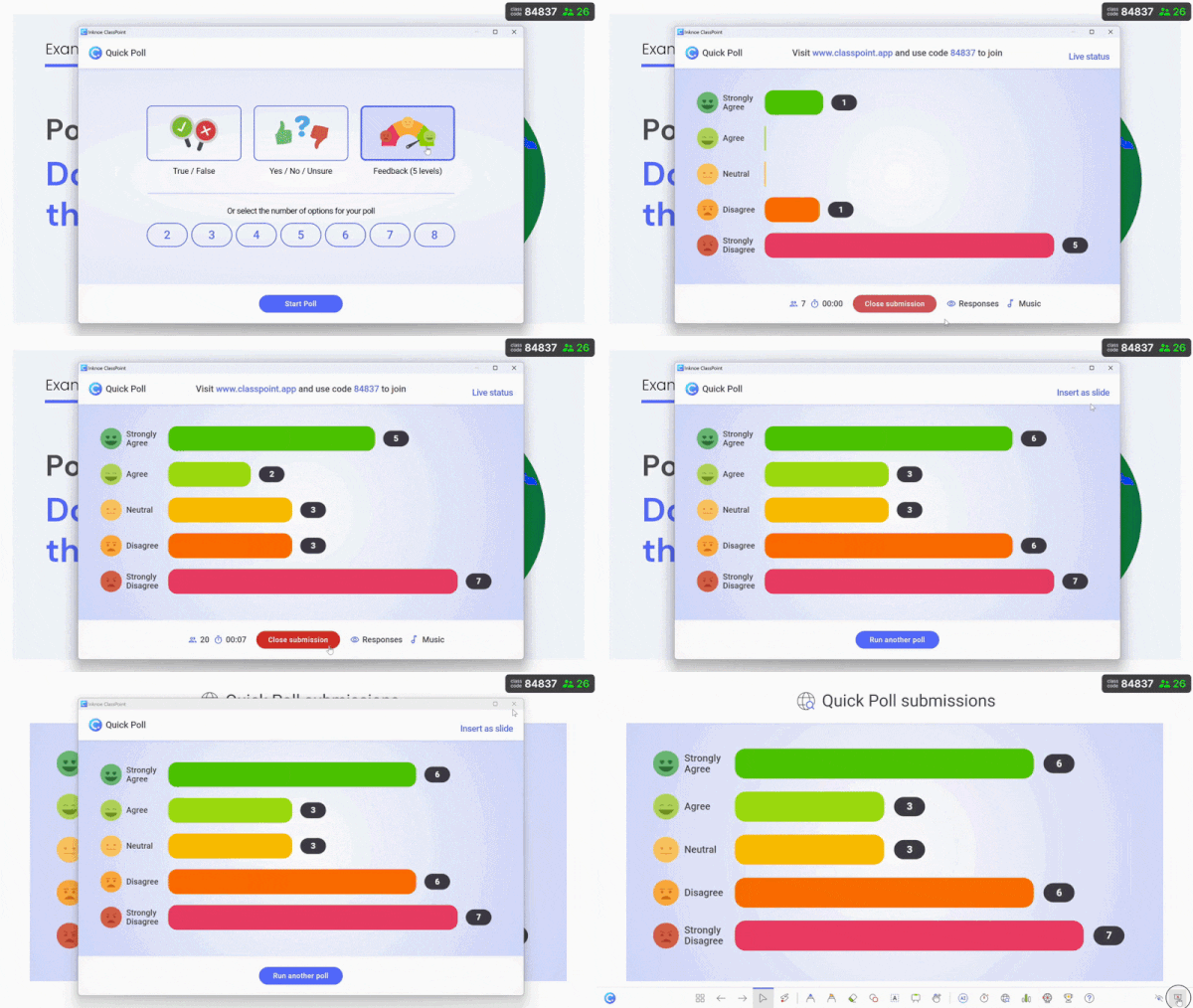
How tech can help: If you want everyone responding at once, ClassPoint’s Quick Poll feature lets you drop a Yes/No, True/False, or a feedback scale right into the PowerPoint slides you’re using for your lectures.
With ClassPoint installed in your PowerPoint, you can start running live polls during slide show right from your toolbar.
From there, you can select a specific poll mode you’d like to run.

Once you start the poll, students answer from their devices, and responses appear live on your screen, so you see the whole class’ thinking instantly.
Other polling tools like Mentimeter or Kahoot! also offer features if you’re exploring options.
To learn more, here’s our quick guide on Effective Questioning Techniques to Increase Participation.
Strategy #2: Make participation low-pressure
Strategy #1 was about question design, lowering the cognitive floor.
Strategy #2 is about removing social risk, so students aren’t exposed when they answer.
Two ways to do that:
Silent individual time before any discussion.
Ask the question. Then, enforce 30 seconds of silence. Let students write or think alone first.
Then open discussion.
Fast talkers can’t dominate. Quiet students aren’t blank.
Small-group talk before whole-class share.
Students discuss the question in pairs or trios for 60 seconds.
Then invite volunteers to share what their group discussed, not their personal answer.
Instead of the student being exposed, it’s the idea that does. If it’s wrong, it’s not “Maria was wrong.” It’s “one group wondered this.”
This way, the social risk drops.
How tech can help: To lower social risk, ClassPoint’s Short Answer activity includes an anonymous mode.
ClassPoint allows you to run different interactive questions in PowerPoint.
Each comes with customizable question settings. For Short Answer, you can enable anonymous responses.
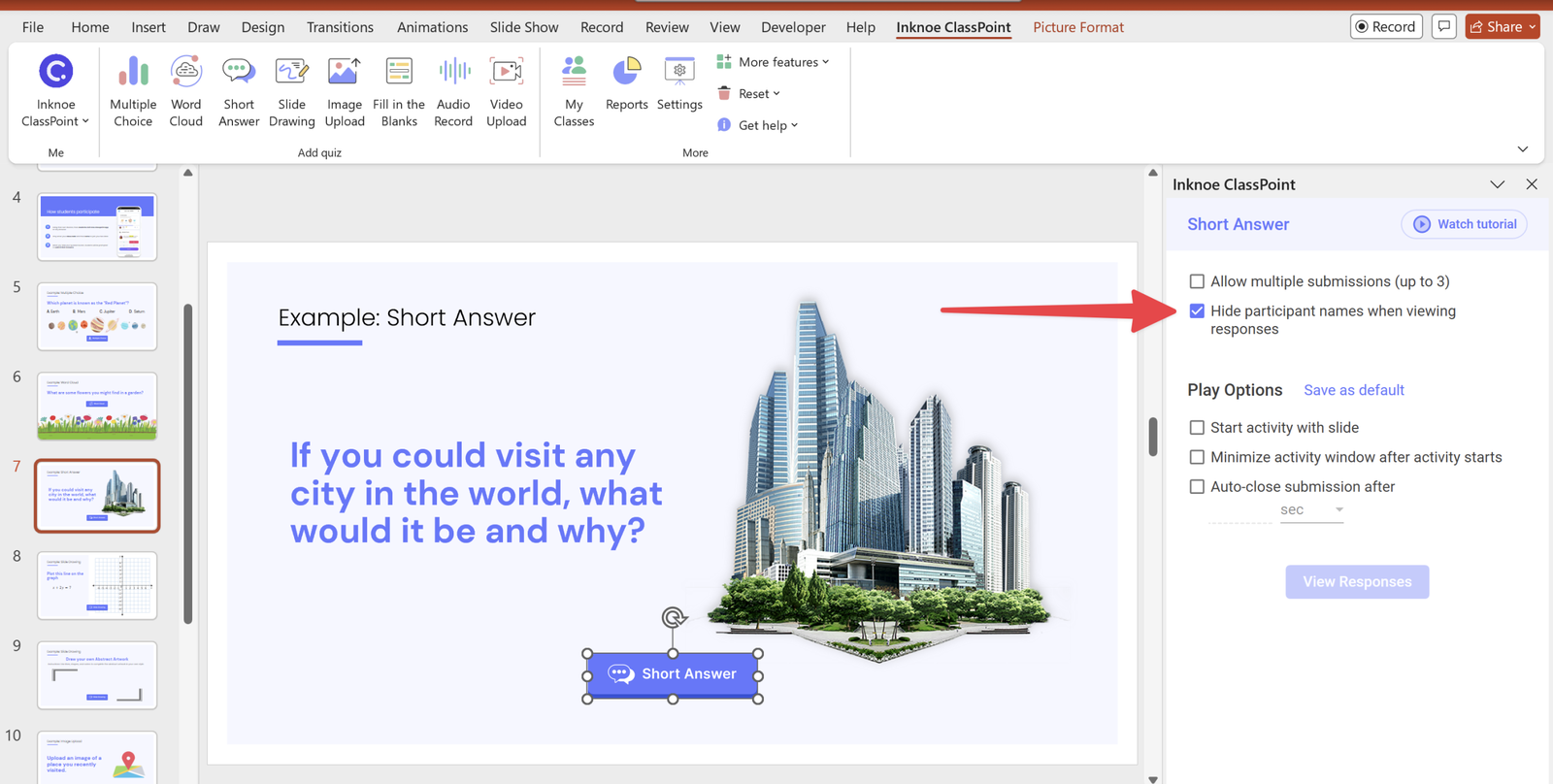
When enabled, student names are hidden on submissions as they come in. This lets ideas surface without putting individuals on the spot.
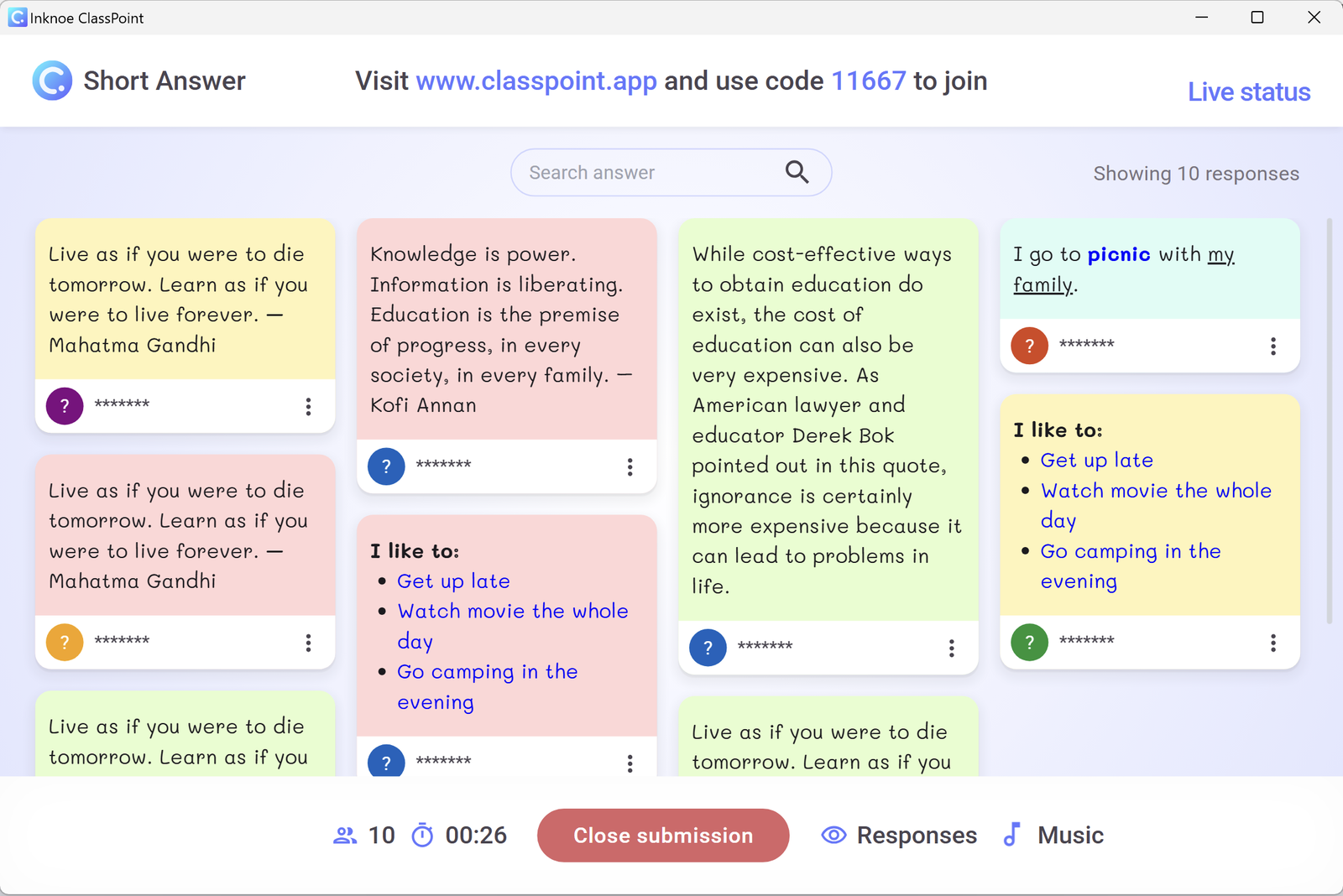
Other tools like Padlet or Google Forms also support private or anonymous submissions.
Research confirms why this matters: students average 2.8–2.9 out of 5 on anxiety about being put on the spot or corrected publicly.
Strategy #3: Encourage participation during instruction
If the above are about question design and removing social risk, this time around, it’s about timing.
Stop saving participation for the end of a 20-minute lecture.
Build micro-moments while you teach, so you catch confusion before it piles up.
And as straightforward as it may look (like you just need random pulse checks), you need to be intentional.
Pause at these moments:
- After modeling a process, before students try it — verify they tracked the steps before they start practicing alone.
- Right before a known stumbling block — if students typically get stuck on step 3, check understanding after step 2.
- When you see glazed eyes — not on a timer. When energy dips or faces go blank, stop. One quick question resets attention.
- Before transitioning activities — ensure everyone is ready to move forward together, not leaving half the room behind.
These are strategic pauses where a 15-second check prevents 10 minutes of reteaching later.
How tech can help: Check-ins don’t have to stop at multiple choice or short text. ClassPoint supports question types like Image Upload or Audio Record, so students can show understanding in different ways.
Image Upload, for one, allows your students to submit images as responses either via live web search or straight from their devices.

These options help keep micro-moments fresh and inclusive.
Platforms like Nearpod also offer multimedia response options, depending on your setup.
Strategy #4: Balance structure with spontaneity
Strategy #1 was question design.
Strategy #2 was removing social risk.
Strategy #3 was timing.
Strategy #4 is this: participation can’t be spontaneous if there’s no structure holding space for it.
Structure looks like:
- A consistent routine: “Every 10 minutes, we pause for a 20-second quick write.”
- A clear protocol: “When we discuss, everyone writes first. Then we talk.”
Spontaneity emerges within that structure:
- Because the routine is predictable, students stop worrying “What do I do?” and start focusing on what to think.
- Because everyone writes first, the discussion that follows isn’t dominated by two voices alone. Instead, even quieter students bring ready ideas.
Without structure, “spontaneous participation” just means the same three kids talking.
With structure, spontaneity becomes collective, not just individual.
How tech can help: If you want participation routines to stick, digital response systems can help you build consistent checkpoints into classroom discussions.
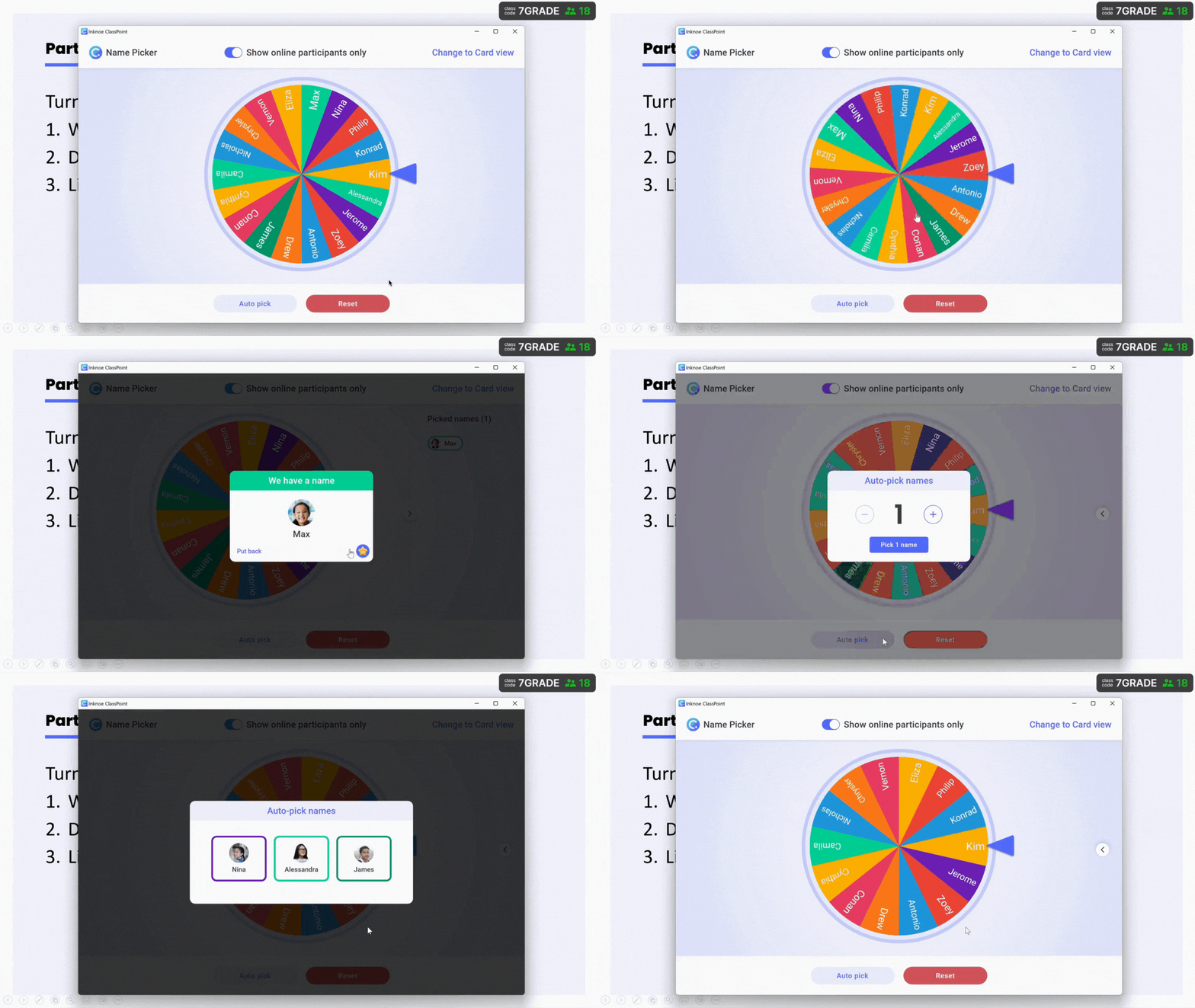
To add light spontaneity within your routine, ClassPoint’s Name Picker randomly selects students to share, making cold-calling feel fair and low-pressure.
Like Quick Poll, you can conveniently pull up ClassPoint’s Name Picker right in slide show within your toolbar.
You’re given three options: spin a wheel, select from a deck of cards, or auto-pick in bulk.
Common mistakes to avoid when “trying to boost participation”
You can religiously follow all our suggested strategies, and still get silence.
That does not mean that what we suggested failed.
But because there weren’t much changes in your everyday classroom habits.
- Asking “Any questions?” Lost students won’t raise their hand to admit confusion, because no one wants to slow the class down.
→ Fix: Ask specific verification questions. “What’s the first step here?” or “Does this one in particular make sense or not much?” - Waiting for hands to go up You get the same 2–3 students every time. The rest stop thinking the moment a hand rises.
→ Fix: Require everyone to respond at once before opening discussion. - Only praising correct answers When you do this, even unintentionally, students learn that being wrong is unsafe. They stop risking answers altogether.
→ Fix: Acknowledge useful mistakes. “That’s a common confusion. Thanks for naming it! Let’s clear that up.” - Cold-calling without warning “Maria, what do you think?” with zero prep time. Students spend the lesson anticipating for their name to be called, not thinking about the actual learning.
→ Fix: Give thinking time first. “I’ll call on three people in 60 seconds. Use that time to jot one thought.”
These habits are common because they feel efficient. But they only engage a few.
Build systems where everyone participates, not just the kids who never hesitate.
Support class participation with tech
While the strategies we’ve shared are valuable, sometimes it can be difficult to consistently implement them without support.
Technology can play a key role in streamlining participation and ensuring every student is actively engaged. Hence, the optional tech integrations you can find in each strategy.
In fact, one study highlighted that technology can significantly boost student engagement by fostering active participation through interactive digital tools and cooperative learning methods.
So, what does that tell us?
It tells us to consider using tools that encourage real-time feedback and provide a platform for interactive questions, so you’re not reliant on traditional methods alone.
Because whole-class participation depends on two things:
- Everyone responding at once
- Teachers seeing patterns in real time
One such tool that can do exactly just that is ClassPoint.
With ClassPoint, you can:
- Run Quick Polls (Yes/No, True/False, feedback scales) live during slideshow
- Collect anonymous Short Answer responses
- Use varied question types beyond the traditional like Image & Video Upload or Audio Record to give students multiple ways to participate
- Add fun, random calling with a built-in Name Picker
With ClassPoint, you can easily implement the strategies mentioned above whether it’s designing low-pressure questions, keeping participation consistent, or creating micro-moments of engagement during your lessons.
Zooming in, a research revealed 54% of students agree that ClassPoint motivated them to participate in the classroom even more.
By utilizing technology that further boosts class participation, you free up more time for the deeper connections and learning that happen when every student feels empowered to contribute.
