
Every teacher has seen that moment when a lesson starts, and half the class is already trying to catch up. Not because the topic is too difficult, but because students enter the room without enough context to understand where the lesson is heading.
This gap between what students know and what they are about to learn creates hesitation, confusion, and slow engagement.
That is where frontloading in education becomes powerful. It prepares students with the essential background knowledge, vocabulary, and mental cues they need before the main lesson begins.
In this guide, we’ll look at what frontloading in education means, why it matters, and how you can use simple techniques to prepare students before the lesson begins.
What Frontloading in Education Means and Why It Matters

Frontloading in education is the practice of preparing students before they meet new content. It means giving them the vocabulary, background information, context, or guiding questions they need ahead of the main activity.
Teachers use frontloading to make lessons more accessible. This is especially helpful for multilingual learners, students who struggle with reading, or classes learning difficult concepts. Instead of dropping students into new material, frontloading sets them up with everything they need to enter the lesson ready.
Why Frontloading in Education Matters
Frontloading in education is effective because it sets students up before the lesson demands their full attention. Here are the key reasons it works:
Builds confidence and readiness
When students know what to expect, they feel calmer and more willing to participate. Frontloading in education lowers the emotional barrier that comes with meeting something new.
Reduces cognitive load
New vocabulary, new ideas, and new tasks can overwhelm working memory. Frontloading breaks these pieces apart so students process vocabulary first and meaning second. This reduces cognitive overload and improves retention. A 2024 research found that frontloading vocabulary significantly improved mastery scores from 50% to 83%.
Supports diverse learners
Frontloading helps multilingual learners, students with disabilities, and learners with limited background knowledge start at a more equal point. A study on English learners with disabilities found that frontloading academic vocabulary improved comprehension in inclusive settings.
Strengthens comprehension and performance
Students who receive context before a text, lab, or project understand more and work with greater clarity. A 2023 study reported measurable gains in reading comprehension after consistent use of frontloading strategies.
Saves time later in the lesson
A small investment before the lesson prevents repeated explanations during the lesson. Teachers spend less time clarifying and more time teaching.
Practical Ways to Frontload in the Classroom
Here are practical strategies that make frontloading in education easy to apply across grade levels:
1. Pre-teach essential vocabulary

Many students get stuck before the lesson even begins because the vocabulary blocks their understanding. Pre-teaching the terms removes that barrier.
Try these quick setups:
- Show a word + picture pairing
- Build a mini “real-life meaning” list
- Do a rapid match-the-term activity
- Let students create one simple sentence using the term
Example:
Before a weather lesson:
“Front,” “humidity,” and “pressure” shown with simple icons → quick sentence grid → students share one example aloud.
To spice up your frontloading session, refer to 7 Fun Vocabulary Games for Kids to Build Stronger Word Skills for your classroom needs.
2. Build background knowledge
Students learn better when they can connect new ideas to something familiar. Background knowledge is the backbone of frontloading in education, especially for multilingual learners.
Here are some options you could use at hand:
| Strategy | Quick Description | Example |
|---|---|---|
| 30-second video | Visual primer | A clip of a volcano before reading an article |
| Picture walk | Preview images before a text | Flip through images in a PowerPoint slide |
| Micro-story | Short scenario tied to the topic | “Imagine you woke up and the internet was down for a week…” |
| Object demo | Bring a real item | Show a compass before teaching directions |
Why it works: Students have something to attach new information to. The brain loves anchors.
3. Offer guiding questions
Guiding questions help students know where to focus. They give the brain something specific to look for.
Here are examples:
What is the author trying to show?
What detail seems most important?
What problem is being solved?
What pattern do you notice?
Use them when you’re starting a new chapter, showing a documentary clip, or introducing a science lab. Guiding questions prepare students before the main learning begins.
To help you ask these guiding questions, read about Effective Questioning Techniques to Increase Student Participation for ideas.
4. Provide models and exemplars

📝 Show first. Teach second.
Students rarely guess your expectations correctly. A model makes everything clearer.
What you can show:
- A solved sample problem
- A strong paragraph from a past student (anonymous)
- A completed template
- A short clip demonstrating a skill
Then, add two labels:
✔ This is what to copy
⚠ This is what to avoid
Models are a strong part of frontloading in education because they remove confusion early.
5. Use advance organizers
Advance organizers help students structure their thinking. They give students a place to store ideas as they learn.
Useful organizers include:
- KWL charts (Know, Want to Know, Learned)
- Concept maps
- Storyboards
- Outlines or checklists
To give you an example, here’s a KWL chart for a history lesson about ancient Egypt:
| What I Know | What I Want to Know | What I Learned |
|---|---|---|
| Egypt had powerful pharaohs. | How pharaohs were chosen. | How leaders governed daily life. |
| The Nile River was important for farming. | Why the floods were predictable. | How the Nile shaped the economy and culture. |
| Pyramids were used as tombs. | How long it took to build them. | What tools and methods workers used. |
Advance organizers create a simple, predictable pathway for learning.
6. Preview the task or project

Students engage more when they know the final goal. Briefly show them what they will produce, the steps involved, and what will matter most in assessment.
Micro scenario:
Before a science experiment, show the completed lab sheet and say, “By the end, your job is to explain why your results look the way they do.”
This lowers anxiety and builds purpose.
7. Connect learning to real life
🌍 Students pay attention when it feels relevant.
Real-world connections make frontloading in education stronger and more memorable.
Ways to connect:
- Everyday objects (compasses, coins, cups, food labels)
- Short relatable scenarios
- Personal questions (“Have you ever…?”)
- Common problems
Example:
Before a math ratio lesson:
“Think about mixing your favorite drink. Too much powder = too sweet. Too much water = too weak. Ratios work the same way.”
Real-life links help students “see” the lesson before learning it.
How ClassPoint Supports Frontloading in Education
Frontloading works best when students can interact with the preview. When they can respond, share, and reflect, the preparation becomes active instead of passive. This is where ClassPoint fits naturally.
Because ClassPoint works inside PowerPoint, teachers can build frontloading activities directly on their slides. No extra tools. No switching screens. Everything happens in one place.
Here are ClassPoint features that support frontloading in education:
⭐ Multiple Choice, Word Cloud, and Short Answer
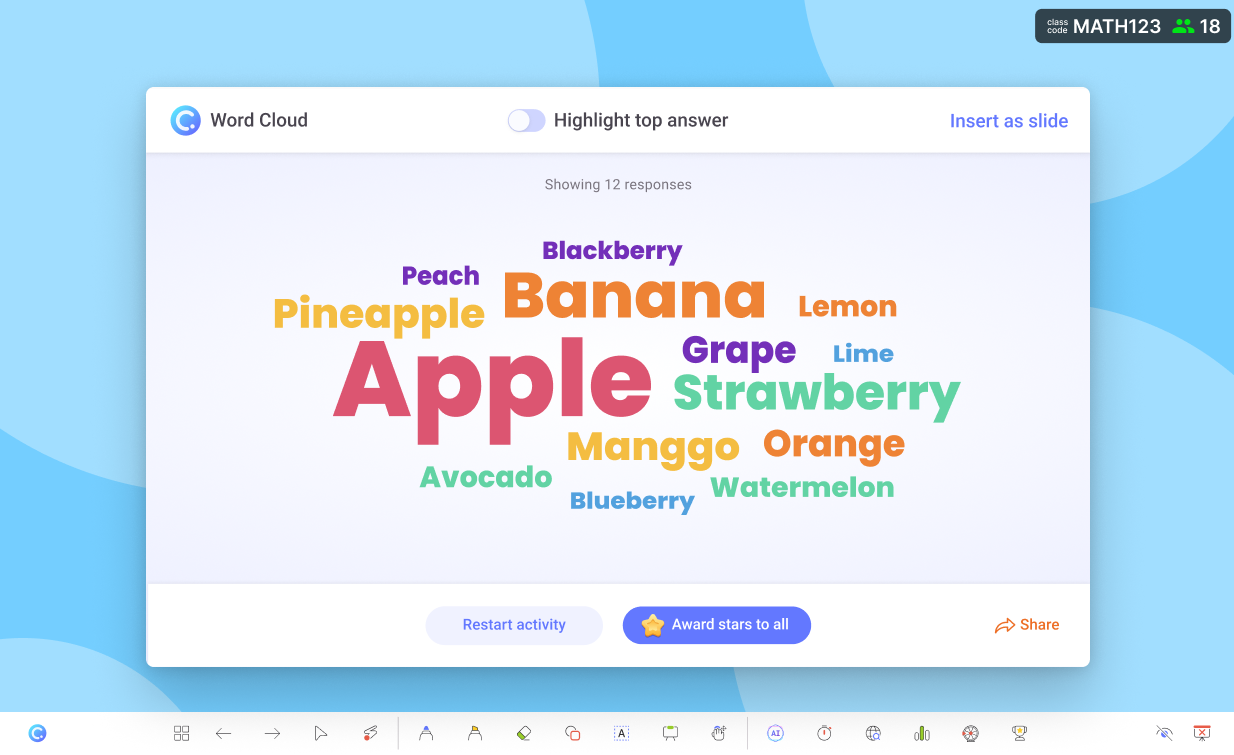
Use these at the beginning of a lesson to check what students already know. You can gather quick responses, identify misconceptions, and adjust your frontloading plan instantly.
Use them to:
- Surface what students already know
- Spot misconceptions early
- Collect ideas before introducing the topic
- Build a shared starting point for everyone
Mini classroom example:
Before teaching photosynthesis, run a Word Cloud asking: “What words come to mind when you hear ‘plants make food’?”
Students’ responses reveal their background knowledge instantly.
Start with Short Answer when you need depth, Word Cloud when you want big-picture ideas, and Multiple Choice for quick readiness checks.
🖼 Image Upload and Slide Drawing
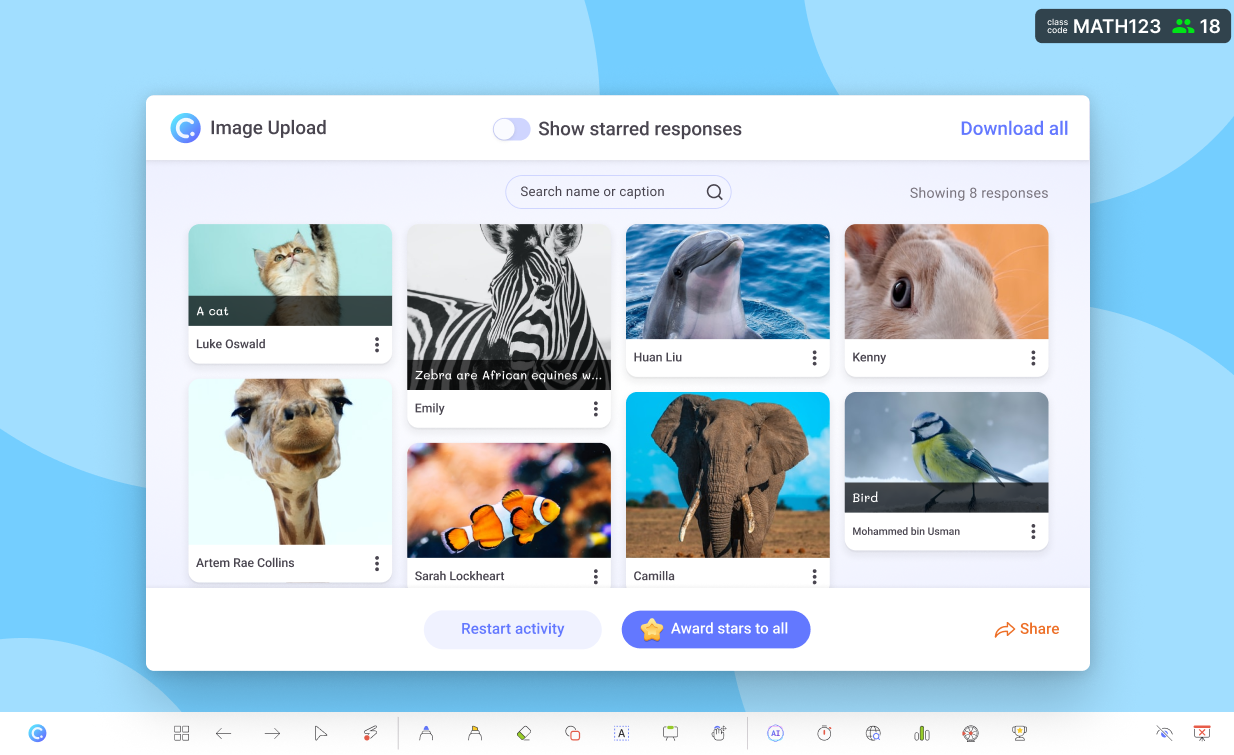
Perfect for visual frontloading activities. These tools help students look first, think first, and connect first before learning begins.
Students can label a blank map, circle important parts of a diagram, upload a picture of something from real life, or draw predictions based on a preview image.
To help you visualize, here’s a table on how to use these features in your frontloading activities:
| Topic | Slide Drawing Idea | Image Upload Idea |
|---|---|---|
| Water Cycle | Draw arrows showing water movement | Upload a picture showing evaporation around them |
| Ancient Egypt | Point to where the Nile might flood | Upload an artifact they think belonged to daily life |
| Geometry | Sketch shapes they already know | Upload photos of shapes in their environment |
These tasks activate prior knowledge in seconds.
To utilize ClassPoint's Image Upload activity, check out 4 Engaging Ways to Use Image Upload in Your Lessons.
⚡Quick Poll

Sometimes all you need is a quick sense of readiness.
Try polls like:
- “How familiar are you with today’s topic?”
- “Rate your confidence: 1, 2, or 3.”
- “Have you learned this before?”
Quick Polls help you decide whether your students need light frontloading or deep frontloading. Aside from this, it also lets students share honestly without pressure as poll responses can be anonymous.
✏️ Annotations and Whiteboard

When teachers model early thinking visually, students follow with more clarity.
Annotations and whiteboards keep frontloading visual, fast, and memorable while you’re presenting without leaving the slide.
These ClassPoint features are useful for sketching vocabulary visuals, breaking down early ideas, or building background knowledge in real time.
Learn more about about annotations by reading How to Annotate on PowerPoint slides with ClassPoint.
🤖 AI Quiz
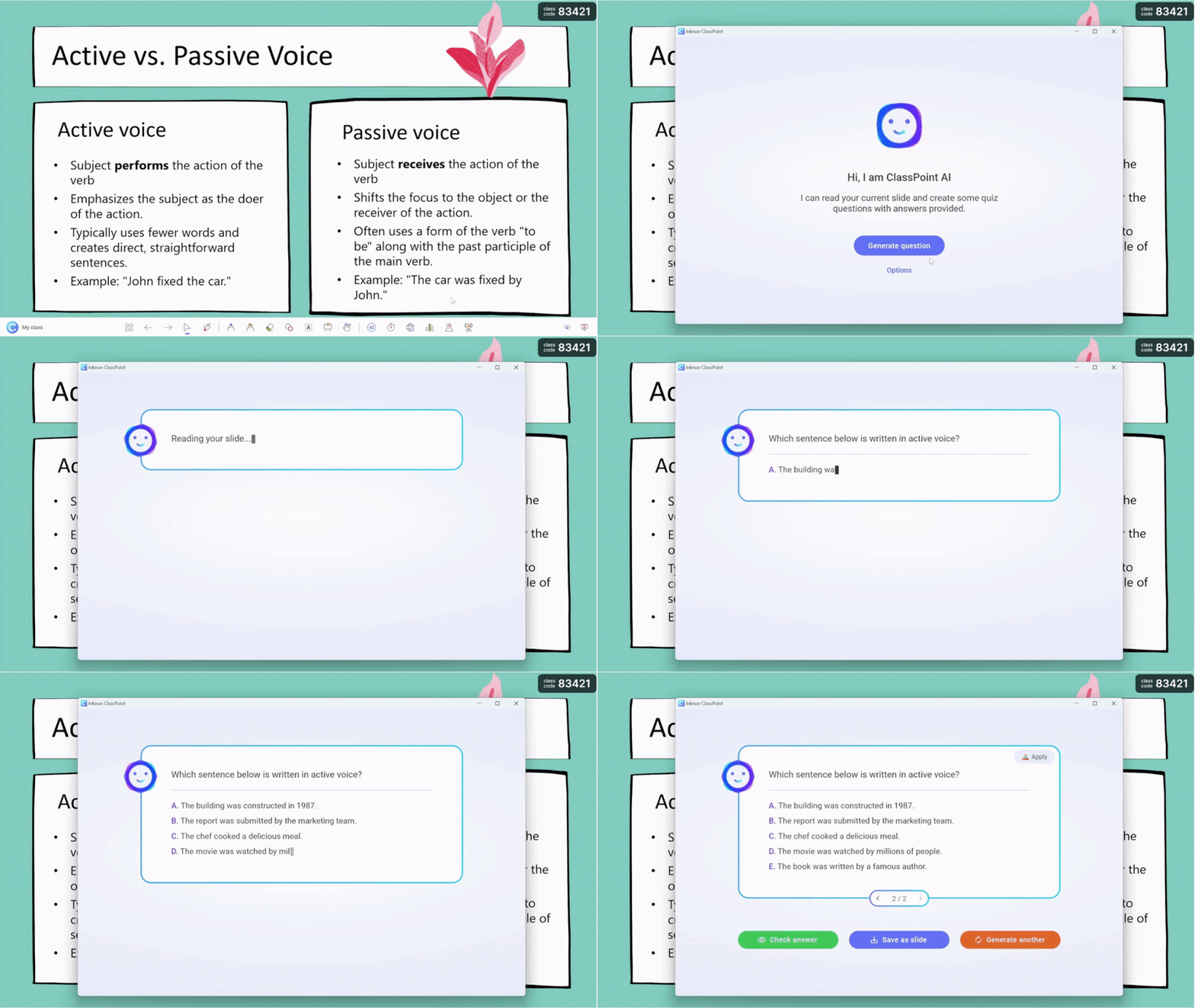
If your slides already contain content, ClassPoint’s AI Quiz can generate quick preview questions. This makes it easy to create warm-up questions that support frontloading in education without extra work.
Aside from that, it can also do the following:
- Suggest vocabulary questions based on your content
- Generate a quick readiness check before the main activity
- Produce simple comprehension prompts for background knowledge
Example: You show a slide of a short text excerpt. AI Quiz instantly generates:
💭 “What do you predict this article will talk about?”
💭 “Which word might be the most important in this paragraph?”
These questions fit naturally into frontloading in education, giving students something meaningful to think about before the lesson begins.
To help you create an AI quiz from ClassPoint, follow this video:
FAQs
Can frontloading in education be overdone?
Yes. Frontloading in education is most effective when it is short, intentional, and directly connected to the lesson. Overloading students with too much information before the lesson can overwhelm them. Aim for brief previews, not full lessons before the lesson.
How can I tell if frontloading in education is working?
Look for early signs during the lesson:
– Fewer clarifying questions
– Faster engagement
– More accurate responses during warm-ups
– Smoother transitions into complex tasks
If these increase, your frontloading strategies are effective.
Does frontloading in education replace direct instruction?
No. Frontloading prepares students for the instruction, but it never replaces it. It simply helps students enter the core lesson with clearer expectations and stronger readiness so the main teaching becomes more efficient and meaningful.
How often should I use frontloading in education?
Frontloading in education works best when used for lessons that introduce new concepts, new vocabulary, or unfamiliar contexts. You do not need to frontload every lesson. Use it strategically when students are likely to struggle at the beginning.
Is frontloading in education suitable for older students, like high school or adult learners?
Absolutely. Older learners often benefit even more because they bring prior knowledge that frontloading can activate. Short previews, real-life examples, or guiding questions can help them connect new content to their existing understanding.
How is frontloading in education different from pre-teaching?
Pre-teaching usually focuses on specific skills, vocabulary, or concepts a student needs before participating in the lesson. Frontloading in education is broader. It prepares the entire class by giving context, background knowledge, and guiding cues.
Can frontloading in education work in classrooms with limited time?
Yes. Many frontloading techniques take less than three minutes. A short poll, a quick picture prompt, or a single guiding question can improve readiness without taking time away from the main lesson.
Does frontloading in education help students with attention difficulties?
Yes. Students with attention challenges benefit from knowing what will happen next. A preview reduces uncertainty and helps them focus on the most important parts of the lesson instead of trying to figure out the structure.
Is digital frontloading necessary, or can I do it without technology?
Frontloading in education does not require technology. You can use stories, objects, short discussions, or simple whiteboard sketches. Technology tools like ClassPoint simply make it easier to make frontloading interactive and responsive.
