If you’ve ever used Nearpod in your classroom, you know how powerful it can be. Who wouldn’t love interactive slides, instant feedback, and tools that actually keep students with you the whole way through?
But maybe you’ve hit some limits. And with that, you’re not alone. More and more teachers are exploring are looking for Nearpod alternatives that feel easier, or simply, just different enough to give lessons a fresh spark.
So I’ve done the digging for you. Below, you’ll find a full rundown of tools teachers are loving, from quick plug-and-play quiz builders to full-on virtual classrooms built for engagement.
What is Nearpod?
Before we dive in, let’s get on the same page. Nearpod is a popular platform that lets teachers deliver interactive lessons, whether students are in class, at home, or anywhere in between.
It’s basically your lesson slides, but leveled up with live activities, quick checks, and student-paced options.
Here’s what teachers typically use Nearpod for:
- Running live, interactive lessons where students follow along on their own devices
- Embedding activities like polls, quizzes, matching games, drawing tasks, and open-ended responses
- Assigning self-paced lessons for students to work through independently
- Tracking student responses in real time or through post-session reports
- Accessing a library of pre-made, standards-aligned lessons and videos
It’s powerful. But it’s not the only option out there.
Quick Comparison: The Best Nearpod Alternatives at a Glance
If you’re short on time and just want a side-by-side look at how these tools stack up, this table lays it all out for you. From interactive PowerPoint add-ins to creative portfolio platforms, each Nearpod alternative has its own flavor and strength.
Here’s a quick breakdown of what each Nearpod alternative does best, how it compares to Nearpod, and how teachers rate it:
| Nearpod alternative | What it is | Standout features | Overall comparability | Capterra rating |
|---|---|---|---|---|
| ClassPoint | PowerPoint add-in for interactive lessons | Live in-slide quizzes, reward system, Quiz Ideas library, doesn’t require 1:1 usage | Better for teachers using PowerPoint; lacks self-paced assignments but faster and simpler for live use | 4.8 ⭐️ |
| Pear Deck | Google Slides add-on for interactive questions | Anonymous responses, Google Slides integration, simple formative checks | Good for Google users; less multimedia depth than Nearpod | 4.4 ⭐️ |
| Classkick | Student practice tool with live teacher feedback | Live student work view, real-time feedback, digital hand-raising | Best used alongside Nearpod; excels at real-time practice, not content delivery | N/A |
| ClassDojo | Behavior and classroom management platform | Dojo points, parent communication, student portfolios | Not a lesson tool; complements Nearpod with behavior and motivation | 4.7 ⭐️ |
| Mentimeter | Polling and live Q&A tool | Live word clouds, anonymous polls, quick setup | Lighter than Nearpod; great for spontaneous polling, lacks full lesson structure | 4.4 ⭐️ |
| ClassIn | Virtual classroom platform for live teaching | Video conferencing, interactive whiteboard, classroom tools | Better for live online teaching; not suited for in-person use | 4.6 ⭐️ |
| Lumio | Interactive lesson tool by SMART Technologies | Group workspace, SMART Notebook support, PhET simulations | On par with Nearpod; stronger for SMART Board users and group tasks | 4.7 ⭐️ |
| Seesaw | Student-driven portfolio and activity platform | Multimodal responses, parent sharing, journals | Ideal for K–5; better for creative expression, not live lesson delivery | 4.7 ⭐️ |
1. ClassPoint – Great for teachers who use PowerPoint and want built-in interactivity
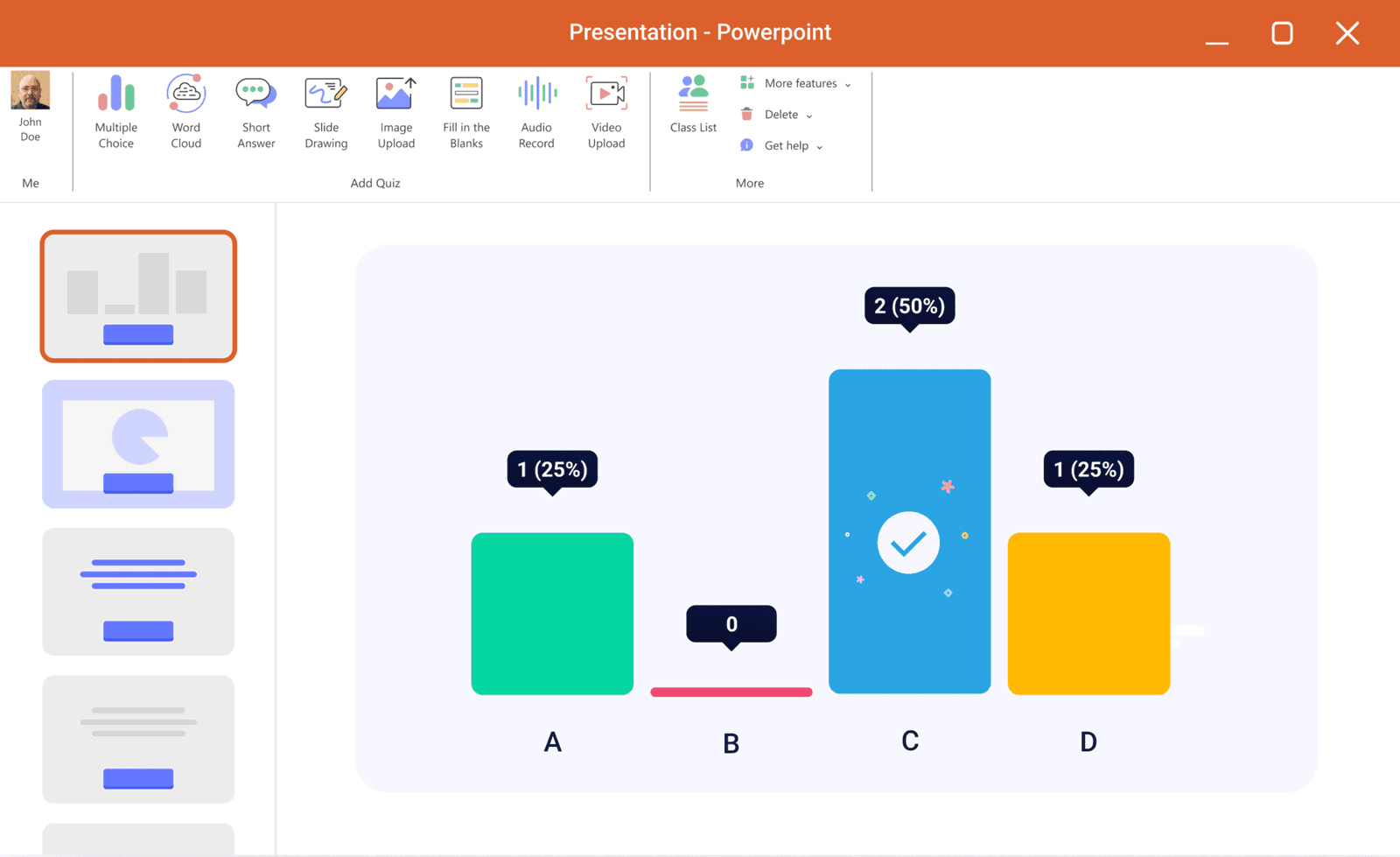
ClassPoint integrates directly into PowerPoint, adding interactive question types (quizzes, polls, word clouds, etc.) to the familiar ribbon toolbar for engaging activities. You can embed live questions and get instant student responses, all while staying in slide show mode.
In addition to question slides, ClassPoint provides handy teaching tools like a random name picker and live inking support. It even has a built-in gamified reward system: you can award digital stars to students for answering questions, and ClassPoint will track points, levels, and badges on a leaderboard.
We've put ClassPoint and Nearpod side by side to take a deeper dive into their differences. Check out ClassPoint vs Nearpod: How the Leading EdTech Powerhouses Compare.
What makes it a good alternative to Nearpod:
- Integration & Ease: ClassPoint works inside PowerPoint, so you can use your existing PPT slides and simply add interactive questions. Nearpod, in contrast, is a standalone platform. Teachers who prefer not to juggle multiple apps will find ClassPoint’s in-PowerPoint integration much simpler to adopt.
- Interactive Features: Both ClassPoint and Nearpod offer live quizzes, polls, and drawing activities for students. ClassPoint supports question types like multiple choice, fill-in blanks, slide drawing, image upload, and even audio/video responses. Nearpod similarly enables quizzes and interactive slides via its web platform. The key difference is ClassPoint runs these activities in PowerPoint, whereas Nearpod runs them through a web interface or app.
- Gamification: ClassPoint has a reward point system, and it automatically generates levels, badges, and leaderboards to gamify your class. Nearpod’s approach to gamification is through specific game-based modules. If you want ongoing rewards across your lesson, ClassPoint does this out-of-the-box, which Nearpod doesn’t natively offer.
- Content & Delivery: Nearpod provides a vast library of pre-made lessons aligned to standards and supports both live teacher-paced sessions and student-paced assignments. ClassPoint offers a Quiz Ideas library with ready-made PowerPoint slides embedded with ClassPoint’s interactive quiz buttons. While it doesn’t have a full curriculum-aligned content library, this quiz bank gives teachers a fast, practical head start.
- Tech Compatibility: Students join a ClassPoint session via a class code or QR code on their device, similar to how they join a Nearpod lesson. No student accounts are required for either tool.
One notable difference is device usage: ClassPoint can be used in offline classroom settings where each student doesn’t have a device, whereas Nearpod is fundamentally designed for 1:1 device usage.
2. Pear Deck – Great for Google Schools and simple formative assessment
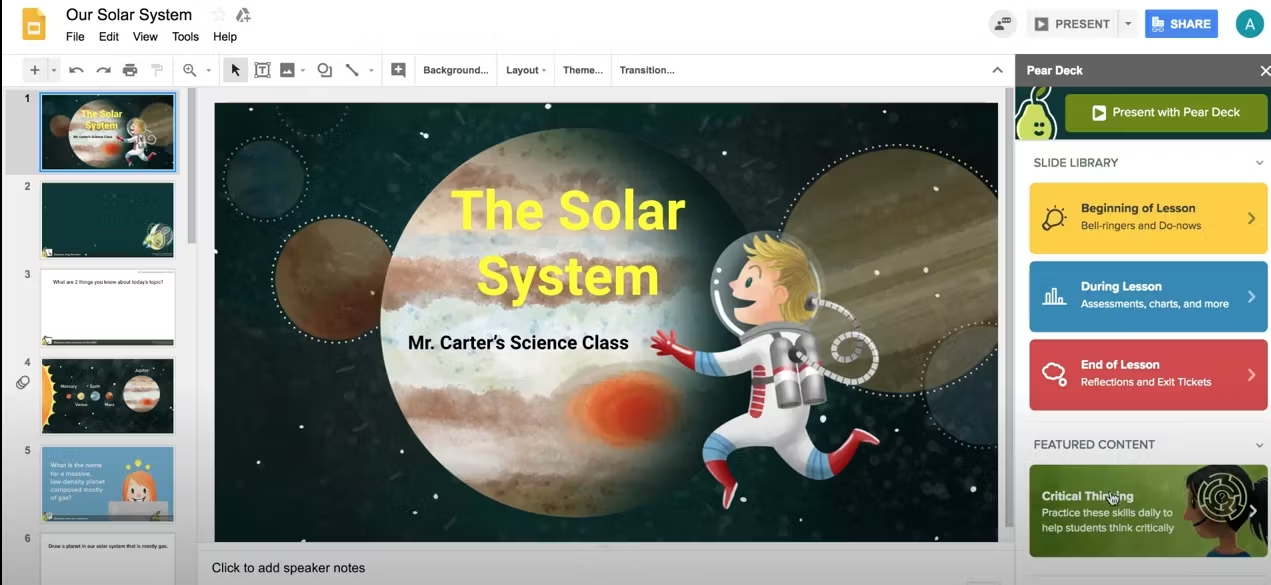
Pear Deck is an interactive presentation add-on that’s ideal for teachers in Google Workspace or Microsoft 365 environments. Much like ClassPoint, Pear Deck turns your slides into interactive experiences, but it integrates with Google Slides (and PowerPoint Online) instead of PowerPoint for desktop. Teachers can add various question types to their slide deck, and students join the session on their own device with a code and respond in real time.
Teachers particularly love that Pear Deck helps encourage all students to engage without the pressure of speaking up in class. During a Pear Deck activity, you can display anonymous answers on the board to discuss as a class, creating a safe space for sharing ideas.
What makes it a good alternative to Nearpod:
- Platform Integration: Much like ClassPoint’s relationship with PowerPoint, Pear Deck lives inside Google Slides as an add-on (and also works with PowerPoint Online). Nearpod, on the other hand, is a separate app where you either build lessons from scratch or import slides.
- Interactive Elements: Pear Deck supports a variety of question types. These cover the core interactive needs similarly to Nearpod’s quizzes, polls, draw-its, etc. However, Pear Deck’s activity range is a bit more basic. If you mostly need quick checks for understanding, Pear Deck matches Nearpod well. For more multimedia-rich content (like Nearpod’s VR or simulation activities), you’d have to supplement Pear Deck with other tools.
- Content Library: Pear Deck does offer premade template slides (e.g. for bell ringer questions, exit tickets, social-emotional checks, etc.), but it relies on teachers to create or import their own lesson content into Google Slides. Nearpod’s advantage is its library of ready-to-use lessons and videos.
- Student Experience: Both Pear Deck and Nearpod have a student-paced mode as well as live mode. In a live session, Nearpod typically has the teacher advance all student screens in sync, whereas Pear Deck also usually follows teacher pacing (with an option to enable student navigation if needed).
- Gamification: Neither Pear Deck nor Nearpod (free version) has the kind of gamified points/levels system that ClassPoint or ClassDojo have. Nearpod’s “Time to Climb” game is a competitive quiz, which Pear Deck doesn’t have an equivalent of.
3. Classkick – Great for real-time student practice and feedback during lessons
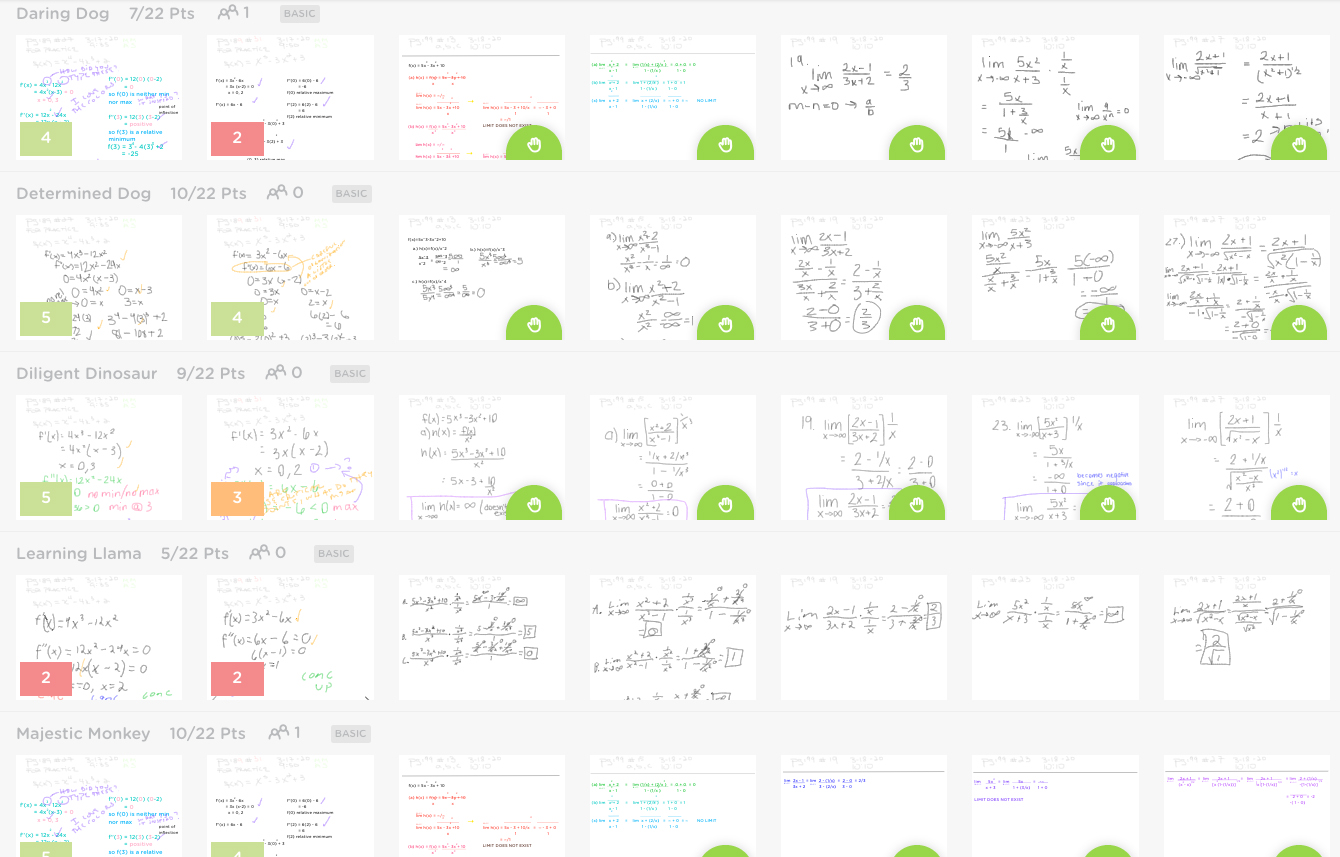
Classkick is an interactive platform that acts like a digital worksheet or notebook, ideal for 1:1 classrooms. It’s great for teachers who want to observe each student’s work in real time and provide instant feedback.
Teachers can create an assignment in Classkick by uploading slides (PDFs, images of worksheets, or creating from scratch) and then invite students via a class code. Students work through the slides on their own device, writing answers or drawing diagrams as needed, and the teacher can see every student’s screen live as they work. If a student is stuck, they can raise a digital hand for help, and the teacher can jump in with feedback or hints right on their slide.
It’s a perfect Nearpod alternative for the “practice” phase of learning. Where Nearpod might present the lesson content, Classkick would be used to have students apply that learning while the teacher coaches them in real time.
What makes it a good alternative to Nearpod:
- Instruction vs Practice: Nearpod is typically used for delivering content. Classkick, by contrast, is geared toward student practice and creation. A teacher might use Nearpod to teach concepts, then switch to Classkick so students can work on problems with the teacher monitoring. They complement each other well, but fulfill different roles in the learning process.
- Real-time Visibility: A standout feature of Classkick is that the teacher sees each student’s work unfold live. Nearpod does show teachers the responses students submit for each activity, but it doesn’t show the process in real time. This makes Classkick more powerful for providing immediate corrective feedback during skill practice.
- Pacing and Control: With Nearpod in live mode, the teacher typically controls the pace. Classkick is generally student-paced: students can move through the assignment at their own speed. For classrooms that value self-paced learning with teacher support, Classkick offers that out of the box.
- Interactive Capabilities: Both tools let students draw and write answers, but Classkick is more flexible in how students can respond. On Classkick, a single slide could have multiple response areas, and students might be uploading a photo of their work, drawing with an ink tool, or typing an open response. Nearpod’s slides usually have one type of interaction at a time.
- Gamification and Rewards: Classkick isn’t a gamified quiz platform; its “motivational” elements come from things like stickers and immediate feedback rather than points or games. Nearpod offers game-like quizzes, but Classkick’s philosophy is more about coaching.
While in the topic of practice, you might want to check out our curated list of 6 Effective Retrieval Practice Strategies For Students’ Long-Term Success.
4. ClassDojo – Great for building classroom community (especially in elementary)
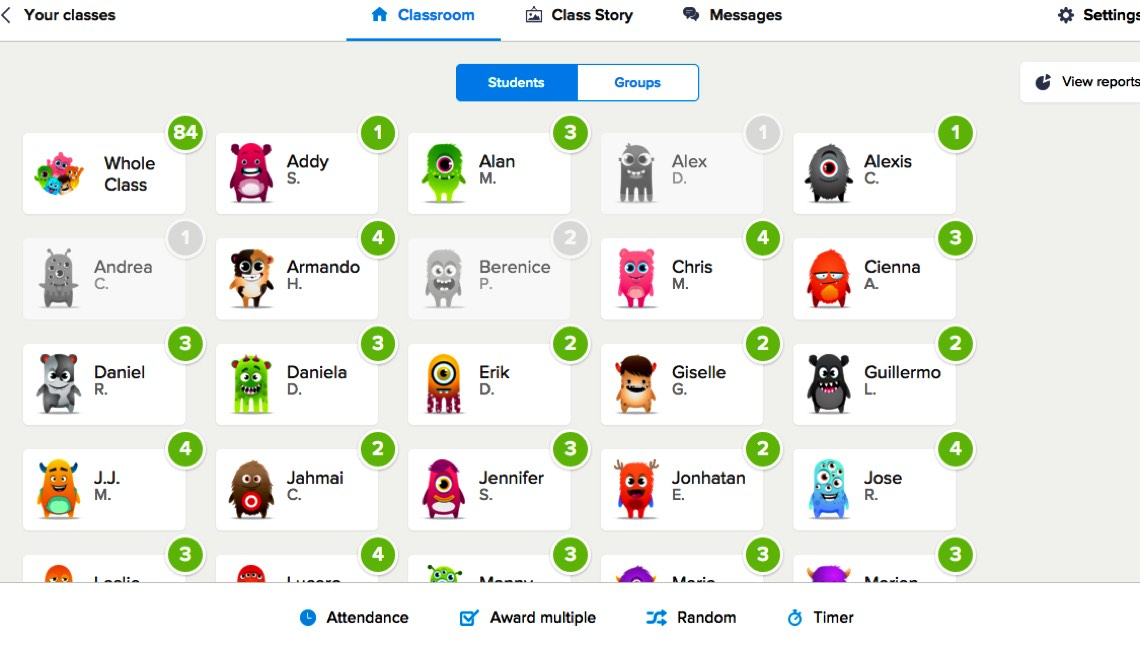
ClassDojo is quite different from Nearpod, but it’s often mentioned in the same breath because it’s all about student engagement, just in a behavioral and community sense rather than lesson content. It allows teachers to award feedback points to students for their behavior and participation, share updates with parents through photos and messages, and foster a positive classroom culture.
If Nearpod engages students with interactive lessons, ClassDojo engages them by making classroom behavior and routine interactive and fun.
What makes it a good alternative to Nearpod:
- Platform Focus: ClassDojo isn’t a lesson delivery or presentation tool at all. Its core purpose is classroom management and communication. Nearpod focuses on interactive lesson content, whereas ClassDojo focuses on student behavior, feedback, and parent engagement.
- Parent Communication: ClassDojo excels at linking parents to the classroom. Teachers can directly message parents, and share photos or student work easily. Nearpod does not have a parent communication component, as it’s strictly between teacher and students.
- Student Work & Portfolio: Nearpod and ClassDojo both allow students to produce work, but in different forms. Nearpod might have students answer an open-ended question or draw something as part of a lesson; ClassDojo’s Portfolio feature lets students independently upload a piece of work for the teacher and parents.
- Usage Scenario: Many teachers actually use ClassDojo alongside a lesson tool like Nearpod or ClassPoint rather than instead of. If you are searching for a “Nearpod alternative” because you want better participation, ClassDojo provides that extrinsic motivation and sense of fun. But it won’t replace the need to have some tool to deliver interactive content.
- Engagement Style: Both ClassDojo and Nearpod incorporate gamification, but in different ways. ClassDojo’s gamification is persistent and behavior-based. Nearpod’s gamified elements are contained within lessons, and are academic in nature.
Notably, ClassPoint actually overlaps here: ClassPoint lets teachers award stars for correct answers in a lesson, which is similar to giving points in ClassDojo but tied to academic responses. So, ClassDojo is to classroom behavior what Nearpod/ClassPoint are to academic participation.
5. Mentimeter – Great for live polls and audience participation
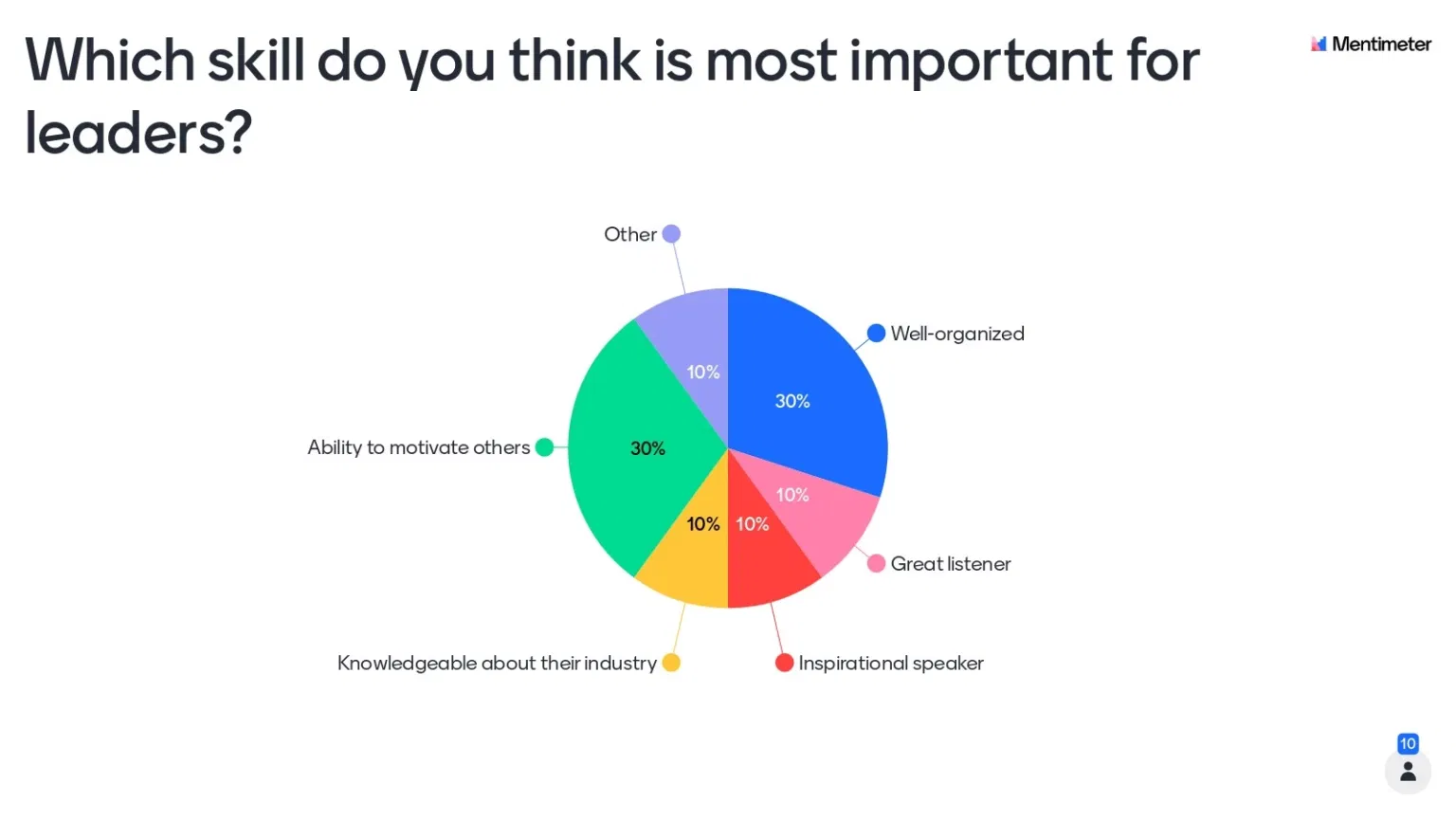
Mentimeter is a versatile online polling tool known in both business and education circles for its ease of use. It’s great for teachers who want quick interactive moments in lessons without a lot of setup. With Mentimeter, you create questions or prompts, and students join via a code on their phone or laptop browser to submit responses (no login required). The results update live on the screen.
While Mentimeter isn’t built specifically for education (so it lacks things like student tracking or standards-aligned content), its flexibility and neutrality are strengths: it works for any audience, any topic.
What makes it a good alternative to Nearpod:
- Scope of Use: Nearpod is an all-encompassing lesson platform, whereas Mentimeter is focused on single activities. Mentimeter’s strength is its simplicity and speed, but it’s not going to replace a structured lesson tool like Nearpod if you need many different activity types in one package.
- Features and Question Types: Mentimeter offers a range of question types and quizzes. These cover a lot of the same ground as Nearpod’s. However, Mentimeter does not have some of Nearpod’s interactive content types like drawing responses or the rich content integrations like Nearpod’s VR field trips or interactive videos.
- Ease of Use: Both tools are user-friendly, but Mentimeter is exceptionally straightforward. Nearpod is also easy for students, but for teachers, designing a Nearpod lesson can take more time since you’re arranging slides, embedding various activities, etc.
- Data and Tracking: Nearpod (especially if students have accounts or you use an LMS integration) can track individual student performance across activities and sessions, giving you reports per student. Mentimeter is generally anonymous or aggregate-focused.
- When to Use: If you find Nearpod a bit heavy for a quick activity, Mentimeter is a perfect light alternative. The trade-off is that Mentimeter by itself won’t structure your entire lesson the way Nearpod can.
For more options that help with live collection of responses, here's a list of 13 Best Audience Response Systems for Classrooms.
6. ClassIn – Great for online teachers needing a full virtual classroom environment
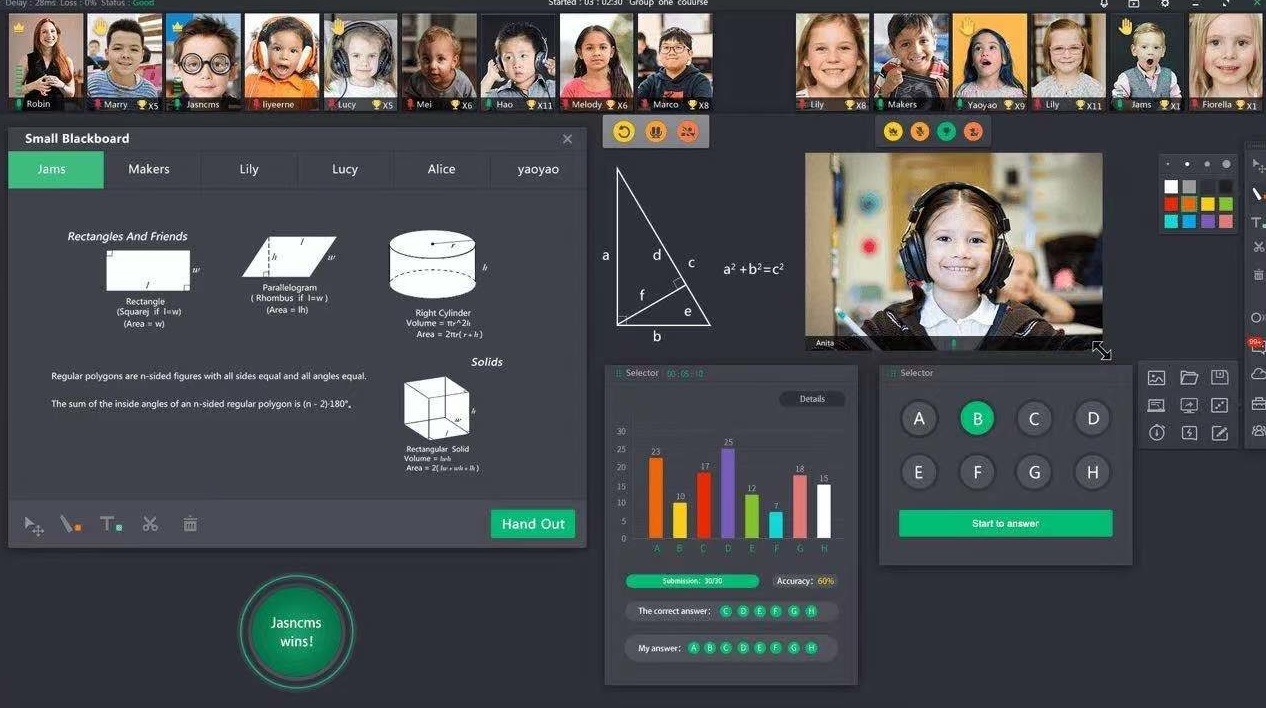
ClassIn is a powerhouse platform primarily designed for online teaching. If you imagine combining a video conferencing tool (like Zoom) with an interactive whiteboard, a learning management system, and various classroom gadgets, you get ClassIn.
ClassIn offers a one-stop virtual classroom: you have live video of teacher and students, a shared interactive blackboard space, the ability to create breakout rooms, chat, and many built-in tools like timers, random pickers, and even subject-specific widgets (e.g., a graphing tool or science experiment simulator).
What makes it a good alternative to Nearpod:
- Type of Tool: ClassIn is fundamentally different from Nearpod in that it’s a synchronous teaching platform with live video. Nearpod doesn’t provide video conferencing. So, if you’re looking for a Nearpod alternative for remote teaching where you want face-to-face interaction and a shared board, ClassIn is a top choice.
- Interactive Features: Nearpod’s interactivity is slide-based, whereas ClassIn’s interactivity is more free-form. In ClassIn, you and students can write on the board, drag and drop objects, or even conduct a web search in a built-in browser together. If Nearpod is a pre-scripted interactive lesson, ClassIn is a live sandbox.
- Content & Lesson Prep: Nearpod requires you to either use premade lessons or create your own lesson in advance on their platform. ClassIn can be more improvisational or open-ended. You could just open ClassIn with a blank whiteboard and start teaching, much like in a physical classroom, writing notes or working through problems live.
- Asynchronous vs Synchronous: Nearpod has an asynchronous mode (Student-Paced lessons) which ClassIn doesn’t really offer, as ClassIn is about synchronous class sessions. However, ClassIn does have some LMS-like features: you can assign homework through ClassIn and collect it, and there’s a platform for posting materials.
- Environment and Cost: It’s worth noting ClassIn is a downloadable application (on PC, Mac, tablets, etc.), not just a website. Nearpod runs in a web browser and is accessible anywhere without install.
We've put together the Top 8 Synchronous Learning Tools to Power Live Classroom Lessons.
7. Lumio (by SMART) – Great for interactive lesson creation, especially with SMART Boards
Lumio (formerly known as SMART Learning Suite Online) is an interactive lesson platform created by SMART Technologies (the makers of SMART Boards). It’s an excellent Nearpod alternative for teachers who want a similar feature set with a few unique twists, and it’s particularly handy if your school uses SMART Boards or you have existing SMART Notebook files.
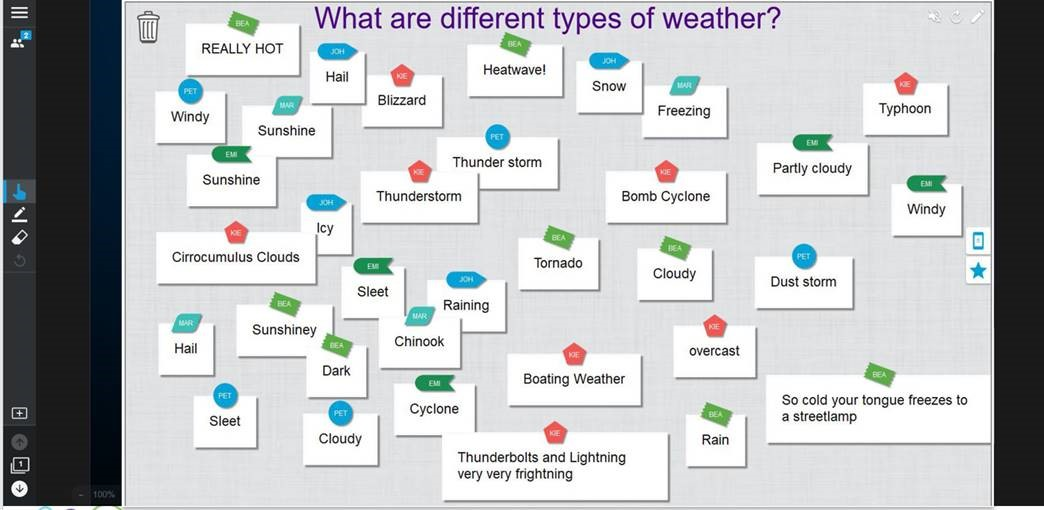
Lumio allows you to combine slides, interactive questions, games, and collaborative activities into lessons that students can join on their devices, much like Nearpod. It’s cloud-based, so students join via a class code on Lumio’s website, and you can run sessions live or assign them for self-paced work.
What makes it a good alternative to Nearpod:
- Feature Parity and Differences: Lumio and Nearpod share a lot of core functionality. Depending on what content you teach, one or the other might have the edge: for example, science teachers might prefer Lumio for their in-built PhET simulations, while geography teachers might like Nearpod for the VR field trips.
- Content Library: Nearpod boasts a large library of premade lessons and videos from partners like PBS and Common Sense Education. Lumio’s lesson library is growing but is not as famous or extensive in ready-to-run content.
- Collaboration: Nearpod has Collaborate Board for students to post text/picture notes in a common space. Lumio has a feature called “Workspace” where you can send students into group work spaces on a shared canvas. Nearpod’s single collaborate board is less structured, though, so for structured group collaboration, Lumio might have the edge.
- Importing and Integrations: Nearpod and Lumio both make it easy to bring in Google Slides or PowerPoint, but Lumio tends to keep formatting more intact and even works with SMART Notebook files. When it comes to integrations, they’re pretty evenly matched. Nearpod might have a slight edge, though, thanks to stronger content partnerships, but the overall experience is comparable.
8. Seesaw – Great for student portfolios and creative assignments (especially K–5)
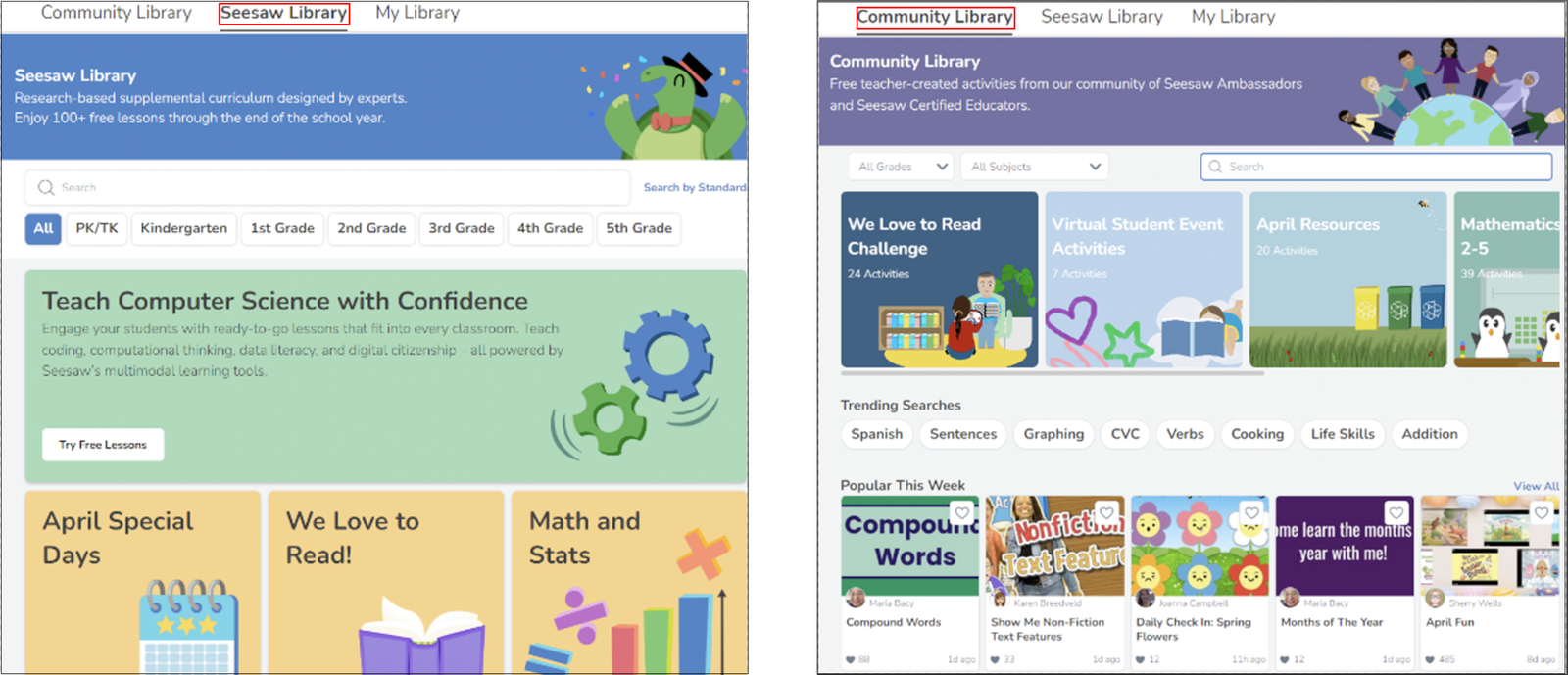
Seesaw is a digital learning platform with a focus on student portfolios and easy-to-use creative tools. While Seesaw is not an interactive presentation tool like Nearpod, many educators consider it an alternative approach to achieve some of the same goals: engaging students in active responses and getting insights into their understanding.
In Seesaw, each student has a journal. Teachers can post an activity and students will respond on their own time. They can use Seesaw’s built-in creative tools to draw, add text, voice-record, take photos or videos, and more. All those responses are saved in the student’s journal portfolio. What’s even nicer is that parents can be connected so they receive updates whenever their child posts something, and they can “like” or comment on their child’s work.
What makes it a good alternative to Nearpod:
- Lesson Delivery vs Assignment Collection: Nearpod is designed for teacher-directed lessons. Seesaw, by contrast, doesn’t have a concept of teacher giving a live slideshow to students. It’s more akin to an LMS assignment module combined with a portfolio.
- Interactivity and Tools: Seesaw’s student tools are rich for creation: drawing, voice recording, video, photos, text, and combinations of these. Nearpod does have a “Draw It” tool and open-ended questions, but they are more limited in scope (e.g., you can’t easily combine a photo, drawing, and audio in one Nearpod response – Seesaw excels at that multifaceted response).
- Feedback and Visibility: In Nearpod, student work is visible to the teacher in real time, but it doesn’t automatically go to peers or parents. In Seesaw, once a student’s post is approved by the teacher, classmates and parents connected to that student can see it in the feed.
- Grade Levels and Subjects: Seesaw is extremely popular in K–5 and even Pre-K, because it’s accessible to young kids. Nearpod is used K–12, but some of its features are more oriented towards upper elementary and above. Seesaw is great for things like art portfolios, language practice, or reading journals with video reflections. It can serve as an alternative or supplement to Nearpod by capturing learning outcomes and practice in a more open format.
- Content and Library: Both Seesaw and Nearpod have large libraries of activities/lessons, but they differ in nature. Nearpod’s library is professionally developed lessons that you deliver to students via Nearpod. Seesaw’s library is almost entirely teacher-contributed activities that students complete in Seesaw.
So… Which Nearpod Alternative Is the Best?
Honestly, it depends on what matters most in your classroom.
If you work heavily in Google Slides, Pear Deck is a natural extension.
If you want to give students space to practice while you provide real-time feedback, Classkick does that better than most.
For younger students, ClassDojo and Seesaw are trusted for building habits, communication, and creative sharing.
If you’re teaching remotely and need structure, ClassIn offers the kind of virtual classroom experience most platforms don’t.
But if your goal is to run interactive lessons without changing how you already teach, ClassPoint stands out. It works directly in PowerPoint, adds real-time engagement and feedback tools, and is clearly delivering on what teachers care about most, being the best-rated tool (4.8 out of 5 ⭐️) out of all of these, even higher than Nearpod (4.7 out of 5 ⭐️) on Capterra.
Each of these tools brings something important to the table. But if you’re after simplicity, and flexibility, ClassPoint is the strongest Nearpod alternative out there.
