Vevox and ClassPoint are both interactive audience engagement tools designed to make presentations and classes more engaging. They enable live polls, quizzes, Q&A, and other activities to get real-time feedback from participants.
However, these two platforms differ in their focus and integration that cater to very specific use cases.
Below, we provide an overview of each platform and compare them across key categories to help educators understand which might better suit their needs.
What is Vevox?
Vevox is a cloud-based live polling and audience engagement platform. It allows presenters to interact with audiences through features like real-time polls, anonymous Q&A boards, live quizzes with leaderboards, and word clouds. Vevox is used in education, corporate meetings, and events where instant feedback and high participation are desired.

Key capabilities of Vevox include:
- Multiple poll types: Standard options (multiple-choice, ranking, rating scales, numeric polls) and advanced question formats like XY plot polls (for 2D risk/impact assessments) and LaTeX formula support for math questions.
- Live quizzes and Q&A: Interactive quiz competitions with scoring and leaderboards, plus moderated Q&A message boards (questions can be asked anonymously or with identity).
- Integrations and modes: Vevox can integrate via an Office 365 PowerPoint add-in, and it offers flexible presentation modes. In smaller sessions, a presenter can simply share their screen or use extended display so audience only sees the poll/content view. For large events, Vevox allows multiple display setups or a secure display-only link that AV teams can use to project live results in additional rooms.
- Data analytics: After sessions, all poll and Q&A data are saved to the presenter’s Vevox dashboard. Detailed Excel reports can be downloaded with all responses and participant scores.
- AI-powered quiz creation: A newer feature of Vevox is its AI Quiz generator, which automatically creates quiz questions. Presenters can input a topic or even upload a document, and Vevox’s AI will generate a set of multiple-choice questions (with suggested correct answers and even explanations).
Overall, Vevox excels at instant engagement and feedback collection. It’s a straightforward, reliable polling tool for gauging opinions or knowledge on the spot.
However, as we will see, its focus is more on immediate participation data and less on in-depth learning features. It’s ideal if you need a quick, easy way to poll and quiz an audience across any device, or if you require features like LMS integration.
Next, let’s look at ClassPoint and how it compares.
What is ClassPoint?
ClassPoint is an all-in-one interactive teaching tool integrated into Microsoft PowerPoint. Unlike Vevox (which runs as a separate app or web service), ClassPoint is a PowerPoint add-in that lets educators create and run live quizzes, polls, and other activities directly in their slides.
It essentially transforms PowerPoint into a student engagement platform, so teachers never have to leave their slide deck to conduct interactive exercises. With ClassPoint, students participate via their own devices (by entering a class code on classpoint.app), and their responses appear in the teacher’s presentation in real time.
Key features of ClassPoint include:
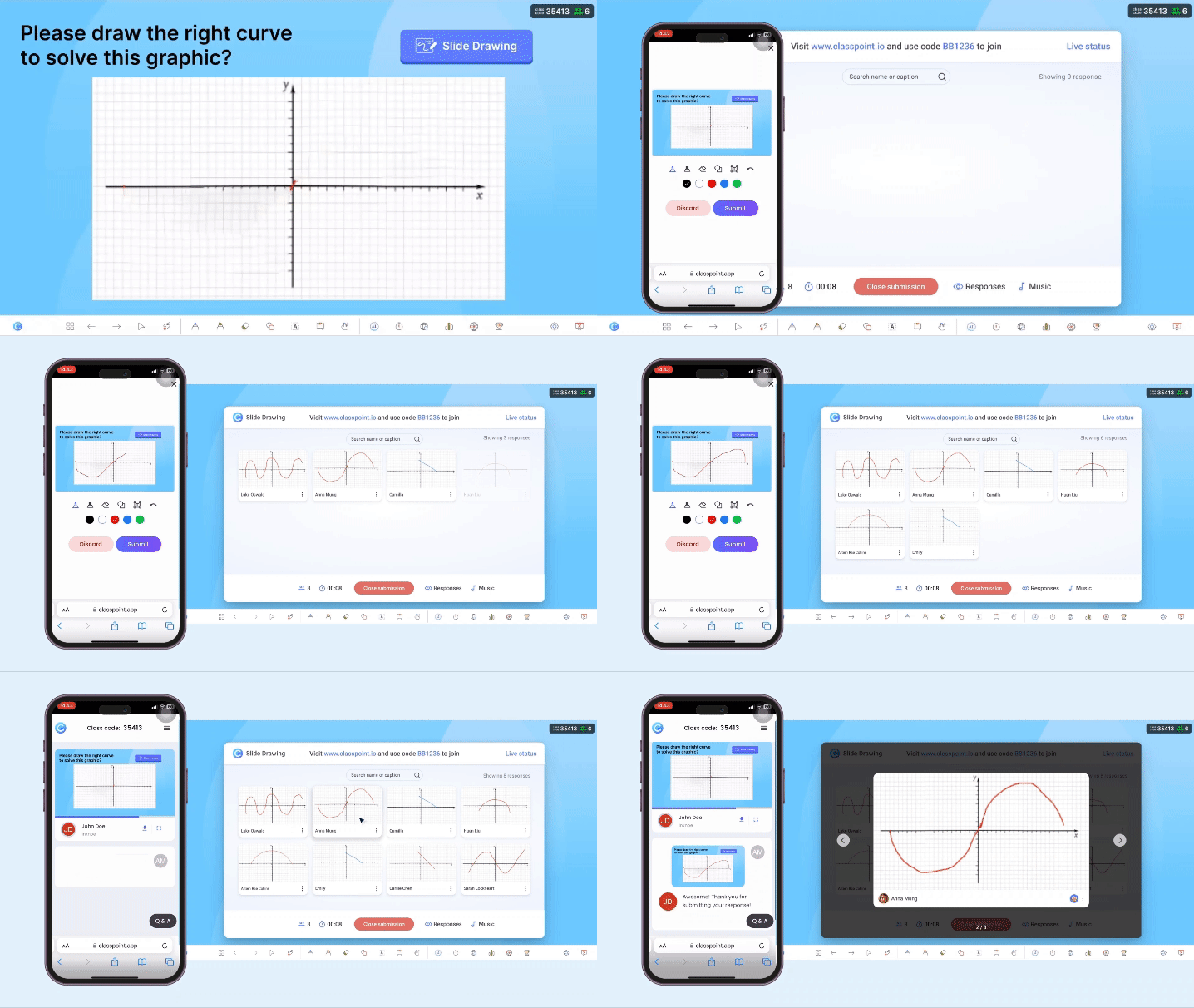
- Diverse question types in slides: Teachers can add a variety of interactive questions to any slide, including multiple-choice, word cloud, fill-in-the-blanks, short answer (open-ended), and even creative response types like image upload, slide drawing (students draw or annotate on the slide), audio recording, and video upload.
- Seamless PowerPoint integration: ClassPoint lives inside PowerPoint, so the presentation and interaction are unified. All student submissions (texts, drawings, etc.) can be displayed on the slides instantly.
- Built-in gamification: ClassPoint awards stars (points) to students for correct answers, tracks their cumulative points, and displays a leaderboard and leveling system. Students earn badges and level-up as they accumulate stars across sessions.
- Presentation and teaching tools: Since ClassPoint is used during live teaching, it provides handy presentation aids: annotation tools for drawing on slides, digital whiteboards, a timer/stopwatch for timed activities, a random name picker to call on students, and draggable objects for interactive demos.
- AI features for educators: ClassPoint has recently introduced AI-powered capabilities integrated into the classroom workflow. These include an AI Quiz Generator, AI Insights for short-answer responses, and an AI Session Summary that provides an automatic recap of each class session via email.
In summary, ClassPoint is tailored for educators who want interactive quizzes and student engagement built into their lesson delivery. It prioritizes meaningful learning activities and provides analytics/insights to track learning progress.
Now, let’s compare Vevox and ClassPoint side by side in the core areas that matter for classroom use.
TL;DR: Vevox vs ClassPoint at a glance
If you already know both tools and just want the big picture before diving deeper, this table sums up how Vevox and ClassPoint differ in purpose and classroom fit.
| Vevox | ClassPoint | |
|---|---|---|
| Core focus | Live polling and audience feedback during presentations | Interactive teaching and live classroom delivery inside PowerPoint |
| What it does best | Collects real-time responses quickly through polls, Q&A, and quizzes across different presentation setups | Supports live teaching with in-slide tools, student interaction, gamification, and post-class insights |
| Presentation model | Runs alongside presentations through web, app, or add-in | Runs inside PowerPoint as part of the slideshow |
| Classroom-friendly quiz types | Poll-based questions, ranking, rating, XY plots | Creative responses, drawing, image, audio, video |
| Gamification | Session-based leaderboards | Ongoing stars, levels, badges |
| Live presentation support | Engagement layer alongside slides | Live teaching tools inside PowerPoint |
| AI capabilities | AI quiz generation | AI quizzes, AI insights, AI session summaries |
| Data & reporting | Excel exports, LMS integration | Shareable reports, AI-assisted summaries |
Looking beyond these two tools, check out our curated list of 13 Best Audience Response Systems for Classrooms.
Classroom-Friendly Quiz Types
Vevox offers a solid range of question types suitable for quick assessments and feedback. In total, Vevox supports nine poll/question formats, covering the basics and some advanced options.
Educators can pose:
- pose multiple-choice questions,
- ask for ranked or rated responses,
- collect numeric inputs,
- or gather open-ended text responses and word cloud entries for brainstorming.
Vevox also stands out by offering dedicated XY Plot and “Pin on Image” polls. These advanced types can be very engaging in certain contexts. However, Vevox’s question types are largely focused on conventional polling. It does not natively support students submitting their own images, drawings, or audio/video responses within a poll.
If your activities require students to produce work, Vevox doesn’t have built-in question types for that.
ClassPoint, having been designed with classroom activities in mind, provides a diverse set of quiz types that let students respond in various modes. It includes all the common question formats similar to Vevox, but goes further by allowing multimedia and creative responses.
Teachers can:
- ask students to annotate and draw on a slide,
- let students snap a photo, search for an image, or record a short video as their answer,
- as well as have them submit audio responses directly to the slide.
All these options make ClassPoint’s quizzes very “classroom-friendly,” because they align with interactive teaching methods (beyond rote recall).
While Vevox’s polling is excellent for quick surveys or checks, ClassPoint’s rich response types provide more avenues for students to express understanding.
In short, ClassPoint’s quiz types are built for active learning, whereas Vevox’s are built for rapid feedback. Teachers looking to facilitate richer student outputs or creative assessments may prefer ClassPoint’s approach.
Speaking of making the learning experience dynamic, here's a short guide on How to Create Engaging Lectures with Active Learning.
Gamification and Competition
Vevox incorporates basic gamification elements through its quiz feature. When you run a scored quiz in Vevox, it can display a live leaderboard showing top participants, turning the quiz into a friendly competition.
That said, Vevox’s gamification is mostly confined to the quiz sessions themselves. Once a quiz ends, the points don’t persist in the system for the next session (unless you manually compile them).
ClassPoint takes gamification to the next level by making it an integral, continuous part of the learning experience. In ClassPoint, students earn stars (points) for their performance in quizzes and can be awarded stars by the teacher at any time for participation or good behavior.

These stars accumulate over time. ClassPoint automatically keeps track of each student’s total stars and displays a Leaderboard of the class’s star rankings. Students also achieve levels and badges as they gain more stars. This system is persistent across sessions: if you use ClassPoint with the same class repeatedly, the students carry their score forward, which encourages consistent effort.
In comparison, Vevox’s gamification is session-limited but offers exciting features like speed scoring and team play, which are great for a burst of fun. ClassPoint’s gamification is continuous and classroom-centric, aiming to build sustained engagement and a positive competitive spirit over time.
Building on the idea of gamified classes, here are Easy Gamification Examples in the Classroom for Busy Teachers.
Live Presentation Support
Vevox supports live presentations as an engagement layer that runs alongside your slides. It works through a web interface or a PowerPoint add-in, letting presenters launch polls, quizzes, and Q&A during a session.
For larger lectures or events, Vevox offers:
- flexible display setups,
- extended presenter views,
- and multi-device control so one screen can manage interaction while another shows results.
ClassPoint treats the slideshow as the teaching space itself. Its live presentation tools are built directly into PowerPoint, designed for moments when teachers need to explain, react, and adapt while teaching.
Key live slideshow tools in ClassPoint include:
- Live inking and annotations: Teachers can write, draw, circle, underline, or sketch directly on slides while presenting.
- Instant whiteboards: Open a custom whiteboard at any point during the slideshow, even if it wasn’t planned in advance.
- Random name picker: Spin a wheel of names, switch modes to pick from emoji cards instead, and draw names in batches up to 10 when you need to up participation.
- Timer and stopwatch: Pull up a ready timer or stopwatch with flexible time limits and time’s up alerts. Available in micro-window mode so it does not take up space.
The difference here is flow. ClassPoint’s live tools support teaching decisions that happen in real time. Vevox supports live interaction around a presentation.
AI Capabilities
Vevox’s use of Artificial Intelligence is currently focused on content creation for quizzes. The flagship AI feature is the AI Quiz Creator, which helps presenters generate quiz questions automatically.
In practice, a teacher can provide a topic or even upload text, and Vevox’s AI will suggest a set of multiple-choice questions along with the correct answer (and distractors). This can save time when you need a quick quiz.
ClassPoint, on the other hand, has embraced AI not only for quiz generation but also to enhance the analysis and feedback side of teaching. First, ClassPoint similarly offers an AI Quiz Generator: it can read the content of your PowerPoint slides and instantly generate quiz questions (MCQs, fill in the blanks, etc.) based on the material.
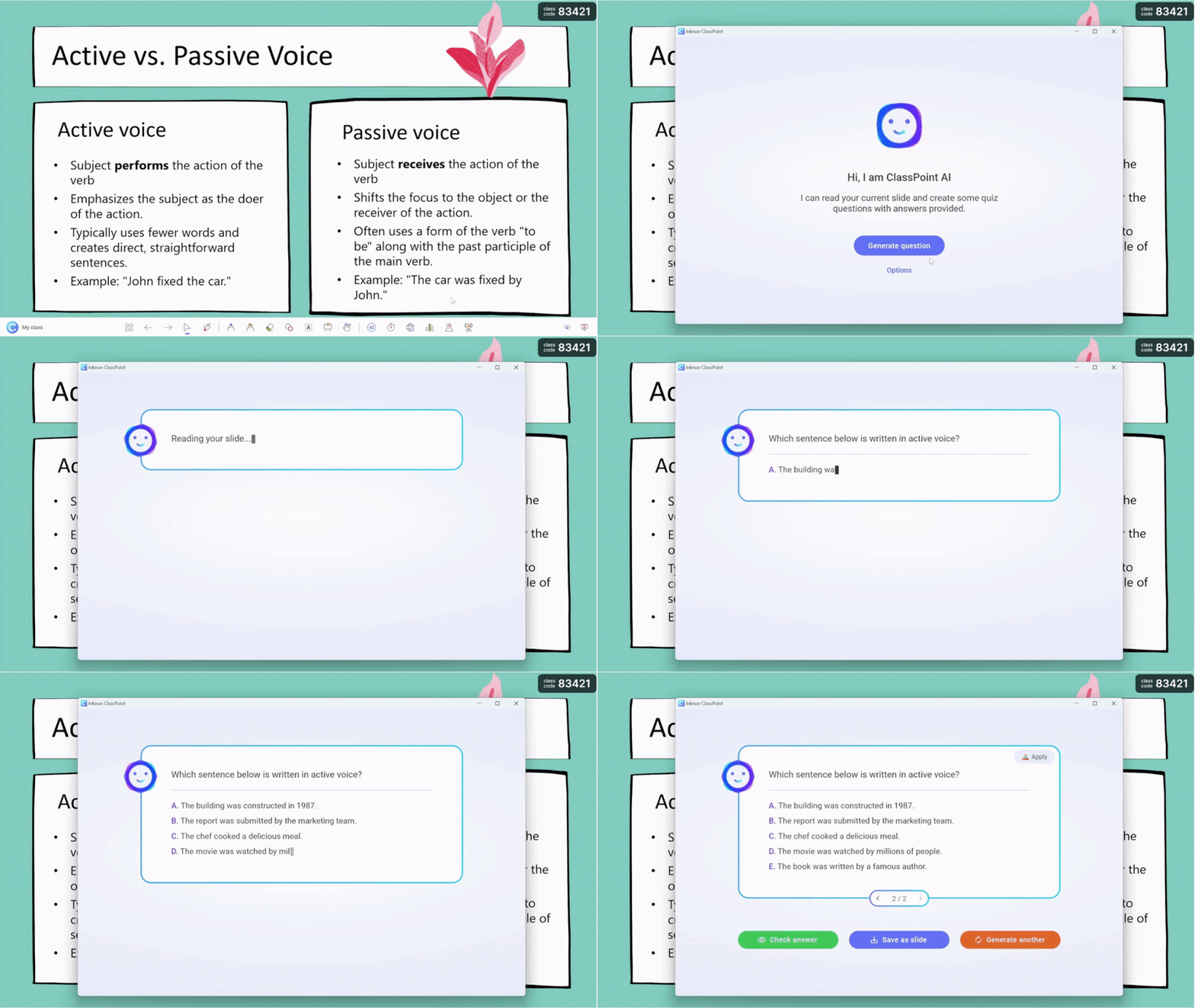
Teachers can even:
- specify the cognitive level (using Bloom’s taxonomy) they want,
- and pick from multiple languages to create your questions with.
Where ClassPoint’s AI really stands out is in post-activity analysis. One such feature is AI Insights for Short Answers. When students submit open-ended responses, ClassPoint can immediately produce an AI-generated summary of those responses.
Another AI-driven feature in ClassPoint is the AI Session Summary (AI Report). After a class session concludes, ClassPoint automatically emails or generates a report that includes overall participation metrics and an AI-written summary of the session’s outcomes.
To get to know more about ClassPoint's AI-powered features, here's a deep dive into all the available AI Tools in ClassPoint.
One must always double-check AI outputs for accuracy, of course. Both systems use AI to augment the teacher, not replace them. But from a comparison standpoint, ClassPoint leverages AI to enhance pedagogical feedback and save teachers time in reviewing student work, whereas Vevox uses AI mainly to save time in preparing that work (the questions).
Data and Reporting
Vevox provides robust data reporting features typical of enterprise polling systems. After a session, all polling data, quiz scores, and Q&A logs are accessible in your Vevox account dashboard. You can also export an Excel report with a single click.
An important note is Vevox’s integration with LMS platforms. Using LTI, Vevox can pass back grades or participation points to systems like Canvas or Moodle if you set it up. This means the Excel export might not even be needed if the integration is in place. That’s a strong feature for higher ed, ensuring that using Vevox for graded quizzes is smooth.
ClassPoint also logs all session data and provides reporting tools, though they are geared more toward the teacher’s needs for reviewing class performance rather than enterprise analytics. Every time you run a ClassPoint activity (quiz, poll, etc.), the results are logged for review later.
What’s nice is that ClassPoint allows teachers to share these reports via a link with others (co-teachers, school leaders). So if you want to show evidence of class progress or discuss results with a mentor, you can simply send the report link instead of a raw spreadsheet.
ClassPoint’s AI Session Summary, as discussed, is essentially part of the reporting. It’s an automatic narrative and statistical summary delivered after each session.
In conclusion, if your priority is to integrate with school systems and deeply analyze data, Vevox’s data and analytics features are proven and comprehensive. If your priority is to get actionable teaching insights, ClassPoint’s reports (augmented by AI) provide a very teacher-centric angle.
The Bottom Line
Both Vevox and ClassPoint are strong interactive tools, but they are built with different teaching philosophies and use cases in mind. The key isn’t which tool is better overall, but when each one makes more sense to use.
✅ Use Vevox if…
Vevox is a good fit when quick, scalable audience interaction is the priority.
- You run one-off lectures, events, or hybrid sessions and need reliable polling on the spot.
- You want survey-style question types, such as ranking and rating.
- You rely on enterprise-level integrations, such as LMS platforms or Microsoft Teams.
- Your sessions focus more on instant feedback than ongoing classroom interaction.
Vevox performs well in contexts where flexibility, reach, and fast participation matter most.
✅ Use ClassPoint if…
ClassPoint is built for interactive teaching and active learning, especially in traditional classroom settings.
- You already teach with PowerPoint and want to make your existing slides interactive.
- You want students to respond in more creative ways, such as drawing, uploading images, or recording audio and video.
- You value ongoing motivation, using stars, levels, and class leaderboards across multiple lessons.
- You want built-in teaching tools during live presentations, like annotation, timers, whiteboards, and draggable objects.
- You need class-level tracking over time, not just session-by-session reports.
ClassPoint works best when interactivity is part of your daily teaching flow, not just a single activity.
A practical takeaway
This comparison isn’t meant to declare one tool better than the other. Instead, it shows how differently the two are built. Some educators even use both.
At the end of the day, the right choice depends on your teaching context: class size, lesson format, the type of student participation you want, and how much you rely on already-existing tools.
Whichever tool you choose, adding live interaction into lessons helps keep students involved and gives teachers clearer insight into learning as it happens.
